¶ SMTP2GO Option
¶ (Last Updated: 12-03-2022, Author: Ben Swindle)
In addition to sendgrid, Clarity also has an SMTP2GO account. Some may prefer SMTP2GO over sendgrid because it's easier to use in most cases, if you would like to be invited to our SMTP2GO account, please send a direct message to ben.swindle@claritymis.com and he will send you an invite through email.
Step 1: Login to smtp2go.com dashboard
Step 2: Navigate to SMTP Users in the left sidebar menu
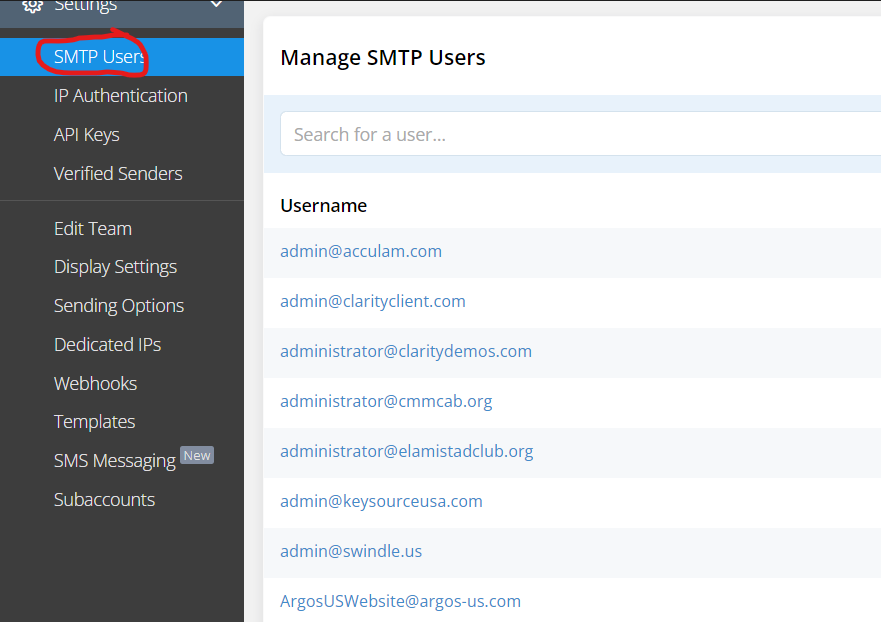
Step 3: Add the SMTP username and set a password
Step 4: Note the options to access the mail relay system:
¶ Connecting via SMTP
SMTP Server: mail.smtp2go.com
SMTP Port: 587
Alternative ports: 8025, 2525, 80 or 25. TLS is available on the same ports.
SSL is available on ports 465, 8465 and 443.
All of the above options will work, however it is HIGHLY recommended, and almost mandatory to use TLS (465,8465,443,587) for security reasons.
¶ If Ben Swindle is Unavailable
If Ben Swindle is unavailable, any team member already invited and currently able to sign in to the SMTP2GO dashboard has the owner role, thus you may contact one of them and they can invite you.
¶ Alternative
You may also use this account info if none of the above are available and you need immediate access to SMTP:
¶ Connecting via SMTP
SMTP Server: mail.smtp2go.com
SMTP Port: 2525
Alternative ports: 8025, 587, 80 or 25. TLS is available on the same ports.
SSL is available on ports 465, 8465 and 443.
User: devops@claritymis.com
Pass: aQEzHwTqhU8eUrVv
Note that the above account info to login to the smtp2go dashboard is devops@claritymis.com // AlSk+=1731!@#!@#
¶ Related Resources (Last Updated: 12-03-2022)
Internal Mail Server (Development Tool)
DNN SMTP Settings (Sendgrid Option)