DNN SMTP settings can be accessed from host > host settings >
Basic Settings > SMTP Server Settings
<u>They will need to be updated post launch!</u>
¶ Development - Clarity Offices
**SMTP Server and port:**10.10.30.82
SMTP Authentication: Anonymous
'''SMTP Enable SSL: '''unchecked
¶ MailTrap SMTP and MailBox for Testing
Invite Link:
https://mailtrap.io/share/1108680/4a60ae63e11a7d241c8243ea35607b4b
Mailtrap is a Email Sandbox Service
You can use it to Capture SMTP traffic from staging and dev environments, Automate test flows and scenarios with flexible API, Analyze email content for spam score and validate HTML/CSS
¶ Alternative SMTP Relay
- Configure your application with the settings below. (Note login info for this SendGrid account is ClarityDevSMTP and QpZm9731QpZm9731) (Note - you cannot log in to this account as it is protected with 2FA)
- The sending email address should be
devops@claritymis.com
+------------+----------------------------------------------------+
|Server |smtp.sendgrid.net |
+------------+----------------------------------------------------+
|Ports || 25, 587 | (for unencrypted/TLS connections) | |
| || ------- | --------------------------------- | |
| || 465 | (for SSL connections) | |
+------------+----------------------------------------------------+
|Username|apikey |
+------------+----------------------------------------------------+
|Password|"Please find in VaultWarden under reference account"|
+------------+----------------------------------------------------+
-
Create an API key
This allows your application to authenticate to our API and send mail. You can enable or disable additional permissions on the API keys page.
"DevConnectionKey2" was successfully created and added to the next step. 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 -
Configure your application
Configure your application with the settings below.
+------------+----------------------------------------------------+
|Server |smtp.sendgrid.net |
+------------+----------------------------------------------------+
|Ports || 25, 587 | (for unencrypted/TLS connections) | |
| || ------- | --------------------------------- | |
| || 465 | (for SSL connections) | |
+------------+----------------------------------------------------+
|Username|apikey |
+------------+----------------------------------------------------+
|Password|"Please find in VaultWarden under reference account"|
+------------+----------------------------------------------------+
¶ Live
SMTP Server and port: 67.227.254.204 (NOTE: this depends on the live server you're using)
SMTP Authentication: Anonymous
SMTP Enable SSL: unchecked
Or
host="smtp.sendgrid.net" port="25""Please find in VaultWarden under reference account"
¶ web.config
You may also need to update the following entry in your web.config file:
<mailSettings>
<network host="smtp.sendgrid.net" port="25""Please find in VaultWarden under reference account""
¶ Backup, not for regular use
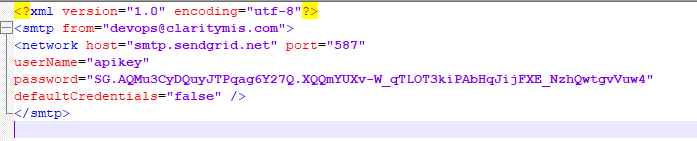
network host="smtp.sendgrid.net" port="25"
userName="apikey" password="Please find in VaultWarden under reference account"
defaultCredentials="false"
¶ SMTP2GO Option
¶ (Last Updated: 09-08-2022, Author: Ben Swindle)
In addition to sendgrid, Clarity also has an SMTP2GO account. Some may prefer SMTP2GO over sendgrid because it's easier to use in most cases, if you would like to be invited to our SMTP2GO account, please send a direct message to ben.swindle@claritymis.com and he will send you an invite through email.
Step 1: Login to smtp2go.com dashboard
Step 2: Navigate to SMTP Users in the left sidebar menu
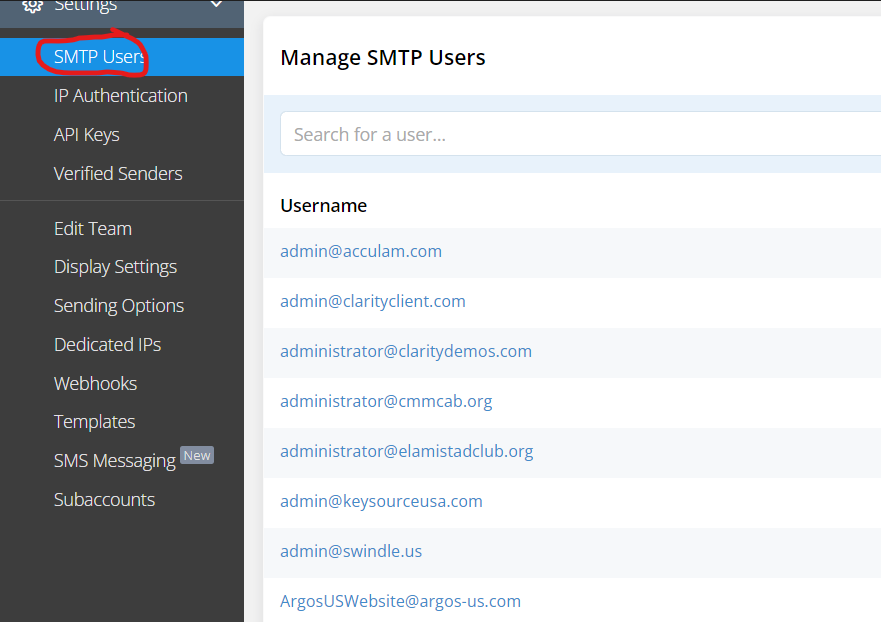
Step 3: Add the SMTP username and set a password
Step 4: Note the options to access the mail relay system:
¶ Connecting via SMTP
SMTP Server: mail.smtp2go.com
SMTP Port: 587
Alternative ports: 8025, 2525, 80 or 25. TLS is available on the same ports.
SSL is available on ports 465, 8465 and 443.
All of the above options will work, however it is recommended to use TLS (465,8465,443,587).
¶ Internal Mail Server
Click here for internal mail server details.
¶ Related Resources
Internal Mail Server (Development Tool)
SMTP2GO Mail Relay (Developer Tool)