¶ Key Terminology
- Customers are exclusive to WooCommerce while User refers to WordPress User accounts.
- Return balances sync to WooCommerce as Account Credits.
- WooCommerce treats Contacts as Addresses.
¶ Known Integrations
¶ ENE (Connect v?)
- Developers: Greg Deane
- Integrations: Accounts (To/From), Sales Orders (To/From), Inventory (To), Returns (To).
- Current Branches:
?
¶ TEKS (Connect v?)
- Developers: Anonymous User, Anonymous User, Greg Deane
- Integrations: Accounts (To/From), Addresses (To/From), Products (To), Pricing (To), Sales Orders (To/From).
- Current Branches:
?
¶ Authentication
WooCommerce REST API Documentation - WP REST API v3
- WooCommerce uses a OAuth authentication
- "Url": "https://{storeName}.com.au/wp-json/wc/v3",
- "ConsumerKey": "{consumerKey}",
- "ConsumerSecret": "{consumerSecret}",
- "AuthType": "OAuth",
- Wordpress uses basic authentication
- Username and Password
¶ WooCommerce API
-
Based off of Wordpress
-
You can access most things through the Woocommerce API
-
Some specific calls may need to go through Wordpress
- EX: Uploading images
-
By default, Woocommerce API is heavily plugin based
- U: claritymedical
- P: 3edcBGT%!@#$%^&
¶ Woo Commerce UI
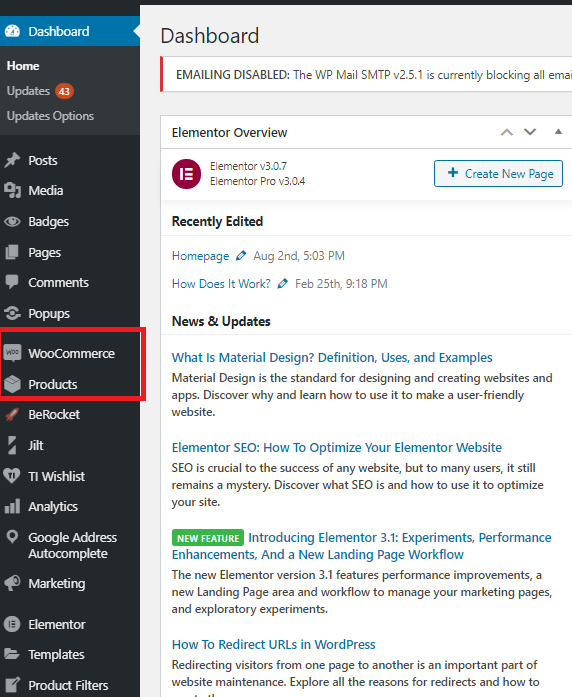
- All the Wordpress plugins will be on the left toolbar

¶ CRUD Operations
¶ CRUD object structure
The WC_Data class is the basic implementation for CRUD objects, and all CRUD objects extend it.
The most important parts to note: $data is an array of props supported in each object, and $id is the object’s ID.
The coupon object class is a good example of extending WC_Data and adding CRUD functions to all properties.
¶ Data
$data stores the property names, and default values:
        /**
     * Data array, with defaults.
     * @since 3.0.0
     * @var array
     */
    protected $data = array(
        'code'                        => '',
        'amount'                      => 0,
        'date_created'                => '',
        'date_modified'               => '',
        'discount_type'               => 'fixed_cart',
        'description'                 => '',
        'date_expires'                => '',
        'usage_count'                 => 0,
        'individual_use'              => false,
        'product_ids'                 => array(),
        'excluded_product_ids'        => array(),
        'usage_limit'                 => 0,
        'usage_limit_per_user'        => 0,
        'limit_usage_to_x_items'      => 0,
        'free_shipping'               => false,
        'product_categories'          => array(),
        'excluded_product_categories' => array(),
        'exclude_sale_items'          => false,
        'minimum_amount'              => '',
        'maximum_amount'              => '',
        'email_restrictions'          => array(),
        'used_by'                     => array(),
    );
¶ Getters and setters
Each one of the keys in this array (property) has a getter and setter, e.g. set_used_by() and get_used_by(). $data itself is private, so the getters and setters must be used to access the data.
Example getter:
    /**
     * Get records of all users who have used the current coupon.
     * @since  3.0.0
     * @param  string $context
     * @return array
     */
    public function get_used_by( $context = 'view' ) {
        return $this->get_prop( 'used_by', $context );
    }
Example setter:
    /**
     * Set which users have used this coupon.
     * @since 3.0.0
     * @param array $used_by
     * @throws WC_Data_Exception
     */
    public function set_used_by( $used_by ) {
        $this->set_prop( 'used_by', array_filter( $used_by ) );
    }
set_prop and get_prop are part of WC_Data. These apply various filters (based on context) and handle changes (so we can save only changes and not all props).
A note on $context: when getting data to use on the frontend or display, view context is used. This applies filters to the data so extensions can change the values dynamically.
edit context should be used when showing values to edit in the backend, and for saving to the database. Using edit context does not apply any filters to the data.
¶ The constructor
The constructor of the CRUD objects facilitates the read from the database. The actual read is not done by the CRUD class, but by its data store.
Example:
    /**
     * Coupon constructor. Loads coupon data.
     * @param mixed $data Coupon data, object, ID or code.
     */
    public function __construct( $data = '' ) {
        parent::__construct( $data );
        if ( $data instanceof WC_Coupon ) {
            $this->set_id( absint( $data->get_id() ) );
        } elseif ( is_numeric( $data ) && 'shop_coupon' === get_post_type( $data ) ) {
            $this->set_id( $data );
        } elseif ( ! empty( $data ) ) {
            $this->set_id( wc_get_coupon_id_by_code( $data ) );
            $this->set_code( $data );
        } else {
            $this->set_object_read( true );
        }
        $this->data_store = WC_Data_Store::load( 'coupon' );
        if ( $this->get_id() > 0 ) {
            $this->data_store->read( $this );
        }
    }
Note how it sets the ID based on the data passed to the object, then calls the data store to retrieve the data from the database.
Once the data is read via the data store, or if no ID is set, $this->set_object_read( true ); is set so the data store and CRUD object knows it’s read. Once this is set, changes are tracked.
¶ Saving and deleting
Save and delete methods are optional at CRUD object level because the WC_Data class can handle it. When save is called, the data store is used to store data to the database. Delete removes the object from the database. save must be called for changes to persist, otherwise they will be discarded.
The save method looks like this in WC_Data:
    /**
     * Save should create or update based on object existence.
     *
     * @since  2.6.0
     * @return int
     */
    public function save() {
        if ( $this->data_store ) {
            // Trigger action before saving to the DB. Allows you to adjust object props before save.
            do_action( 'woocommerce_before_' . $this->object_type . '_object_save', $this, $this->data_store );
            if ( $this->get_id() ) {
                $this->data_store->update( $this );
            } else {
                $this->data_store->create( $this );
            }
            return $this->get_id();
        }
    }
Update/create is used depending on whether the object has an ID yet. The ID will be set after creation.
The delete method is like this:
    /**
     * Delete an object, set the ID to 0, and return result.
     *
     * @since  2.6.0
     * @param  bool $force_delete
     * @return bool result
     */
    public function delete( $force_delete = false ) {
        if ( $this->data_store ) {
            $this->data_store->delete( $this, array( 'force_delete' => $force_delete ) );
            $this->set_id( 0 );
            return true;
        }
        return false;
    }
¶ Connect Specifics
¶ Jobs
¶ Customers
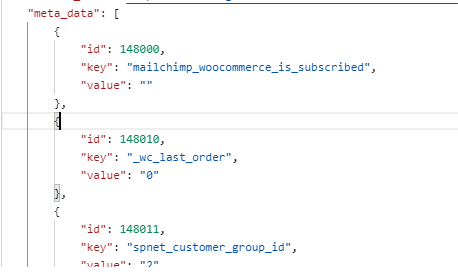
- Many plugins will use the data from Meta- data fields
¶ Products
¶ Categories
- The Category field requires a Category ID
- To use this Category you may need to use the Category endpoint to pull a list of all Categories
- If needed you can also use the Category endpoint to create a new Category
¶ Attributes
- Each attribute requires the Attribute ID
- You may need to use the Attribute endpoint to pull a list of all Attributes
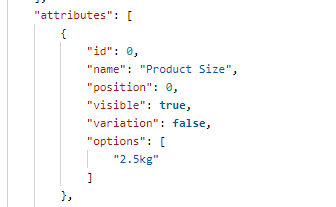
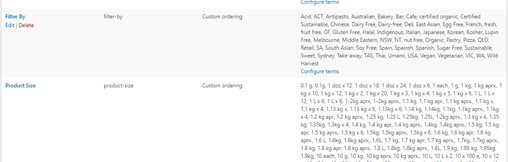
- Attributes let you define extra product data, such as size or color. You can use these attributes in the shop sidebar using the "layered nav" widgets.
¶ Images
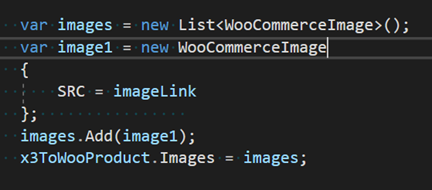
- You must first use the Wordpress API to upload the image to Wordpress
- The link to that image will be part of the Wordpress response as the source_URL property
- Then you can create a new WooCommerce image and set the SRC Property as that image link
¶ Known Customizations
- Accounts
- Custom WC Address Plugin Work
- Custom Node that can look through Entities and verify unique nicknames
- Sales Orders
- Custom Account Credit Coupon Logic: Separate Sub-Pipeline
- Products
- Multi-Store/Multi-Site
- Pricing
- Custom Pricing Plugin
- Sales Orders
- Account Creation Sales Order Process
- Tax Exemption Certificate
- Tax Changes (Order Updates/To)
¶ Outlying Issues
¶ Integration Service
¶ Pagination
- WooCommerce will only return 100 entities per request
- The List Request has Pagination included to return all results
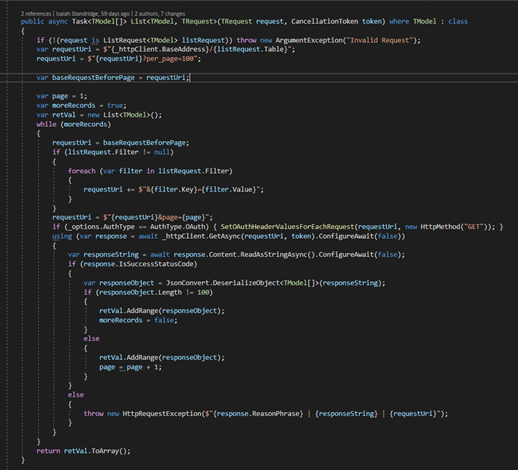
- Be aware that some large calls such as products may take a while as you will be sending sometimes 10 or more requests at a time
- Some projects may require you to make a Wordpress account in addition to a WooCommerce customer
- When creating new WooCommerce accounts you may be required to make a Wordpress account for the customer as well
Syncs skip line items not known to WooCommerce. If no line items, it skips the entire order.
Avatax does not sync to WooCommerce
¶ Common Model Mappings
¶ Common Model Workflows
Phase 2