vLLM is an open-source library designed to enhance the efficiency and speed of large language model (LLM) inference and serving. It introduces the PagedAttention algorithm, which optimizes memory management by effectively handling attention key and value memory. This innovation allows vLLM to achieve higher throughput and reduced memory usage compared to traditional LLM serving methods. vLLM OOB server handles multiple parallel requests and is ideal for production-level inference LLMs
Prerequisites (12/26/2024)
- Access to Rhel - 10.100.226.153 AI server
- Generic creds :
- User: clarity
- PW: Situation-Unhearing-Preteen9
- Generic creds :
- Access to model on HF token
- Confirm ports are available for use. Currently we have 6000, 8000 and 9000 open
- Available GPUS -(can view from terminal using command "NVTOP")
- All open
- One in use
- All open
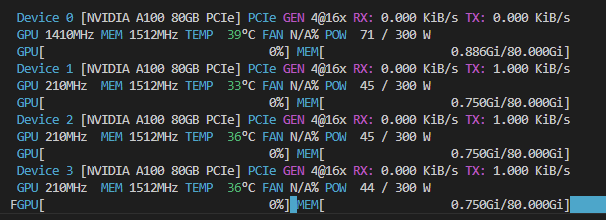
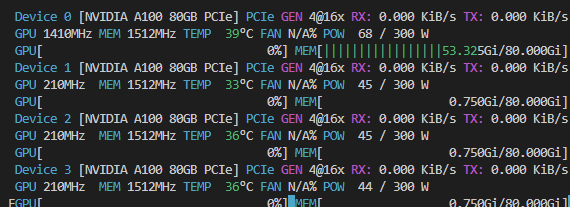
¶ Single - Create a Server - simple
There is a lot of complexity and variances on how to create servers. This section will cover the simplest method. All commands must be entered from a terminal from "/mnt/RHEL-19T/Data/UsefulPrograms/FastInference" on the AI server :

¶ 1. vllm serve {{my_hf_model}} --{{download_directory}} --{{port#}} --trust_remote_code
- vllm serve openbmb/MiniCPM-V-2_6 --download-dir /mnt/RHEL-19T/Data/Models/Llama3 --port 9000 --trust_remote_code
- In this configuration, the model has to be small enough to fit on a single GPU memory limit, in our case, 80 GIG. This generally means the model has to be around 30 billion parameters
¶ 2. vllm serve {{my_hf_model}} --{{download_directory}} --{{port#}} --trust_remote_code --quantization bitsandbytes --load_format bitsandbytes --dtype bfloat16 -- max_model_len 100000
- vllm serve unsloth/Llama-3.3-70B-Instruct-bnb-4bit --download-dir /mnt/RHEL-19T/Data/Models/Llama3 --port 6000 --quantization bitsandbytes --load_format bitsandbytes --dtype bfloat16 --trust_remote_code --max_model_len 100000
- In this configuration, larger models like a 70 b parameter model can be loaded into one GPU at the expense of accuracy
¶ 3. vllm serve {{my_hf_model}} --{{download_directory}} --{{port#}} --trust_remote_code --tensor-parallel-size 4 --enforce-eager
- vllm serve meta-llama/Llama-3.3-70b-instruct --download-dir /mnt/RHEL-19T/Data/Models/Llama3 --port 9000 --tensor-parallel-size 4 --enforce-eager
- In this configuration, larger non quantized models can be ran fulling, without accuracy reduction, at the expense of all GPUs
¶ Multiple- Create a Server - simple
You'll need a new terminal for each server you want to create. In each terminal set the available GPU with this command "export CUDA_VISIBLE_DEVICES=1" . Like so :
py
Then create the a server from the simple server steps with the variation that meets your needs.
IMPORTANT You must change the port for each server!
¶ Make Calls to the Server
VLLM uses the same API set up as OPEN.AI so libraries that allow you to set the URL can be used instead of creating your own.
¶ Chat/Completions
¶ Postman
Post - http://10.100.226.153:8000/v1/chat/completions (change port for your server)
{
    // Model Name must match what was loaded
    "model": "OnsJP/Llama-3.2-3B-Instruct-FCHSearch_12_18_24_2",
    "messages": [
        {"role": "system", "content": "Only respond like so 'category_ID, subcategory_id, material_ID, finish_id, size' based on search queries. If you do not know guess and if you cannot guess, response with no IDs. Never ask for clarification. Pretend you are not a bot that can communicate with language. You can only return IDs."},
        {"role": "user", "content": "Rotor Clip Housing Ring Internal 9-3/4 1066-1090 Carbon Steel Zinc Clear MS16625"}
    ]
}
Python
from openai import OpenAI

trained_client = OpenAI(
    base_url=openai_trained_baseurl,
    api_key="token-abc123", #VLLM doesn't require a token OOB but it has to be set
)

completion = trained_client.chat.completions.create(
    model= model_id,
    messages=[
      {"role": "system", "content": prompt},
      {"role": "user", "content": question}
    ]
  )
answer = completion.choices[0].message.content
print(answer)
C#
Code exists but needs to be cleaned up and made more generic before its ready to be pulled into projects
¶ Completions
¶ Postman
Post - http://localhost:8000/v1/completions
{
  // Model Name must match what was loaded
  "model": "facebook/opt-125m",
  "prompt": "San Francisco is a",
  "max_tokens": 7, // Sets the length of response
  "temperature": 0 // Sets whether the bot will be creative with the response
}
Python
from openai import OpenAI

# Modify OpenAI's API key and API base to use vLLM's API server.
openai_api_key = "EMPTY"
openai_api_base = "http://localhost:8000/v1"
client = OpenAI(
    api_key=openai_api_key,
    base_url=openai_api_base,
)
completion = client.completions.create(model="facebook/opt-125m",
                                      prompt="San Francisco is a")
print("Completion result:", completion)
C#
Code exists but needs to be cleaned up and made more generic before its ready to be pulled into projects