¶ Overview
When developing a client Connect application, we typically only want jobs to run when we tell them to. This will allow us better control over what is running and when. However, once we move into UAT we should be setting these jobs to run on a schedule so that they can be properly tested by the client.
This document outlines how to accomplish this transition in Connect V3.1
¶ Process
- There are 2 overloads for
RecurringJobManager.AddSimpleJob - During initial development you can use the signature that only passes in the SyncJob that you want to add
RecurringJobManager.AddSimpleJob(() → ProcessOrders(null, CancellationToken.None));
- This signature defaults the schedule to
Cron.Never() - The other signature allows for you to pass in the cron string explicitly.
RecurringJobManager.AddSimpleJob(() → ProcessOrders(null, CancellationToken.None), "*/5 * * * *");
- However, hardcoding the cron value is not ideal as the client should have the ability to update these values easily without opening code.
¶ Creating the AppSettings and Options
-
If the file does not already exist. Create a {{ClientAcronym}}Options.cs file
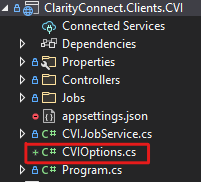
-
In the file add a {{JobName}}Cron property for each Job that you have
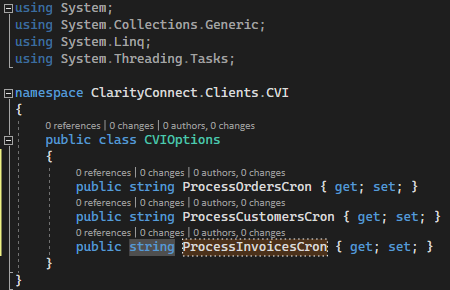
-
We can now add this node to our appsettings
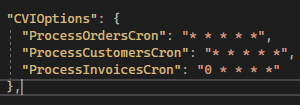
-
We now need to inject these options
-
Open Client Program.cs and add the options to the dependency injection container in the AddConnectServices method

-
We can now inject these into the Client JobService class to be used by the service
-
You may need to add the
Microsoft.Extensions.OptionsUsing statement for the page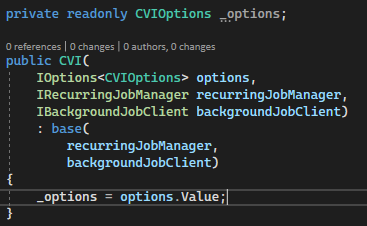
-
-
Now that we have access to the options we can use them in the AddSimpleJob methods
