A User Story is an informal, natural language description of one or more features of a software system and are often written from the perspective of an end-user or system. A good User Story ends with the user or system achieving some small, but meaningful goal. Below is a list of each User Story Field and a description of what the field is used for.
+--------------+-------------------+-------------------------------------------------------------------------------------------------------------------------------------------------------------------------------------------------------------------------------------------------------------------------------------------------------------------------------------------------------------------------------------------------------------------------+
|Item Name |Item Field |Definition |
+--------------+-------------------+-------------------------------------------------------------------------------------------------------------------------------------------------------------------------------------------------------------------------------------------------------------------------------------------------------------------------------------------------------------------------------------------------------------------------+
|User Story|Name |The name provides a quick way to identify and refer to a story; A verb-noun combination often works best. |
+--------------+-------------------+-------------------------------------------------------------------------------------------------------------------------------------------------------------------------------------------------------------------------------------------------------------------------------------------------------------------------------------------------------------------------------------------------------------------------+
|User Story|Description |The description contains the story itself. Keep it short and capture functionality that provides value to the user or customer. A good User Story touches on: |
| | | |
| | |- the user's role, |
| | |- the function the user is performing, and |
| | |- what value the function provides. |
| | | |
| | |Examples: |
| | | |
| | |A business traveler sorts flights by level of agony so they can minimize the stress of air travel. |
+--------------+-------------------+-------------------------------------------------------------------------------------------------------------------------------------------------------------------------------------------------------------------------------------------------------------------------------------------------------------------------------------------------------------------------------------------------------------------------+
|User Story|Size |Estimating stories is an inexact science, so we sometimes use t-shirt sizes to describe the size of a story. This reflects the imprecise nature of estimating and gives us an easy way to compare the size of one story to another. |
+--------------+-------------------+-------------------------------------------------------------------------------------------------------------------------------------------------------------------------------------------------------------------------------------------------------------------------------------------------------------------------------------------------------------------------------------------------------------------------+
|User Story|Assigned To |If a particular person or group is responsible for a User Story, you may want to fill in the assigned to field. |
| | | |
| | |By default, there are no choices defined, however, you may specify your own choice-list by customizing predefined fields via the Tools menu. |
+--------------+-------------------+-------------------------------------------------------------------------------------------------------------------------------------------------------------------------------------------------------------------------------------------------------------------------------------------------------------------------------------------------------------------------------------------------------------------------+
|User Story|Priority |The priority indicates the relative importance of Use Cases and Requirements. Lower numbers mean higher priority. Characteristics of high priority items include: |
| | | |
| | |- Needed in early iterations |
| | |- High risk |
| | |- Architecturally significant |
| | |- Important to customer |
| | |- Important to business |
+--------------+-------------------+-------------------------------------------------------------------------------------------------------------------------------------------------------------------------------------------------------------------------------------------------------------------------------------------------------------------------------------------------------------------------------------------------------------------------+
|User Story|Status |Status indicates where you are with regard to delivering the story. |
+--------------+-------------------+-------------------------------------------------------------------------------------------------------------------------------------------------------------------------------------------------------------------------------------------------------------------------------------------------------------------------------------------------------------------------------------------------------------------------+
|User Story|Acceptance Criteria|Some say that a story is an agreement to have a conversation. Acceptance tests capture the highlights of those conversations. Taken together, the acceptance criteria provide a way to determine whether a story has been fully implemented. |
| | | |
| | |In the best-case scenario, acceptance criteria are written by the customer and before the developer starts work on the story. |
| | | |
| | |Examples: |
| | | |
| | |- Test orders with out of stock items. |
| | | |
| | |The chart needs to work for people with color blindness. |
+--------------+-------------------+-------------------------------------------------------------------------------------------------------------------------------------------------------------------------------------------------------------------------------------------------------------------------------------------------------------------------------------------------------------------------------------------------------------------------+
|User Story|Related Documents |All user stories can reference related documents or URLs. Use drag/drop from the Windows Explorer or right-click to manually add a document. Note that the document is only referenced here - it is not stored in the Use Case model. If other people need to access the document, make sure it is on a shared server or specify a relative path and put it in a version control system along with your Use Case files.|
| | | |
| | |Examples: |
| | | |
| | |- UI specifications |
| | |- Software interface specifications |
| | | |
| | |Screen mockups - note that standard image files can automatically get inserted as pictures into Word reports. |
+--------------+-------------------+-------------------------------------------------------------------------------------------------------------------------------------------------------------------------------------------------------------------------------------------------------------------------------------------------------------------------------------------------------------------------------------------------------------------------+
|User Story|Issue Description |Describes a User Story issues that does not have an immediate solution. |
+--------------+-------------------+-------------------------------------------------------------------------------------------------------------------------------------------------------------------------------------------------------------------------------------------------------------------------------------------------------------------------------------------------------------------------------------------------------------------------+
|User Story|Issue Assigned To |Indicates who the User Story issue is assigned to. |
+--------------+-------------------+-------------------------------------------------------------------------------------------------------------------------------------------------------------------------------------------------------------------------------------------------------------------------------------------------------------------------------------------------------------------------------------------------------------------------+
|User Story|Issue Resolved By |Indicates who the User Story issue was resolved by. |
+--------------+-------------------+-------------------------------------------------------------------------------------------------------------------------------------------------------------------------------------------------------------------------------------------------------------------------------------------------------------------------------------------------------------------------------------------------------------------------+
|User Story|Issue Status |Indicates the status of the User Story issue. |
+--------------+-------------------+-------------------------------------------------------------------------------------------------------------------------------------------------------------------------------------------------------------------------------------------------------------------------------------------------------------------------------------------------------------------------------------------------------------------------+
|User Story|Notes |All packages, Actors, Use Cases, and Requirements can have notes attached to them. The date of the note is automatically filled in with today's date. |
| | | |
| | |Examples: |
| | | |
| | |- Reader comments |
| | |- Questions |
| | |- History of changes |
| | |- Decisions made and why they were made |
| | |- Action items from meetings |
| | |- Reminders |
| | |- Tasks |
+--------------+-------------------+-------------------------------------------------------------------------------------------------------------------------------------------------------------------------------------------------------------------------------------------------------------------------------------------------------------------------------------------------------------------------------------------------------------------------+
|User Story|Has references to |This list shows the items that the current item references. References are automatically created when you add ID links to an item's description or other fields such as goals, steps, and custom fields. To create an ID link, type the ID, or use the right-mouse menu. An automatic reference is also created when you type in the name of an Actor or definition. |
+--------------+-------------------+-------------------------------------------------------------------------------------------------------------------------------------------------------------------------------------------------------------------------------------------------------------------------------------------------------------------------------------------------------------------------------------------------------------------------+
|User Story|Is referenced by |This list shows the items that reference this one. See the help for references to for information on how references are created. |
| | | |
| | |This list helps you understand which items may be affected if you make modifications to the current item. For example, if you add a field to a definition, you can see which Use Cases may need modification in order to take the new field into account. |
| | | |
| | |Explicit References can be removed at any time by right-clicking on it in this list. |
+--------------+-------------------+-------------------------------------------------------------------------------------------------------------------------------------------------------------------------------------------------------------------------------------------------------------------------------------------------------------------------------------------------------------------------------------------------------------------------+
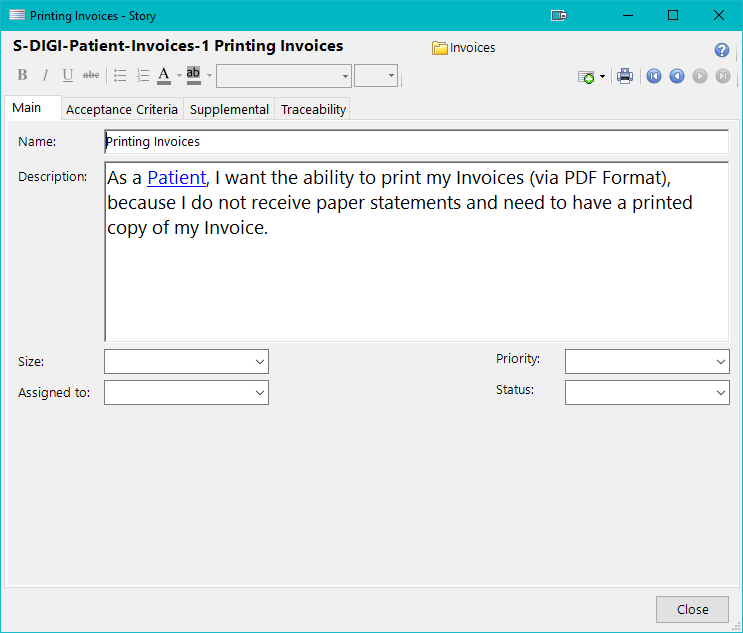
User Story: Main Tab
User Story: Acceptance Criteria Tab
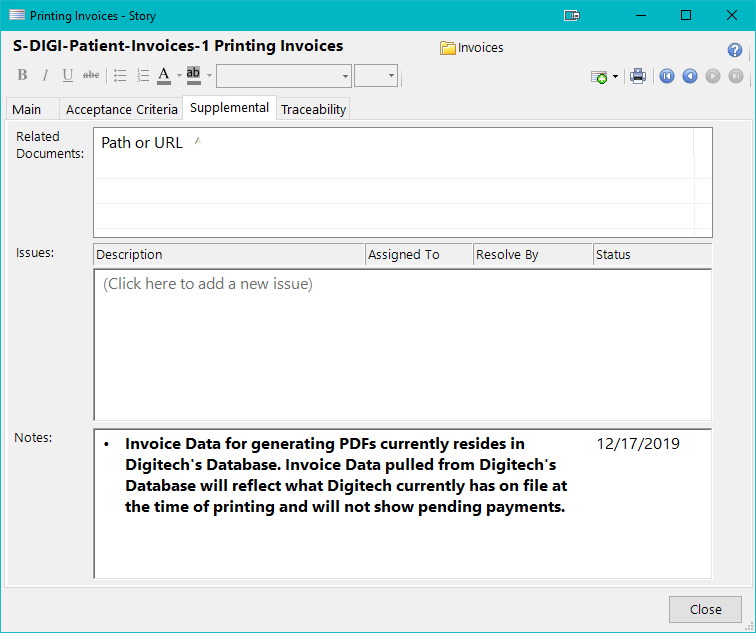
User Story: Supplemental Tab
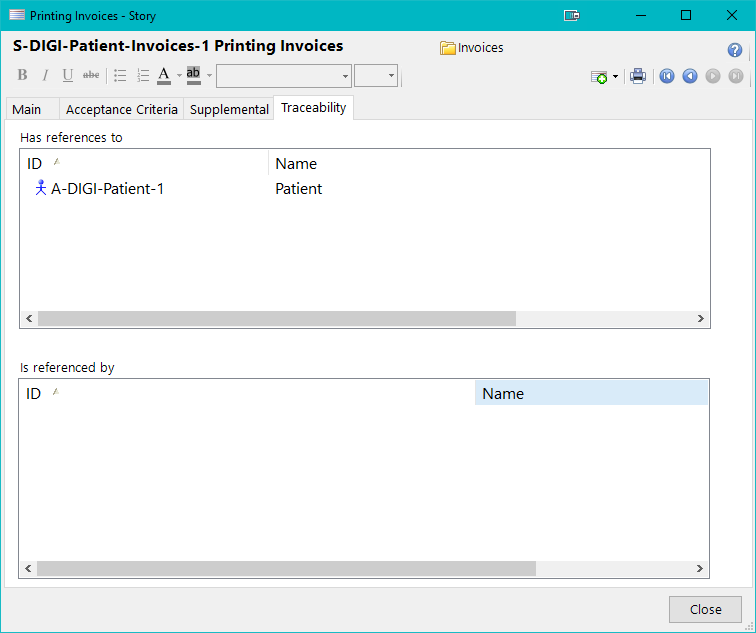
User Story: Traceability Tab