A Use Case is a list of actions or event steps typically defining the interactions between a role and a system to achieve a goal. Below is a list of each Use Case Field and a description of what the field is used for.
+-------------+---------------------+---------------------------------------------------------------------------------------------------------------------------------------------------------------------------------------------------------------------------------------------------------------------------------------------------------------------------------------------------------------------------------------------------------------------------------------------------------------------------------------------------------------------------------------------+
|Item Name|Item Field |Definition |
+-------------+---------------------+---------------------------------------------------------------------------------------------------------------------------------------------------------------------------------------------------------------------------------------------------------------------------------------------------------------------------------------------------------------------------------------------------------------------------------------------------------------------------------------------------------------------------------------------+
|Use Case |Name |A short verb-noun combination that describes the Use Case Workflow. It should reflect the primary Actor's goal and be stated from the Actor's perspective. |
+-------------+---------------------+---------------------------------------------------------------------------------------------------------------------------------------------------------------------------------------------------------------------------------------------------------------------------------------------------------------------------------------------------------------------------------------------------------------------------------------------------------------------------------------------------------------------------------------------+
|Use Case |Priority |The priority indicates the relative importance of Use Cases and Requirements. Lower numbers mean higher priority. Characteristics of high priority items include: |
| | | |
| | |- Needed in early iterations |
| | |- High risk |
| | |- Architecturally significant |
| | |- Important to customer |
| | | |
| | |Important to business |
+-------------+---------------------+---------------------------------------------------------------------------------------------------------------------------------------------------------------------------------------------------------------------------------------------------------------------------------------------------------------------------------------------------------------------------------------------------------------------------------------------------------------------------------------------------------------------------------------------+
|Use Case |Description |A brief description that should be added when a new Use Case is created to ensure that its purpose isn't forgotten. In your description: |
| | | |
| | |- Tell the purpose |
| | |- Describe major behaviors Use present tense and active voice |
| | |- Tell the result of the Use Case in the last sentence |
| | | |
| | |Example:\ |
| | |Use Case: Bind a Quote |
| | | |
| | |The potential customer purchases a motorcycle insurance policy based on the terms and limits described in an existing quote. The system creates a policy and applies an initial payment. |
+-------------+---------------------+---------------------------------------------------------------------------------------------------------------------------------------------------------------------------------------------------------------------------------------------------------------------------------------------------------------------------------------------------------------------------------------------------------------------------------------------------------------------------------------------------------------------------------------------+
|Use Case |Actors: Primary |The primary Actor initiates the Use Case and receives direct value from the system. Often there is only one primary Actor per Use Case, but there may be times when multiple primary Actors are needed. |
| | | |
| | |Example:\ |
| | |Use Case: Place Order\ |
| | |Primary Actors: Clerk, Sales Manager |
| | | |
| | |In this example, the two Actors have a different set of goals overall but share some common goals such as the "place order" Use Case. When writing the steps of your Use Case, you may want to refer to the role that the primary Actors are playing, e.g. "1. Order taker logs in". It is implicit that "order taker" maps to one of the primary Actors. |
+-------------+---------------------+---------------------------------------------------------------------------------------------------------------------------------------------------------------------------------------------------------------------------------------------------------------------------------------------------------------------------------------------------------------------------------------------------------------------------------------------------------------------------------------------------------------------------------------------+
|Use Case |Actors: Supporting |Supporting Actors (also known as secondary Actors) provide a service to the system. |
| | | |
| | |Example:\ |
| | |Use Case: Verify Credit\ |
| | |Primary Actor: Loan Officer\ |
| | |Supporting Actor: Credit Reporting System |
| | | |
| | |In this example, the credit reporting system is used in the Use Case to retrieve a credit score. Unlike the primary Actor it doesn't initiate the Use Case or receive value from the Use Case. |
+-------------+---------------------+---------------------------------------------------------------------------------------------------------------------------------------------------------------------------------------------------------------------------------------------------------------------------------------------------------------------------------------------------------------------------------------------------------------------------------------------------------------------------------------------------------------------------------------------+
|Use Case |Test Scenarios |Use Cases can own one or more test scenarios. Each test scenario should test one aspect of the Use Case. For example, you may have one test scenario that verifies the main success scenario is functioning properly, and another one to verify that a particular error condition is handled correctly. |
+-------------+---------------------+---------------------------------------------------------------------------------------------------------------------------------------------------------------------------------------------------------------------------------------------------------------------------------------------------------------------------------------------------------------------------------------------------------------------------------------------------------------------------------------------------------------------------------------------+
|Use Case |Main Success Scenario|The main success scenario describes the activities performed in order to accomplish the Use Case goal. The activities can be described using numbered steps, prose or both. Each step should record an interaction between the Actor and the system, or a key system behavior that is triggered by interactions. The main success scenario, sometimes called the "sunny day" scenario, should describe the most common flow of events where nothing goes wrong. Describe failure conditions and alternative flows in the extensions section.|
+-------------+---------------------+---------------------------------------------------------------------------------------------------------------------------------------------------------------------------------------------------------------------------------------------------------------------------------------------------------------------------------------------------------------------------------------------------------------------------------------------------------------------------------------------------------------------------------------------+
|Use Case |Extensions |Since the main success scenario only describes the most common usage where nothing goes wrong, you need extensions to describe the alternative flows and failure conditions of the main scenario. Extensions should be written as a condition followed by the list of steps that occur when the condition is true. The condition should indicate what the system detected, e.g. "timeout waiting for password". The extension number corresponds with the step in the flow of events that it is an extension for. |
+-------------+---------------------+---------------------------------------------------------------------------------------------------------------------------------------------------------------------------------------------------------------------------------------------------------------------------------------------------------------------------------------------------------------------------------------------------------------------------------------------------------------------------------------------------------------------------------------------+
|Use Case |Anytime Extensions |Extensions that can happen at any time during the flow of events are denoted with an asterisk. |
+-------------+---------------------+---------------------------------------------------------------------------------------------------------------------------------------------------------------------------------------------------------------------------------------------------------------------------------------------------------------------------------------------------------------------------------------------------------------------------------------------------------------------------------------------------------------------------------------------+
|Use Case |Preconditions |Preconditions describe the state of the system before the Use Case executes. They are verifiable assertions made about what has already happened. Write preconditions in the present tense. |
| | | |
| | |Examples: |
| | | |
| | |- The quote is valid. |
| | |- The broker is logged on. |
| | | |
| | |Incorrect: |
| | | |
| | |- The manager is on duty (system can't verify) |
| | |- The user tried to log in (past tense) |
+-------------+---------------------+---------------------------------------------------------------------------------------------------------------------------------------------------------------------------------------------------------------------------------------------------------------------------------------------------------------------------------------------------------------------------------------------------------------------------------------------------------------------------------------------------------------------------------------------+
|Use Case |Success Guarantee |Also known as postconditions. Describes the state of the system after successful completion of the Use Case. Write the success guarantee in the past tense. |
| | | |
| | |Examples: |
| | | |
| | |- The email was sent. |
| | | |
| | |The file was saved. |
+-------------+---------------------+---------------------------------------------------------------------------------------------------------------------------------------------------------------------------------------------------------------------------------------------------------------------------------------------------------------------------------------------------------------------------------------------------------------------------------------------------------------------------------------------------------------------------------------------+
|Use Case |Level |The level of a Use Case is an indication of the amount of detail in the Use Case: |
| | | |
| | |- · Summary: acts as a table of contents for other Use Cases. Can execute over a long period of time. |
| | |- · User: addresses the user goal directly. Rule of thumb is that one person can execute a user-level Use Case in 20 minutes or less. |
| | |- · Subfunction: low-level Use Cases required to complete other user-level Use Cases. |
| | | |
| | |You may type in your own level in addition to using the predefined choices. You may also customize the choice-list via the Tools/Predefined Fields menu item. |
+-------------+---------------------+---------------------------------------------------------------------------------------------------------------------------------------------------------------------------------------------------------------------------------------------------------------------------------------------------------------------------------------------------------------------------------------------------------------------------------------------------------------------------------------------------------------------------------------------+
|Use Case |Use Case Status |Use Case authoring is an iterative process - you typically don't write a Use Case from start to finish in one sitting. Set the Use Case status to help keep track of the Use Case level of completion. |
| | | |
| | |You may type in your own status descriptions in addition to using the predefined choices. You may also customize the choice-list via the Tools/Predefined Fields menu item. |
+-------------+---------------------+---------------------------------------------------------------------------------------------------------------------------------------------------------------------------------------------------------------------------------------------------------------------------------------------------------------------------------------------------------------------------------------------------------------------------------------------------------------------------------------------------------------------------------------------+
|Use Case |Assigned To |If a particular person or group is responsible for a Use Case or Requirement, you may want to fill in the assigned to field. |
| | | |
| | |By default, there are no choices defined, however, you may specify your own choice-list by customizing predefined fields via the Tools menu. |
+-------------+---------------------+---------------------------------------------------------------------------------------------------------------------------------------------------------------------------------------------------------------------------------------------------------------------------------------------------------------------------------------------------------------------------------------------------------------------------------------------------------------------------------------------------------------------------------------------+
|Use Case |Complexity |Use complexity to help determine the priority of Use Cases and their implementation schedule. For example, if the business need of a Use Case is high and the complexity is low, then it is likely that you will want to implement it in an early release. However, you may want to implement it in a later iteration of that release in order to get high-risk Use Cases out of the way first. As another example, you might consider deferring highly complex Use Cases that have low business need for a later release. |
| | | |
| | |Complexity is used by the CaseComplete Estimator report. If you want this Use Case to fActor into the estimation of the time to complete this project, you must choose a value. |
| | | |
| | |You may type in your own complexity descriptions in addition to using the predefined choices. You may also customize the choice-list via the Tools/Predefined Fields menu item. However, if you choose a complexity other than a predefined choice, this Use Case will not be counted in the CaseComplete Estimator report, unless you first customize the report. |
+-------------+---------------------+---------------------------------------------------------------------------------------------------------------------------------------------------------------------------------------------------------------------------------------------------------------------------------------------------------------------------------------------------------------------------------------------------------------------------------------------------------------------------------------------------------------------------------------------+
|Use Case |Implementation Status|Once the implementation of your project has begun, you may wish to keep track of the various stages of development for each Use Case. An example of how this could be useful is to identify Use Cases that are ready for testing. |
| | | |
| | |You may type in your own status descriptions in addition to using the predefined choices. You may also customize the choice-list via the Tools/Predefined Fields menu item. |
+-------------+---------------------+---------------------------------------------------------------------------------------------------------------------------------------------------------------------------------------------------------------------------------------------------------------------------------------------------------------------------------------------------------------------------------------------------------------------------------------------------------------------------------------------------------------------------------------------+
|Use Case |Release |The Release Field indicates the expected completion of the Use Case. You can use any text that suits your organization, for example, a date or a release codename. This is especially useful if the implementation status is set to "deferred" to indicate when the Use Case should be revisited. |
| | | |
| | |By default, there are no choices defined, however, you may specify your own choice-list by customizing predefined fields via the Tools menu. |
+-------------+---------------------+---------------------------------------------------------------------------------------------------------------------------------------------------------------------------------------------------------------------------------------------------------------------------------------------------------------------------------------------------------------------------------------------------------------------------------------------------------------------------------------------------------------------------------------------+
|Use Case |Related Documents |All Use Cases can reference related documents or URL's. Use drag/drop from the Windows Explorer or right-click to manually add a document. Note that the document is only referenced here - it is not stored in the Use Case model. If other people need to access the document, make sure it is on a shared server or specify a relative path and put it in a version control system along with your Use Case files. |
| | | |
| | |Examples: |
| | | |
| | |- UI specifications |
| | |- Software interface specifications |
| | | |
| | |Screen mockups - note that standard image files can automatically get inserted as pictures into Word reports. |
+-------------+---------------------+---------------------------------------------------------------------------------------------------------------------------------------------------------------------------------------------------------------------------------------------------------------------------------------------------------------------------------------------------------------------------------------------------------------------------------------------------------------------------------------------------------------------------------------------+
|Use Case |Issue Description |Indicates Use Case Issues that you don't have an immediate answer for. |
+-------------+---------------------+---------------------------------------------------------------------------------------------------------------------------------------------------------------------------------------------------------------------------------------------------------------------------------------------------------------------------------------------------------------------------------------------------------------------------------------------------------------------------------------------------------------------------------------------+
|Use Case |Issue Assigned To |Indicates who the Use Case Issue to assigned to. |
+-------------+---------------------+---------------------------------------------------------------------------------------------------------------------------------------------------------------------------------------------------------------------------------------------------------------------------------------------------------------------------------------------------------------------------------------------------------------------------------------------------------------------------------------------------------------------------------------------+
|Use Case |Issue Resolved By |Indicates who the Use Case Issue was resolved by. |
+-------------+---------------------+---------------------------------------------------------------------------------------------------------------------------------------------------------------------------------------------------------------------------------------------------------------------------------------------------------------------------------------------------------------------------------------------------------------------------------------------------------------------------------------------------------------------------------------------+
|Use Case |Issue Status |Indicates the status of a Use Case Issue. |
+-------------+---------------------+---------------------------------------------------------------------------------------------------------------------------------------------------------------------------------------------------------------------------------------------------------------------------------------------------------------------------------------------------------------------------------------------------------------------------------------------------------------------------------------------------------------------------------------------+
|Use Case |Notes |All Use Cases can have notes attached to them. The date of the note is automatically filled in with the date the note was added. |
| | | |
| | |Examples: |
| | | |
| | |- Reader comments |
| | |- Questions |
| | |- History of changes |
| | |- Decisions made and why they were made |
| | |- Action items from meetings |
| | |- Reminders |
| | |- Tasks |
+-------------+---------------------+---------------------------------------------------------------------------------------------------------------------------------------------------------------------------------------------------------------------------------------------------------------------------------------------------------------------------------------------------------------------------------------------------------------------------------------------------------------------------------------------------------------------------------------------+
|Use Case |Testing Setup |Describes the preparation that a tester should perform before testing this Use Case. This may be one or more actions that achieve a desired start-state, for example logging in and navigating to a particular screen. |
| | | |
| | |If multiple Use Cases share the same setup, enter it once, copy it, select all applicable Use Cases in the main list, and then paste the text into the properties window to apply it to all selected Use Cases. |
+-------------+---------------------+---------------------------------------------------------------------------------------------------------------------------------------------------------------------------------------------------------------------------------------------------------------------------------------------------------------------------------------------------------------------------------------------------------------------------------------------------------------------------------------------------------------------------------------------+
|Use Case |Testing Configuration|Describes the system environments and configurations that this Use Case should be tested with, such as which operating systems, or web browsers. |
| | | |
| | |If multiple Use Cases share the same configuration, enter it once, copy it, select all applicable Use Cases in the main list, and then paste the text into the properties window to apply it to all selected Use Cases. |
+-------------+---------------------+---------------------------------------------------------------------------------------------------------------------------------------------------------------------------------------------------------------------------------------------------------------------------------------------------------------------------------------------------------------------------------------------------------------------------------------------------------------------------------------------------------------------------------------------+
|Use Case |Has reference to |This list shows the items that the current item references. References are automatically created when you add ID links to an item's description or other fields such as goals, steps, and custom fields. To create an ID link, type the ID, or use the right-mouse menu. An automatic reference is also created when you type in the name of an Actor or definition. |
+-------------+---------------------+---------------------------------------------------------------------------------------------------------------------------------------------------------------------------------------------------------------------------------------------------------------------------------------------------------------------------------------------------------------------------------------------------------------------------------------------------------------------------------------------------------------------------------------------+
|Use Case |Is referenced by |This list shows the items that reference this one. See the help for references to for information on how references are created. |
| | | |
| | |This list helps you understand which items may be affected if you make modifications to the current item. For example, if you add a field to a definition, you can see which Use Cases may need modification in order to take the new field into account. |
| | | |
| | |Explicit References can be removed at any time by right-clicking on it in this list. |
+-------------+---------------------+---------------------------------------------------------------------------------------------------------------------------------------------------------------------------------------------------------------------------------------------------------------------------------------------------------------------------------------------------------------------------------------------------------------------------------------------------------------------------------------------------------------------------------------------+
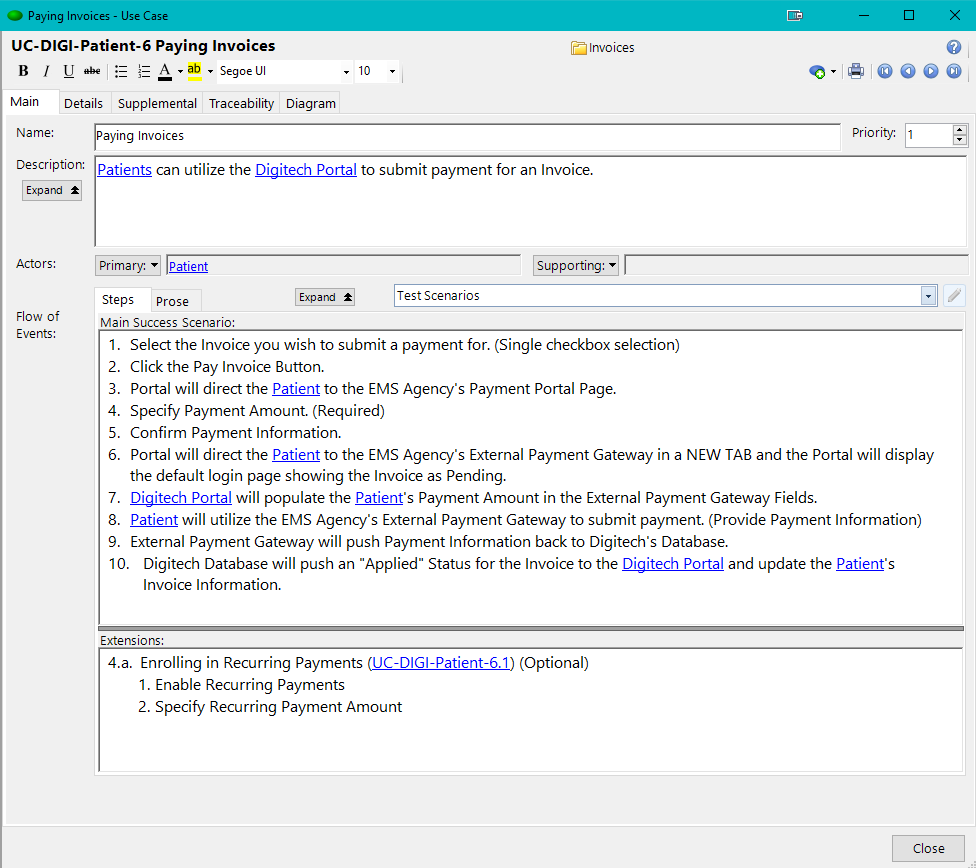
Use Case: Main Tab
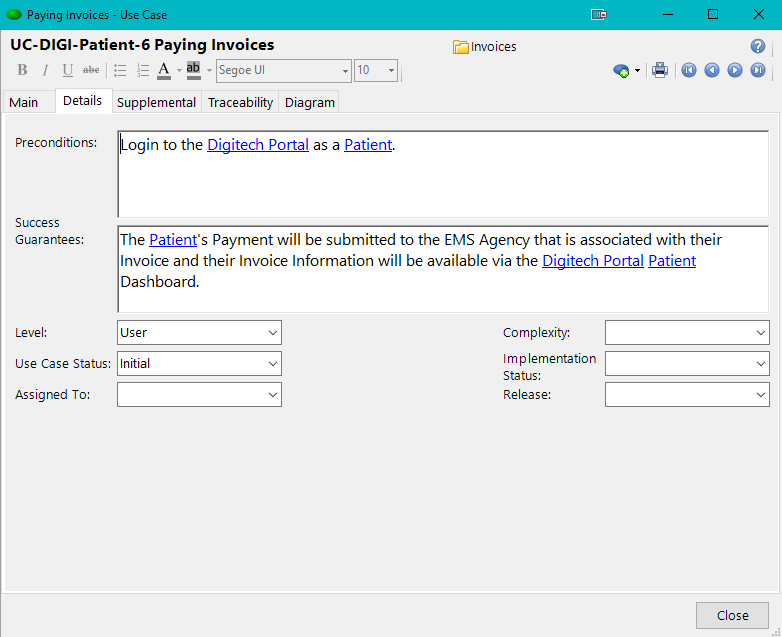
Use Case: Details Tab
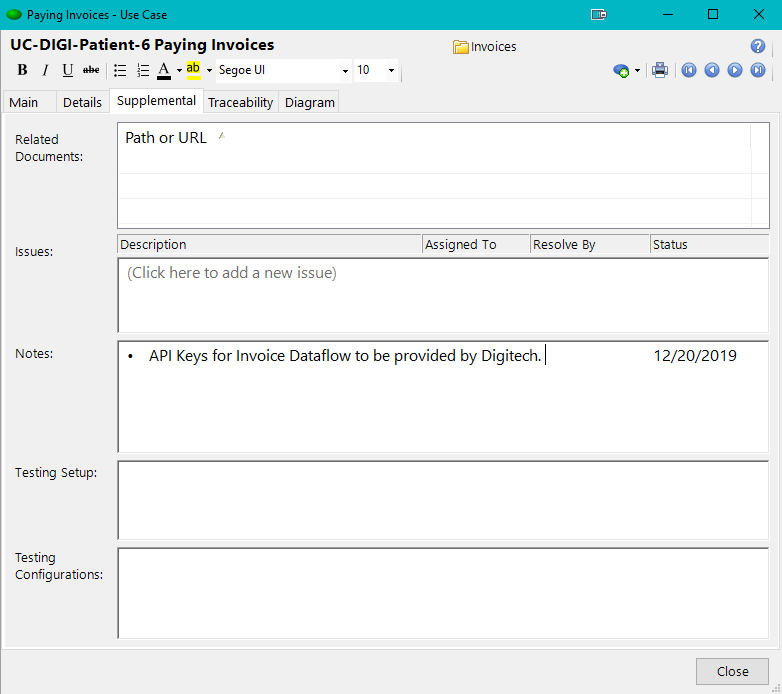
Use Case: Supplemental Tab
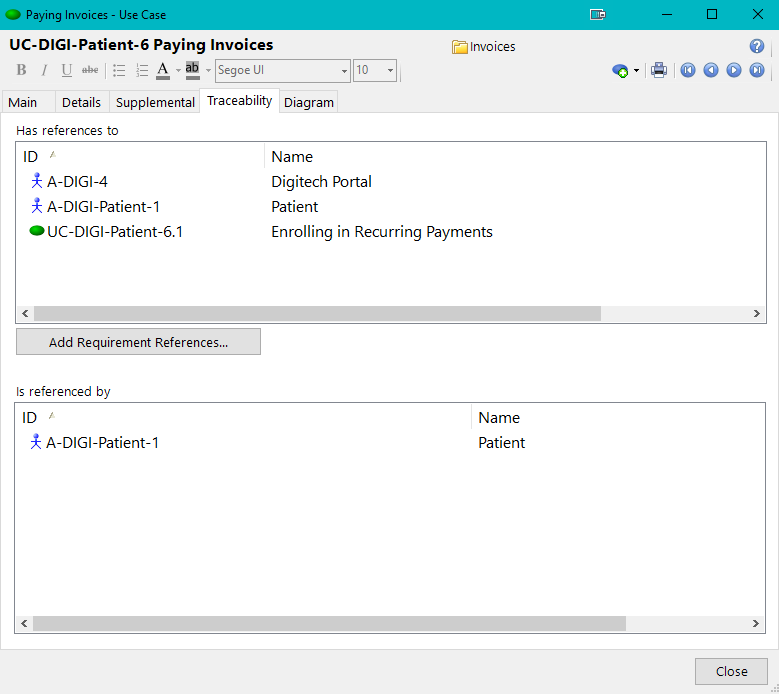
Use Case: Traceability Tab
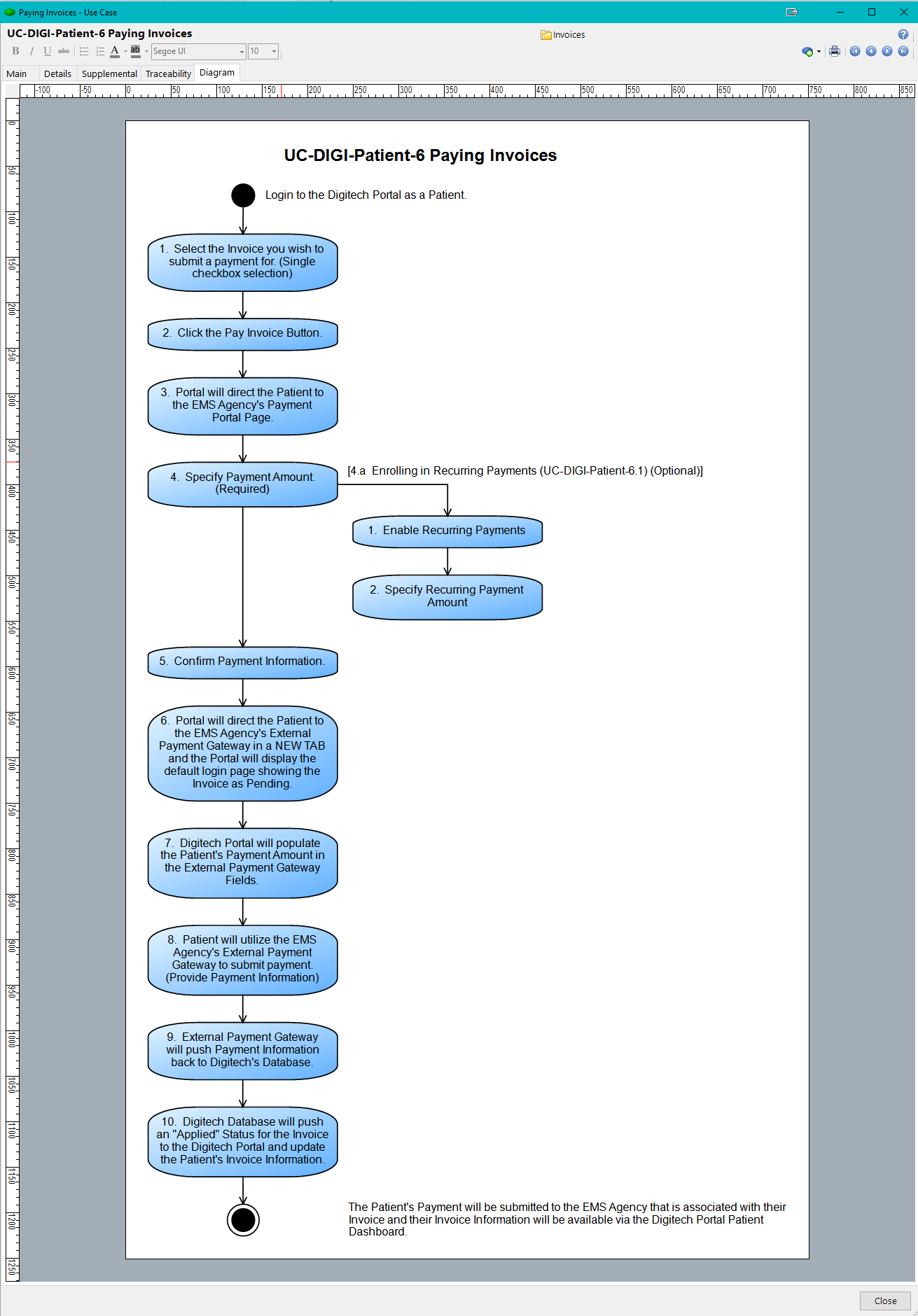
Use Case: Activity Diagram