¶ Key Terminology
- Common Sage X3 Acronyms
- BP – Business Partner(s)
- A/P- Accounts Payable
- A/R- Accounts Receivable
- CRM- Customer Relationship Management
- BOM- Bill of Materials
- G/L: General Ledger
- RFQ: Request for Quote
- RMA: Return Merchandise Authorization
- MRP: Material Requirements Planning
- WIP: Work in Progress
- UBD: Use by Date (Inventory)
- PU: Product Update
¶ Key Sage X3 Terms and Definitions
- Company – represents the business or firm. A company can have multiple sites.
- Site – represents the sub-entity within the company. This can be a location, warehouse, or another facility. Example: X Company has a Finance Headquarters (Site A). The Finance site has a Stock Site (A1), Manufacturing Site (A2), Purchase Site (A3), and a Sales Site (A4).
- Legislation – allows you to change settings and records to specific legislations. Allows for unique regional processing – USA term codes specifically used for USA transactions, etc.
- Chart of Accounts – a set of numerical codes used to identify all of the ledger accounts in the financial module of the system.
- Parameters – settings influencing how Sage X3 functions and how it is structured. Can be used for activating and deactivating functionality in the software.
- Activity Codes – helps track customizations and activities in the system such as tables, views, fields, options, etc.
- Statistical Groups – Used to organize, sort, and group products, customers, and suppliers. The maximum number of five statistical groups. Activity Codes are used to increase or decrease the number of statistical groups. For example, please reference the screenshot below. This is the statistical groups for a keyboard. Notice how it is categorized:
- Fixed Assets – asset management system covers assets like property, plant, office equipment, and more. X3 calculates depreciation, offers tracking, planning, reporting, and more.
- Entry Transaction – controls aspects if the entry process and manage the available fields before entry of screens. Found for all modules under Setup. Can customize elements, hide or display fields, and automatically print crystal reports.
- Print – used as a tool for report requests from the client. Please refer below to what the Print function looks like in Sage X3 PU 11. The print option will be located on the right side of your screen.
- Batch Server – Used in X3 for system performance to accept requests and transaction processing.
- Database – Sage X3 supports Microsoft SQL Server as well as Oracle. Also, can be used for reporting and business intelligence.
¶ Known Integrations
¶ ANT (Connect v?)
- Developers: Anonymous User
- Integrations: Customers (To), Products (From), Inventory (From), Pricing (To), Sales Orders (To), Payments/Transactions (To)
- Current Branches:
?
¶ ENNIS (Connect v3)
- Developers: Austin Gregg
- Integrations: Customers (From), Addresses (From), Products (From), Inventory (From), Pricing (From), Sales Orders (From/To).
- Current Branches:
?
¶ DYNA (Connect v?)
- Developers: @Isaiah, Anonymous User
- Integrations: Inventory (From), Shipping (From), Sales Orders (To)
- Current Branches:
?
¶ Authentication
¶ SOAP Web Services Guide
¶ SOAP Connection Pools
Connection pools are the interface to X3 for SOAP calls. Learn how to configure a pool.
¶ OAuth2 Authentication
Because X3 does not allow basic authentication, it is necessary to use OAuth2 authentication for SOAP web services. These sections cover the things you need to set it up. We provide step-by-step instructions, from creating a provider to authenticating, using Google as an example.
¶ Creating an OAuth2 Client
This is the place to start. Here’s how you can set up your own OAuth2 client.
¶ Configuring OAuth2 in X3
All the pieces you need inside X3 to work with OAuth2.
- Creating an OAuth2 Service
Create a service to connect to your OAuth2 provider. - Linking Your Users to an OAuth2 Service
Enable OAuth2 authentication for your X3 users. - Logging In with OAuth2
Configure X3 logins to use OAuth2 authentication.
¶ Using OAuth2 to Make a Web Service Call
Once you have OAuth2 authentication configured, you’ll want to add it to your web service calls.
¶ CRUD Operations
Open Classic SOAP Web Services in the Administration tab and select Web Services (Client might need to create one) From here you can pen Run, Read, and Query
¶ Query
- The Language code will most likely be ENG, but it’s possible a client will be using a different configuration.
- Another common Language code is BRI.
- Put in your SOAP Pool for Pool alias. Leave Pool ID and Request configuration blank.
- Enter the Web Service name for Public name.
- We are querying customers, so enter our BPC web service.
- Don’t forget List size at the bottom.
- The most we can query at a time is 9,999 so use that number
- Lastly select Invoke, you should now have a list of all customers
¶ Read
- A read can only be done using an Object’s Key Value. In the case of Customers or the BPC object, this is the BPCNUM field.
- Use BPCNUM as the Key and one of the BPCNUMs from the Query as the Value.
- The Keys can be found in the appropriate Object here. Table dictionary @ L.V. Expertise X3
- If successful, you will now have access to the full customer profile.
¶ Creating Custom Programs
Query is great for seeing a full table, but what if you wanted to narrow down your search. One common job will be only grabbing new entries or searching by a certain date, which is not possible with Query
- In your SageX3 Connector folder, locate the file YCCSCRIPT. This file contains the basis for custom programs we will be using.
- Select Script editor in the Development tab under Script Dictionary.
- For File name enter YCCSCRIPT. Copy the contents of YCCSCRIPT from the connector into the body and press Compile.
- Now navigate to Subprograms also in the Development tab under Script Dictionary.
- Create a new Subprogram
¶ Connect Specifics
¶ Configuring connect
- Open an instance of Clarity Connect.
- Start in appsettings.json in the main project. If there is not one, create one
- Next up we want to configure our Sage X3 Options. To begin with we will just be using our YSCCBPC script and BPC object.
¶ Reading From Sage X3 Database
Requires: Database credentials from the client
- Can be configured to use either an Oracle or SQL database
- Either database will have the same table names. Add the database using a database first approach Database First - EF6
- Below is a list of tables that will be used
¶ Accounts
var allAccounts = OracleDB.Bpcustomers.Where(x => x.Upddat0 >= compareDate || x.Credat0 >=
 compareDate).ToList();
var contacts = OracleDB.Contacts.Where(x => x.Bpanum0 == account.Bpcnum0 && x.Cntfnc0 == 2).ToArray();
contactName = OracleDB.Contactcrms.FirstOrDefault(x => x.Cntnum0 == contact.Ccncrm0);
var address = OracleDB.Bpaddresses.Where(x => x.Bpanum0 == account.Bpcnum0 && x.Bpaadd0 != "000").ToList();
¶ Products
var newProducts = OracleDB.Itmmasters.Where(x => x.Upddat0 >= compareDate || x.Credat0 >= compareDate).ToList();
var specs = OracleDB.Ypartsetspecs.Where(x => x.Ypartset0 == product.Ypartset0).ToArray();
¶ Inventory
var newInventory = OracleDB.Itmmvts.Where(x => x.Upddat0 >= compareDate || x.Credat0 >= compareDate).ToList();
¶ Price List
var priceList = OracleDB.Spricfiches.Where(x => x.Pli0.Contains("{priceList}"));
           foreach (var record in priceList)
           {
               var pliRecord = OracleDB.Spriclists.Where(x => x.Plicrd0 == record.Plicrd0).GroupBy(x => x.Plicri20);

               foreach (var priceRule in pliRecord)
               {


               }
           }
¶ Sales Orders
var x3SalesOrders = OracleDB.Sorders.Where(x => x.Upddat0 >= compareDate || x.Credat0 >= compareDate).ToList();
var lineItemQuantities = OracleDB.Sorderqs.Where(x => x.Sohnum0 == order.Sohnum0).ToArray();
¶ Creating a Service
- Your service should contain a private const string called X3DateFormat
- Every request will require a ObjectName, a key, and a keyValue. The service should take in the key as a parameter in addition to the CancellationToken.
- The ObjectName should be pulled from options.
¶ Creating a Job
Create a new job called CustomersSageX3ToCef
Add this method and set a breakpoint at the if Statement
[SkipWhenPreviousJobIsRunning]
        [DisableConcurrentExecution(5), AutomaticRetry(Attempts = 0, OnAttemptsExceeded = AttemptsExceededAction.Fail)]
        public async Task ProcessAccountsFromSageX3ToCEF(PerformContext context, CancellationToken token)
        {
            var compareDate = GetCompareDate(context, nameof(ProcessAccountsFromSageX3ToCEF)) ?? DateTime.Now.AddDays(-10);
            compareDate = new DateTime(2015, 01, 01);
            var x3AccountIDs = await _x3Service.ListX3ProductIds(compareDate, token).ConfigureAwait(false);
            if (x3AccountIDs?.Any() != true) { return; }

            //foreach (var sku in x3AccountIDs)
            //{
                        //    var product = await _x3Service.ReadX3Product(_x3Options.ProductObjectPublicName, nameof(X3Field.ITMREF), sku.RETVAL, token);
            //}

        }
Back in your JobService.SageX3ToCEF set the job we just created.
        {
            RecurringJobManager.AddOrUpdate(
                recurringJobId: "ProcessAccountsFromSageX3ToCEF",
                job: Job.FromExpression(() => ProcessAccountsFromSageX3ToCEF(null, CancellationToken.None)),
                cronExpression: _cron.wooX3Cron.SageToWooProducts,
                options: _recurringJobOptions); ;
        }
We’re ready to run the job now. Run the programKnown Customizations
- Select Recurring Jins
- Select the Job and excecute Trigger Now
- You should have Accounts now
Now uncomment out the foreach loop. Make sure you’re using the AccountObjectPublicName and BPCNUM as the X3Field
foreach (var sku in x3AccountIDs)
{
  var account = await _x3Service.ReadX3Product(_x3Options.AccountObjectPublicName, nameof(X3Field.BPCNUM sku.RETVAL, token);
}
Now put a breakpoint on the account and step through it. You should pull an XML document that will contain all of the information about that customer.
¶ Uploading to Sage X3 From Connect
¶ Get Object Schema
Get XML Schema from Sage X3. Start with opening your Classic Soap Web service
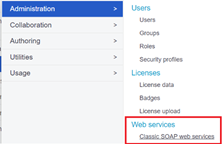
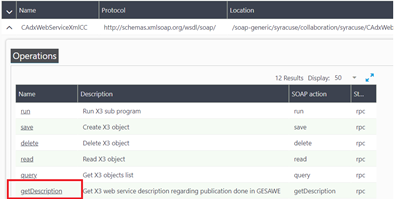
Select the, Get Description, Web Service
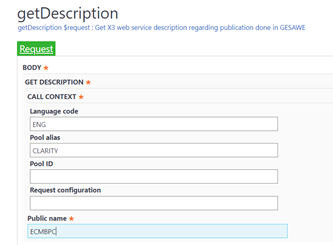
Enter which web service you are wanting to upload to. In this case lets upload a new customer
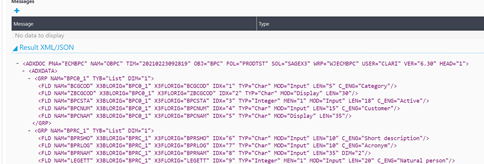
A full XML template for that object should be generated. Copy all of that XML
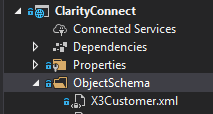
Create a new folder in your Clarity Connect project called, ObjectSchema. Create a new XML file called X3Customer.xml. Paste in the full XML schema from Sage X3 Description Web Service
Open your SageX3Options and add a line for X3CustomerFileName

Now go to AppSettings and add the option there as well using your X3Customer.xml

public void SetSageX3CEFJobs()
{
  RecurringJobManager.AddOrUpdate(
    recurringJobId: "ProcessAccountsFromSageX3ToCEF",
    job: Job.FromExpression(() => ProcessAccountsFromSageX3ToCEF(null, CancellationToken.None)),
    cronExpression: _cron.wooX3Cron.SageToWooProducts,
    options: _recurringJobOptions); ;
In your AccountsSageX3ToCEF class create a new method called BuildXmlMessage. This is how we will implement the X3CustomerFileName Schema we just created. You may need to add a few new properties to your X3Account class.
private string BuildXmlMessage(X3Account account)
{
  var x3SchemaReader = new X3SchemaReader(_x3Options.X3CustomerFileName);
  x3SchemaReader.AddXmlSoapData("BPCNUM", account.BPCNUM);
  x3SchemaReader.AddXmlSoapData("BPRNAM", account.BPRNAM);
  x3SchemaReader.AddXmlSoapData("BCGCOD", account.BCGCOD);
  //x3SchemaReader.AddXmlSoapData("ZBPCNUM", account.ZBPCNUM);
  x3SchemaReader.AddXmlSoapData("PTE", account.PTE);

  var count = 1;

  var addressList = new List<NameValuePair>
  {
    new NameValuePair("BPAADDFLG", "1"),
    new NameValuePair("CODADR", account.CODADR),
    new NameValuePair("CRY", account.CRY),
    new NameValuePair("ADDLIG1", account.XADDLIG1),
    new NameValuePair("ADDLIG2", account.XADDLIG2),
    new NameValuePair("CTY", account.XCTY),
    new NameValuePair("SAT", account.XSAT),
    new NameValuePair("POSCOD", account.XPOSCOD),
    new NameValuePair("FCYWEB", account.XFCYWEB),
    new NameValuePair("TEL1", account.XTEL1),
    new NameValuePair("WEB1", account.XWEB1),
  };

  x3SchemaReader.AddXmlSoapListData(addressList, count++);
  return x3SchemaReader.XmlRequestMessage;
}
Open both your x3Service and iX3Services and create a new method called UpdateX3CustomerAsync.
Task UpdateX3CustomerAsync(string bpcNum, string customer, CancellationToken token);

public async Task UpdateX3CustomerAsync(string bpcNum, string customer, CancellationToken token)
{
  var x3UpdateRequest = new SageX3AccountUpdateRequest("ECMBPC", nameof(X3Field.BPCNUM), bpcNum, customer);
  var x3CustomerResult = await Mediator.Send(x3UpdateRequest, token).ConfigureAwait(false);
}
Create a new ICefService.Customer and CefService.Customer and add the interface to your ICefService class. In your ICefService.Customer, create a new method called ListCustomersByCompareDate. Your full method in your CefService.Customer should look something like this.
public async Task<List<AccountModel>> ListCustomersByCompareDate(DateTime? compareDate, CancellationToken token)
{
  var searchModel = new SearchModel();
  searchModel.ModifiedSince = compareDate;
  var request = new CefAccountListRequest(searchModel);
  var orders = await Mediator.Send(request, token).ConfigureAwait(false);
  return orders.ToList();
}
Back in your AccountsSageX3ToCEF class, create a new method called ProccessCustomersFromWooCommerceToSageX3
[SkipWhenPreviousJobIsRunning]
        [DisableConcurrentExecution(5), AutomaticRetry(Attempts = 0, OnAttemptsExceeded = AttemptsExceededAction.Fail)]
        public async Task ProcessCustomersFromCEFToSagex3(PerformContext context, CancellationToken token)
        {
            //var compareDate = GetCompareDate(context, nameof(ProcessCustomersFromSageX3ToWooCommerce)) ?? DateTime.Now.AddDays(-10);

            // How far back to check for updated customers
            var compareDate = DateTime.Now.AddDays(-1);

            //Get All CEF Customers
            var cefCustomers = await _cefService.ListCustomersByCompareDate(compareDate, token).ConfigureAwait(false);
            if (cefCustomers?.Any() != true) { return; }

            foreach (var cefCustomer in cefCustomers)
            {
                // Check if customer has been updated

                var cefToX3Customer= Mapper.Map<X3Account>(cefCustomer);
                var x3CustomerUpdate = BuildXmlMessage(cefToX3Customer);

                await _x3Service.UpdateX3CustomerAsync(cefToX3Customer.BPCNUM, x3CustomerUpdate, token).ConfigureAwait(false);


            }
        }
In your AccountProfile Mappings add a new mapping for AccountModel to X3Account
CreateMap<AccountModel, X3Account>()
              //.ForMember(dest => dest.BPC, opt => opt.MapFrom(src => src.BPCNUM + " - " + src.BPRNAM))
              //.ForMember(dest => dest.BCGCOD, opt => opt.MapFrom(src => src.C)) // Customer Category

              .ForMember(dest => dest.BPCNUM, opt => opt.MapFrom(src => src.CustomKey)) // WooID
              .ForMember(dest => dest.BPRNAM, opt => opt.MapFrom(src => src.Name)) // Customer Nam
              .ForMember(dest => dest.XTEL1, opt => opt.MapFrom(src => src.Phone)) // Phone Number
              .ForMember(dest => dest.XWEB1, opt => opt.MapFrom(src => src.Email)) // Email

              .AfterMap((src, dest) => dest.BCGCOD = "CC2")
              .AfterMap((src, dest) => dest.CRY = "US")
              .AfterMap((src, dest) => dest.CUR = "USD")
              .AfterMap((src, dest) => dest.LAN = "ENG")
              .AfterMap((src, dest) => dest.CODADR = "A1")
              .AfterMap((src, dest) => dest.PTE = "DCC")
              .ForAllOtherMembers(opt => opt.Ignore());
       }
Set a new job in your JobService class
RecurringJobManager.AddOrUpdate(
              recurringJobId: nameof(ProcessCustomersFromCEFToSagex3),
              job: Job.FromExpression(() => ProcessCustomersFromCEFToSagex3(null, CancellationToken.None)),
              cronExpression: _cron.x3CefCron.X3ToCefAccounts,
              options: _recurringJobOptions);
Run your new job!
¶ Known Customizations
- Customers
- Custom naming convention
- Products
- Product Images
- Variant Product Logic
- Pricing
- Price Change Report
- Sales Orders
- Sync Restrictions on Order Status and Fulfillment Status
- Payments/Transactions
- Merge with Sales Order sync
- Customers
- Multi-Store Customers
- Products
- Populate Multi-Line Text for Variants
- Inventory
- Multi-Store Inventory
- Variant Inventory
- Pricing
- Sparklayer Plugin
- Sales Order
- Makro Field Inclusion
- Phone-In Order Inclusion
- Promo Code
- Tracking Updates
- Inventory
- Workflow for Percentage of Inventory Values
- Shipping Data
- Syncing Shipping Values back to Internal Warehouses
- Sales Orders
- Integration with a custom Conversion Table
¶ Outlying Issues
If you are running integrations with Sage X3 using REST or SOAP web services, you may come across issues when the web pool is in a stopped state, or is no longer responding due to errors on prior web service calls. There are several ways to check the state of a web service pool and to restart the web service pool using Syracuse REST utilities.
¶ OBTAINING THE POOL UUID
When consuming web services with Sage X3, you're used to referring to the pool using the SOAP classic pool alias, which can be seen under Administration > Administration > Web Services > Classic SOAP Pools configuration. For any activities related to the pools as described below, you will need to use the pool UUID (universally unique identifier).
¶ Obtain UUID by querying the Web Pools
A list of web pools can be retrieved by running a REST query request, as shown below, substituting your Sage X3 URL for "x3instance".
http://x3instance:8124/sdata/syracuse/collaboration/syracuse/soapClassicPools?representation=soapClassicPool.$query
Using "Basic Auth" for the Authorization type, the same way you use X3 web service SOAP, will result in some paging information, along with a list of resources, which are the SOAP pool details. Below is a sample of the resource details.
The piece of information you will need for specific activities on the web pool is the UUID for the web pool.
Another item that is useful in the "autoStartDisabled" value. If this has a value of "true", the web service is not currently running.
¶ OBTAIN WEB POOL DETAILS
If the pool UUID is already know, the pool details can be obtained by running a REST details request, as shown below, substituting your Sage X3 URL for "x3instance". Also make sure you substitute you UUID in the single quotes.
http://x3instance:8124/sdata/syracuse/collaboration/syracuse/soapClassicPools('7f487d15-fd90-44a4-941a-a0d75175bf9e')?representation=soapClassicPool.details
The results will contain the same information as the query results, for a single pool only.
¶ RESTARTING THE WEB POOL
By using the above request and results, you can determine the state of your web pool using REST commands. This information could be used to stop and start the pool.
**NOTE—if you run reoccurring tasks for integrations, be aware that stopping and starting the pool will interrupt any transactions in process. This should only be done after hours, if it is determined that the pool is not responding.
¶ Periodic Pool Restart
One way to use these commands would be to do a daily or weekly stop and start of the web pool. This can be done by embedding the REST commands for stop and start in a .net, curl, or other application to issue the commands.
¶ Stop the Pool
Using the UUID for the web pool, the pool can be stopped using the POST request below.
http://x3instance:8124/api1/syracuse/collaboration/syracuse/soapClassicPools('7f487d15-fd90-44a4-941a-a0d75175bf9e')/$service/stop
The response will include messages indicated whether or not the stop was successful. If there are multiple channels, based on the settings under host, there will be a message for each process stopped.
¶ Start the Pool
Using the UUID for the web pool, the pool can be started using the POST request below.
http://x3instance:8124/api1/syracuse/collaboration/syracuse/soapClassicPools('7f487d15-fd90-44a4-941a-a0d75175bf9e')/$service/start
The response will include messages indicated whether or not the start was successful. If there are multiple channels, based on the settings under host, there will be a message for each process started.
¶ Common Model Mappings
¶ Common Model Workflows
Phase 2