The current implementation of QuickBooks (C4, C4.6+) uses QODBC to integrate with QuickBooks22 Enterprise version.
¶ Key Terminology
¶ Basic API resources and resource categories
By “resources,” we mean the API entities your app can use to create or update data in QuickBooks Online. These entities correspond to data points businesses use to do their accounting in QuickBooks Online, like forms (invoices, bills receipts), accounts (bank, expense, tax, etc) or groups (lists, inventory items, etc).
Since they’re related, we may refer to both the API entity and related customer-facing data point as a “resource.” Most API entity names are based on common accounting terms. However, we may refer to them or categorize them in ways that are unique to QuickBooks.
Here are key customer-facing concepts and the corresponding API:
List entities/resources: Lists used to track individuals or accounts commonly referenced in transactions. We sometimes call list resources “name lists.”
Transaction entities/resources: Sales forms used for transactions.
- Relevant API entities: Invoice, Bill, Payment, BillPayment, Refund
Reports entities/resources: Reports used to track business metrics.
- Relevant API entities: ProfitandLoss, GeneralLedger, CashFlow
Inventory entities/resources: Inventory items and inventory management.
- Relevant API entities: Item. The Item entity tracks products and services, as well as inventory hierarchies and bundles.
Journal entry: A type of record that accountants use to make corrections or major changes to a chart of accounts, such year-end adjustments or errors. Use this sparingly.
- Relevant API entities: JournalEntry
¶ Known Integrations
¶ AQUA (Connect v4)
- Developers: (P) Anonymous User
- Integrations: Products (From), Customers (From), Sales Orders (To, From)
- Current Branches:
?
¶ BMS (Connect v4.7)
- Developers: (P) Anonymous User, (A) Anonymous User
- Integrations: Sales Orders (From), Invoices (To)
- Current Branches:
?
¶ Links to Published Pipelines
- Pipeline 1 File Upload:
- Pipeline 2 File Upload:
¶ Authentication
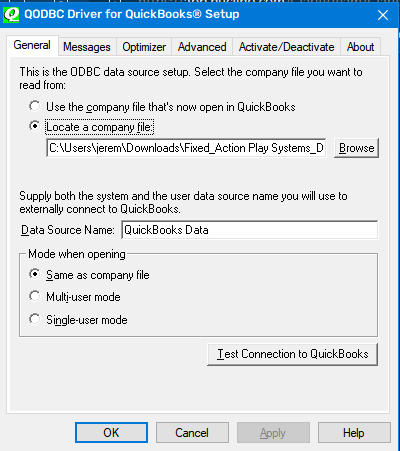
- QuickBooks22 QODBC requires an Admin account to be able to authorize 3rd party applications to connect to the database. Using the QODBC Support Wizard is the fastest way to go through the checklist to verify connectivity.
¶ Link to UI/Dashboard
- Links/Screenshots/Etc to GUI
¶ Schema
- Authentication Schema
Examples
- Authentication Example
¶ CRUD Operations
- All CRUD requests are made as SQL statements into the QODBC Client.
¶ List Requests
- Standard
SELECTqueries.
¶ Read Requests
- Standard
SELECT
¶ Create Requests
¶ Update Requests
¶ Delete Requests
- Not Implemented
¶ Previous Integrations: Models
- Custom Attributes:
- Each QuickBooks entity must derive from
IQuickBooks22Object, which exposes the following attributes & fields:QBQueryable: Attribute that specifies whether the property is something that can be queried for.QBUpdatable: Attribute that specifies whether the property is something that should be sent in when updating.QBInsertable: Attribute that specifies whether the property is something that should be inserted in SQL queries.TableName:public static stringthat specifies the table name that the model exists on.
- Each QuickBooks entity must derive from
- Products
- Required Fields
-
- Suggested Fields
-
- Required Fields
- Customers
- Required Fields
-
- Suggested Fields
-
- Required Fields
- Sales Orders
- Required Fields
- Sales Order Lines must be sent in to
- Suggested Fields
-
- Required Fields
¶ Connect Specifics
- Saved Args
QRemoteServerIP: The IP Address of the QRemote Client.QRemoteServerPort: The Port address of the QRemote Client.DataSourceName: The name of the Data Source, given by setting up 32-bit Data Sources within the Windows environment.
- Environment-Specific Setup
- Custom Nodes Available
- Pipeline-Specific Requirements
¶ Known Customizations
- Pricing
- Split Sync
- Sales Orders
- Part Number Translations
- Invoices
- APS SKU to Freight
¶ Outlying Issues
- Remaining TODOs
- Suggested Improvements
- Move from QODBC to QWC for more native experience and no dependence on 3rd party tools.
- Technical Debt
- Using QODBC was a decision made to get AQUA spun up quickly. A proper implementation utilizing the bundled QuickBooks Web Connector would be a better solution long term for licensing fees and ease of setup.
¶ Documentation
- Direct Download Link: https://dlm2.download.intuit.com/akdlm/SBD/QuickBooks/2022/Latest/QuickBooksEnterprise22Trial.exe
- QODBC Download: QODBC Driver for QuickBooks Download – QODBC.com Tools for QuickBooks
- Tables List: QODBC Table Documentation
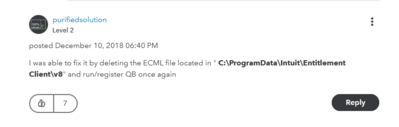
- QuickBooks22 comes with a 30-day Enterprise free trial, which can be reset by the following:
- QODBC comes with a 30-day free trial that cannot currently be reset and requires a license to be activated.
- Postman/Insomnia Collections:
¶ Common Model Mappings
¶ Common Model Workflows
Phase 2