Full Dev Guide for Oracle EBS: Oracle E-Business Suite Developer's Guide
¶ Key Terminology
- EBS uses a batch process that currently runs nightly to create actual invoices (AR "transactions" in Oracle speak) by pulling eligible order lines into interface tables and then creating the transactions, including performing all the related accounting/sub-ledger accounting processes.
- User ID: A unique identifier for the application user (foreign key to FND_USER).
- Responsibility ID: The user's current responsibility (foreign key to FND_RESPONSIBILITY).
- Application ID: The user's current application (foreign key to FND_APPLICATION).
- Session ID: A unique identifier for the application user session (foreign key to ICX_SESSIONS).
- Transaction ID: A unique identifier to identify the runtime context of the application. Four different transaction types are currently supported:
- Concurrent Program (CP): the CP ID (foreign key to FND_CONCURRENT_PROGRAMS), Request-Id (foreign key to FND_CONCURRENT_REQUESTS) are automatically captured.
- Form Function: the Form ID (foreign key to FND_FORMS), Function-Id (foreign key to FND_FORM_FUNCTIONS) are automatically captured.
- ICX: the ICX Session ID (foreign key to ICX_SESSIONS) and ICX Transaction-Id (foreign key to ICX_TRANSACTIONS) are automatically captured.
- Service: the Process ID (foreign key to fnd_concurrent_processes), Concurrent-Queue ID (foreign key to fnd_concurrent_queues) are automatically captured.
- AUDSID: A unique identifier for the database connection (userenv('SESSIONID')).
- Process ID: A unique identifier for the database process (v$session.Process).
- Module: Typically in Java this is the full class name. When a class name starts with "oracle.apps", then the leading "oracle.apps." is dropped in the logged message. For example: "oracle.apps.jtf.util.Encoder" is logged as "jtf.util.Encoder".
¶ Known Integrations
¶ ADI (Connect v?)
- Developers: Anonymous User
- Integrations: Accounts (From), Products (From), Brands (From), Pricing (From), Inventory (From), Invoices (To/From), Sales Orders (To/From)
- Current Branches:
Pending
¶ JBM (Connect v?)
- Developers: Greg Deane, Anonymous User
- Integrations: Accounts (To/From), Contacts (To/From), Products (From), Sales Orders (To/From), Invoices (From)
- Current Branches:
Pending
¶ Authentication
¶ Before You Begin Exposing Oracle E-Business Suite APIs
Before you begin exposing the Oracle E-Business Suite APIs, ensure that you install Oracle E-Business Suite 12.2.6 or later and that you install and configure the Oracle E-Business Suite Integrated SOA Gateway for REST services.
¶ Expose Oracle E-Business Suite Services as REST APIs
Expose the required Oracle E-Business Suite services as REST APIs with Oracle Integration Repository in the Oracle E-Business Suite Integrated SOA Gateway.
- Sign in to Oracle E-Business Suite as the ASADMIN user.
- Start Oracle Integration Repository in Oracle E-Business Suite Integrated SOA Gateway, and then click Search.
- In the Internal Name field, enter oracle.apps.fnd.rep.ws.service.EbsMetadataProvider, and then click Go. Click Metadata Provider.
- Click the REST Web Service tab. In the Service Alias field, enter provider, and then select the GET method option for all the rows in the table. Click Deploy.
- Click the Grants tab. Select all the rows in the table, and then click Create Grant. In the Grantee Name field, enter hrms, or a user with similar entitlements, and then click Create Grant.
- Click Search. In the Internal Name field, enter IRC_PARTY_API, and then click Go. Click Party.
- Click the REST Web Service tab. In the Service Alias field, enter IRL_PARTY_API, and then select the method options for all the rows in the table. Click Deploy.
- Click the Grants tab. Select all the rows in the table, and then click Create Grant. In the Grantee Name field, enter hrms, or a user with similar entitlements, and then click Create Grant.
Now, the Oracle E-Business Suite services are exposed as REST APIs, and Oracle Integration Cloud can connect to Oracle E-Business Suite and invoke these services.
Installing the On-Premises Agent:
Import information from Oracle Taleo Enterprise Cloud...
¶ Token Service REST Endpoints
OAuth2/Token Service
Get Access Token
Method: POST
Path: /rest/oauthTokenService/v1/token
This authenticates the calling application, and returns Access token
¶ Request
Supported Media Types
- application/x-www-form-urlencoded
Form Parameters
- assertion: string
- "sub" may either be equal to "aud" (if we perform the call as application, not as a OFSC user). Otherwise "sub" should be equal to the "login" field of an OFSC user that you want to authorize to call REST APIs.
- "iat" - UNIX timestamp when this assertion was issued.
- "exp" - UNIX timestamp when this assertion expires. Please make "exp" short e.g. a minute or a few minutes.
Example JWT assertion token that you can copy-paste to https://jwt.io to see the fields: eyJ0eXAiOiJKV1QiLCJhbGciOiJSUzI1NiJ9.eyJzdWIiOiJwaGlsbGlwIiwiYXVkIjoib2ZzYzp5YW1hdG86NTM0ZjgyYThkMWFjMmE0N2RhOWNmZTk1YTRjOGJmOWI4N2I2NjU1MyIsImlzcyI6Im15IG1vbW15IiwiaWF0IjoxNDg1NDY5MzY0LCJleHAiOjE0ODU0Njk0OTR9.Y8fAyCvJ1EqGip0jgOb8VjwjPq3WDZuTRsFrZSfNSSH-8QXTyj11adQPDH8OZKrpTyPMtxHGZscBniimCpA7w-0_9TDCNf4v1mHvWgNZDI-Q8qe7wr66rrH1wGpBDX6QijGw2GU_642aw6hXo2YVtViUz9NJ0W-sLj1y7yamwJPiJNGx_diiQJxMJ4pPzqs6H1KxkucmSlbKMjscausF8NVqpB_wupcuSxlvo5-mCDsbfZrDPMgnvi1SqoaHOrzTiPSFp96dowXnVnlsHcypASczmQvz30MIuQvHLGJq_HRTXcgzZ5ofY0At823c1dPY0Jfri172TadT5jc10g4QHg
grant_type: string
-
This can be either
- "client_credentials" - if you would like to authenticate via HTTP Basic using client_id / client_secret as credentials.
- "urn:ietf:params:oauth:grant-type:jwt-bearer" - if you would like to authenticate using JWT Assertion token
Allowed Values:[ "client_credentials", "urn:ietf:params:oauth:grant-type:jwt-bearer" ]
-
ofsc_dynamic_scope: string
-
If this parameter is specified, an additional claim will be added to the access token returned in response with the same name and value as the parameter. The 'ofsc_dynamic_scope' parameter and claim have the format of a URL with optional query parameters. The claim applies the following restrictions to the requests:
- endpoint: OFSC REST API will reject the token with HTTP 401 status code, if it is used to call a different endpoint, than the one specified in 'ofsc_dynamic_scope' claim.
- query fields: OFSC REST API will reject the request with HTTP 401 status code, if the request URL does not contain all the query parameters specified in the 'ofsc_dynamic_scope' claim
- query values: OFSC REST API will reject the request with HTTP 401 status code, if all the query parameter values specified in the request URL do not exactly match the query parameter values of the 'ofsc_dynamic_scope' claim.
Multiple URLs can be specified in this parameter and claim, separated by a single space.
In the following cURL command example, the 'ofsc_dynamic_scope' is set to "https://api.etadirect.com/rest/ofscCore/v1/whereIsMyTech?activityId=12345" (value is URL-encoded in the command)
curl -u 'client_id@instance_name:client_secret' -X POST --url 'https://api.etadirect.com/rest/oauthTokenService/v1/token' -d 'grant_type=client_credentials' -d 'ofsc_dynamic_scope=https%3A%2F%2Fapi.etadirect.com%2Frest%2FofscCore%2Fv1%2FwhereIsMyTech%3FactivityId%3D12345'
¶ Response
Supported Media Types
- application/json
¶ 200 Response
Successful response containing access token
Body (schema)
Type: object
- expires_in: integer
- Title:
Expires in - Number of seconds since current time after which the returned access token is no longer valid
- token: string
- Title:
Token - The access token is returned in this field.
- token_type: string
- Title:
Token type - It is always 'bearer' for now.
¶ Default Response
Error response
Body (Error)
Type: object
- detail: string
- Detailed information about the error
- status: string
- HTTP status code
- title: string
- Summary error message
- type: string
- A URL of a page containing details of this error
¶ Examples
The following example shows how to fetch an access token by submitting a POST request on the REST resource:
cURL Command Example
Copycurl -X POST -u '<CLIENT-ID>@<INSTANCE-NAME>:<CLIENT-SECRET>' \
-d 'grant_type=client_credentials' \
'https://api.etadirect.com/rest/oauthTokenService/v1/token'
Response Body Example
CopyHTTP/1.1 200 OK
Content-Type: application/json; charset=utf-8
{
   "token": "eyJ0eXAiOiJ...SKIP...qtCqNDk6qy_utky5M",
   "token_type": "bearer",
   "expires_in": 3600
}
¶ CRUD Operations
¶ Creating One or Multiple Business Objects
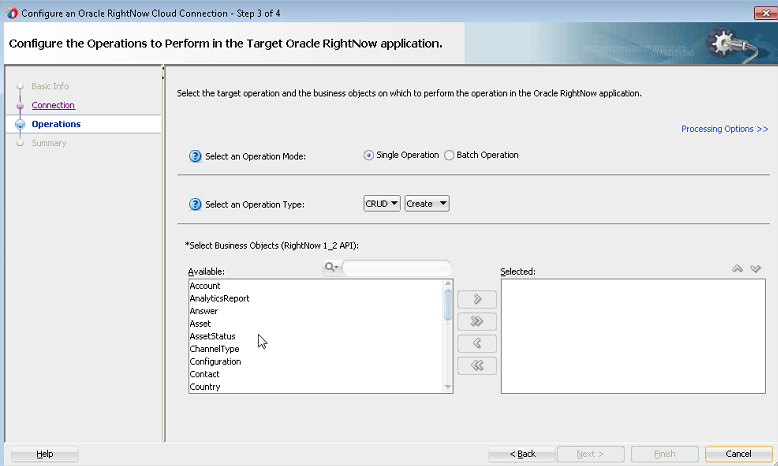
You create one or multiple business objects (standard or custom) on RightNow Cx using the . For example, you create Organization, Contact and Incident objects all as part of a single request or as three independent requests.
For example, on the Operation screen, you can select the Organization, Contact, and Incident objects as part of one request.
Figure 3-11 Creating Organization, Contact, and Incident Objects in One Request
¶ Retrieving Data from One or Multiple Objects
You can retrieve data either from one or multiple objects available on the RightNow CX cloud platform using the Oracle RightNow adapter. For example, you can use the Oracle RightNow adapter to retrieve data just related to just organizations or the information could be a combination of organizations, contacts and incidents in one request.
For example, you can retrieve data from just Organization, by specifying the Get operation in Operations screen and selecting the Organization object.
- Choose the Get operation from the Select an Operation Type list.
- Use the arrow to move the Organization object from the Available list to the Selected list.
- Click Next.
Figure 3-12 Retrieving Data from One Object
¶ Updating One or Multiple Business Objects
Use the Update operation to update any primary object and associated subobjects. You can update one or multiple business objects (standard or custom) on the RightNow CX cloud platform using the . For example, you can update Organization, Contact and Incident objects as part of a single request or as three independent requests.
For example, you can update the Organization, Contact and Incident objects as part of a single Update request on the Operation screen.
To perform an Update operation:
- Select Update from the Select an Operation Type list.
- Select one or more business objects from the Available list.
- Use the arrows to move the business objects to the Selected list.
- Click Next.
You can update one object as part of a series of updates to three objects.
Figure 3-13 Updating a Single Business Object
¶ Deleting one or Multiple Business Objects
You can delete one or multiple business objects (standard or custom) on the RightNow Cx cloud platform using the Oracle RightNow adapter. For example, you can delete Organization, Contact and Incident objects all as part of a single request or as three independent requests.
In the following screenshot, you use the Oracle RightNow adapter Operation screen to delete Organization, Contact, and Incident objects.
To delete multiple business objects:
- Choose the Destroy operation from the Select an Operation Type list.
- Use the arrow to move the Organization, Contact and Incident objects from the Available list to the Selected list.
- Click Next.
¶ Connect Specifics
https://dev.azure.com/clarity-ventures/Connect/_git/C4.Modules.ESM.OracleEBS
Work in Progress
¶ Known Customizations
- Accounts
- Account Filtering
- Inventory
- Inventory Location Details
- Sales Orders
- Pending Orders
- Contacts
- Registry ID Associations
- Products
- Inventory Inclusion
- Export of Integrated Products
- Invoices
- Payment Terms
¶ Outlying Issues
¶ Inbound Services are not Working in Oracle ERP Cloud Adapter
- Impacted Releases: 12.2.1.2.0 and 12.2.1.3.0
- Impacted Platforms: All
- Inbound Services are not working in Oracle ERP Cloud Adapter 12.2.1.2.0 and 12.2.1.3.0.
- Workaround
- Use Oracle Integration Cloud Service for inbound services. The resolution for Oracle ERP Cloud Adapter will be delivered in the next available patch.
¶ Incorrect Property Values Generated for the PL/SQL API WF_EVENT.RAISE() Using Oracle E-Business Suite Adapter
- Impacted Releases: 12.2.1.3
- Impacted Platforms: All
- Creation of a partner link for the PL/SQL API WF.EVENT.RAISE() using Oracle E-Business Suite Adapter is successful at the design time; however, the PackageName and ProcedureName properties have incorrect values in the xx_apps.jca file which gets generated in the project. Invocation of the composite fails during runtime for this partner link.
- Workaround
- Update the xx_apps.jca file with the following values:
<property name="PackageName" value="WF_EVENT"/><property name="ProcedureName" value="RAISE"/>
- Update the xx_apps.jca file with the following values:
¶ Importing an Eloqua Adapter Service/Composite Created in 12.1.3 Fails During Runtime
- Impacted Releases: 12.2.1, 12.2.1.1.0 and later releases
- Impacted Platforms: All
- After you import a configuration jar created in 12.1.3, the service fails during runtime with the following exception:
The invocation resulted in an error:
Invoke JCA outbound service failed with application error, exception:
com.bea.wli.sb.transports.jca.JCATransportException:
oracle.tip.adapter.sa.api.JCABindingException:
oracle.tip.adapter.sa.impl.fw.ext.org.collaxa.thirdparty.apache.wsif.WSIFExcep
...
- Workaround
- Create the CSF key manually when importing a 12.1.3 OSB configuration or SOA composite. This is because even though 12.2.1.1.0 and 12.2.1.2.0 do not require you to create a CFS key manually for a new service/composite in Enterprise Manager Fusion Middleware Control, 12.1.3 did require you to create the CSF key manually.
¶ Flexfield Support for Open Interface Table Is Not Fully Functional in Oracle E-Business Suite Adapter
- Impacted Releases: 12.2.1, 12.2.1.1.0 and later releases.
- Impacted Platforms: All
- When creating an Open Interface Table partner link configured with flexfields for Oracle E-Business Suite Adapter, the generated schema files do not include the associated flexfield definition or reference.
- This issue is specific to Open Interface Tables. Flexfield support for PLSQL APIs works as expected.
- Workaround
- Pending
¶ Two XSDs Created for Database Adapter Stored Procedure Migrated from 11g to 12c in Oracle E-Business Suite Adapter If Wizard Rerun
- Impacted Releases: 12.1.3, 12.2.1, 12.2.1.1 and later releases
- Impacted Platforms: All
- While creating a new project in Oracle E-Business Suite Adapter, if the underlying Database Adapter project contains a stored procedure and is migrated from 11g to 12c release, when you rerun the stored procedure through the Configuration Wizard, a new xsd under the Schema folder is created for 12c release.
- Workaround
- Manually delete the old xsd file created earlier before the migration and update the read.wsdl to reference the new xsd in the Schema folder.
- Note that if database tables are used, the new schema is correctly written to the old schema location.
¶ Performance Slow While Importing a Flexfield Mapping for a PL/SQL API in Oracle E-Business Suite Adapter
- Impacted Releases: 12.1.3, 12.2.1, 12.2.1.1 and later releases
- Impacted Platforms: All
- During the partner link creation for a PL/SQL API that has flexfield data configured, if you decide to construct the flexfield mapping by using an existing one through the Import feature, then it may take three to five minutes to get the mapping file (*_mapping.xml) imported to the Oracle E-Business Suite Module Browser.
- Workaround
- Pending
¶ Flexfield Support for Open Interface Table Is Not Fully Functional in Oracle E-Business Suite Adapter
- Impacted Releases: 12.2.1, 12.2.1.1.0 and later releases.
- Impacted Platforms: All
- When creating an Open Interface Table partner link configured with flexfields for Oracle E-Business Suite Adapter, the generated schema files do not include the associated flexfield definition or reference.
- This issue is specific to Open Interface Tables. Flexfield support for PLSQL APIs works as expected.
- Workaround
- Pending
¶ Email Subject and Body Garbled in UMS-Outbound when it is Non_UTF-8 Server Encoding
- Impacted Releases: 12.1.3, 12.2.1, 12.2.1.1.0 and later releases
- Impacted Platforms: All
- Email subject and body get garbled in UMS-outbound (SendNotification) scenario. This happens when server encoding is Non_UTF-8. The mail corruption happens when message is String Type or Opaque or when it is using XSD.
- Workaround
- Restart the server, when the server encoding is changed to be UTF-8.
¶ XA class support is deprecated for Oracle JCA Adapter for MQ Series
- Impacted Releases: 12.1.3, 12.2.1, 12.2.1.1, 12.2.1.2
- Impacted Platforms: All
- XA class support is deprecated for Oracle JCA Adapter for MQ series. Do not use XA with Oracle JCA Adapter for MQ Series or Transport.
- Workaround
- Use WebSphere MQ JMS API instead in XA transactions. When XA transactions are required, use Oracle JCA Adapter for JMS to interact with IBM MQ instead of Oracle JCA Adapter for MQ Series. If the MQ adapter is used for XA transaction, the adapter might encounter an error when it needs to roll back an XA transaction. The user will then need to manually resolve any in-doubt transactions.
¶ XSLT Transform Mapper Activity in Oracle BPEL Process Manager
- Impacted Releases: 12.1.3, 12.2.1, 12.2.1.1.0 and all alter releases
- Impacted Platforms: All
- When you attempt to map a node from the source node to the target node in the XSLT Mapper for Oracle RightNow schemas, you receive the following error:
Could not create element value-of
- In addition, the mapped element comes out of Target Parent Node.
- Workaround
- Before performing any mapping, check whether the Parent Node on the Target node is gray in color. Select this parent node on the target (for example, Contact), then right-click and select Create Node in XSLT.
¶ Common Model Mappings
¶ Common Model Workflows
Phase 2
¶ Additional Documentation Resources from Oracle Site
Oracle E-Business Suite Concepts-Index.pdf
Oracle E-Business Suite Concepts-Glossary.pdf
Oracle E-Business Suite Concepts-Multiple-Organization.pdf
Oracle E-Business Suite Concepts-Globalization.pdf
Oracle E-Business Suite Concepts-LoadBalancing.pdf
Oracle E-Business Suite Concepts-High-Availability.pdf
Oracle E-Business Suite Concepts-Authentication.pdf
Oracle E-Business Suite Concepts-Security.pdf
Oracle E-Business Suite Concepts-Cloning.pdf
Oracle E-Business Suite Concepts-Technical-Configuration-Tools.pdf
Oracle E-Business Suite Concepts-TOC.pdf
Oracle E-Business Suite Concepts-Preface.pdf
Oracle E-Business Suite Concepts-Architecture.pdf
Oracle E-Business Suite Concepts-File-System-Structure.pdf
Oracle E-Business Suite Concepts-Database-Features.pdf
Oracle E-Business Suite Concepts-Patching.pdf