¶ Overview
The PM Invoicing meeting is a recurring weekly review of each project and its budget. The goal of the invoicing meeting is to ensure a strategy is proposed to maintain the health of the project's budget. Projects with a low or negative hours balance must have a plan of action to ensure clients pay promptly. The output of the meeting includes detailed notes that the operations team and PMO team can use as follow-up for the project.
- Technology: Microsoft Excel
- Sphere:
- Reporting: Relating to invoicing/financials
- SDLC: All
- Cadence: Weekly
- Related article: Information about the spreadsheet for weekly updates PM Invoice Spreadsheet Info
¶ Preparation & Steps
Before or on Friday each week, a Project Manager must provide notes for each project within the Operation's provided PM Invoice Spreadsheet. The Ops team will provide a link to the spreadsheet in the CVI - Internal Operations: Project Management channel. The PM will fill out the invoicing sheet before 9 a.m. CST on Monday.
- Access the shared link to the PM Invoice spreadsheet inside the CVI - Internal Operations channel.
- Navigate to your sheet within the Excel file.
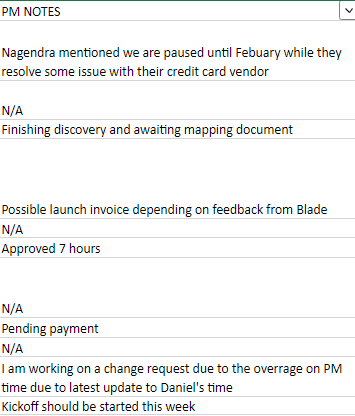
- In the Column titled “PM Notes,” provide detailed updates on any next steps to maintain the health of the project budget.
- Any project with a negative or low balance MUST have a note indicating proposed steps for maintaining the budget of each project.
- Detailed notes may include the following:
- A link to the thread where the budget is discussed with the client.
- A Change Request awaiting or with approval.
- A discussion around possible credits or project pause.
- A request for more assistance from leadership.
- Note: Any project with a positive balance that does not have hours in the sprint exceeding its balance may have “N/A” in the column to indicate no action is required.
- Detailed notes may include the following:

¶ Invoicing Sheet
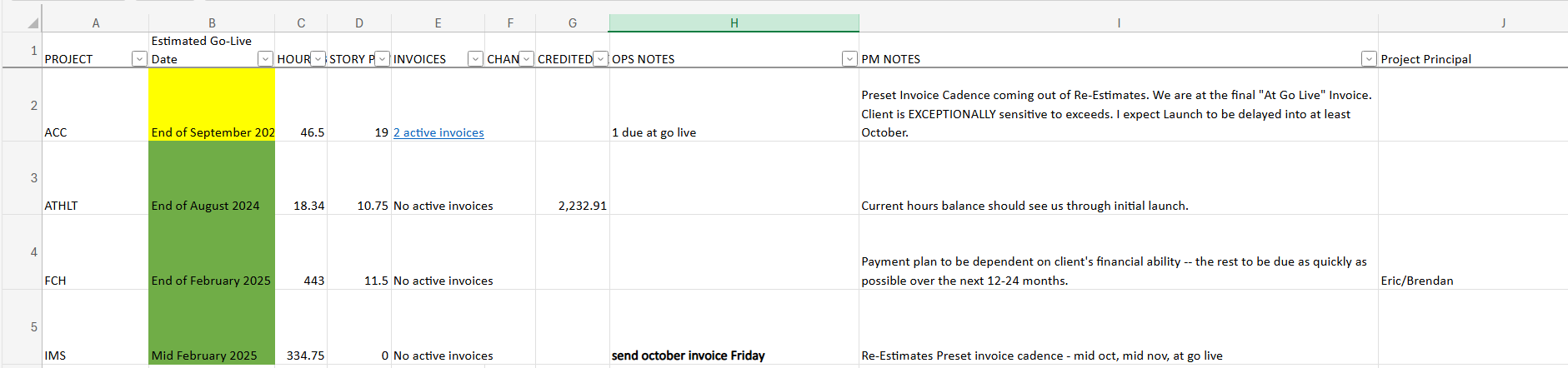
The PM Invoice sheet includes several columns, including the following:
- Project: Acronym for the project managed by the PM.
- Estimated Go-Live Date: Goal date for launch per the client team.
- Hours Balance: Current project balance of hours on-hand.
- Story Points In Sprint: The number of story points (hours) within the current or upcoming sprint.
- Invoice: Any invoices created and linked to the project.
- Change Request: Current change request proposed to the client.
- Credits: Hours credited on the project.
- Ops Notes: Kristin and the Operation team generated notes to provide details on each project's invoicing plan.
- PM Notes: The Project Manager's notes provide details on the invoicing plan for each project.
- Phase: Current phase of the project (Discovery/Architecture, Re-Estimates, Development, UAT, Launch Preparations, Post Go Live Support, Support and Maintenance).
- Relevant Links and Communication: Any links to notes/messages/exchanges that leadership or Ops should be aware of.
- Project Principal: Lead developer or development management member providing oversight to the project on the development side.
- Project Type: CEF, Connect, Integrated CEF, Payhub, etc.
- Area Path: Area path in Azure Dev Ops where project backlog can be found.
¶ Example PM Notes
PM notes must include a clean and concise plan that everyone within the PMO and Operations team can understand. High and poor-quality examples are provided below.
High-Quality Example: Provides details on the change request, provides a timeline on payment and gives details for any credit request.
Provided the client with a change request for hours (40 hours) last Friday. The balance will reach zero by the end of the month so the client has been informed that payment confirmation is required within the week. Project handoff with Amy included using 1.5 hours (with both our time) which may need a review for credit.
Poor-Quality Example: Lacks detail, gives no timeline, and includes a credit request without explanation.
I'll get around to sending a change request. Not sure what hours we need yet. I want to credit 20 hours because we messed up.
¶ Top Terms to be aware of
Budget, Scope, and Timeline -- that's what customers what to hear about in every project update call.
- Current budget – inform the client of their current budget including on-hand hours and outstanding invoices. Give an update on if the budget is on pace to complete the projects or if there are some change requests that will need to be performed.
- Scope – Let the client know how the scope of the project is looking and if there are any changes in scope (for example a task to be performed that is out of scope)
- Timeline – Update the Gantt chart to show the client the status of their project with an estimated completion date. This should show the work that is to be performed in the upcoming sprint and give a good breakdown of the project timeline