¶ Summary
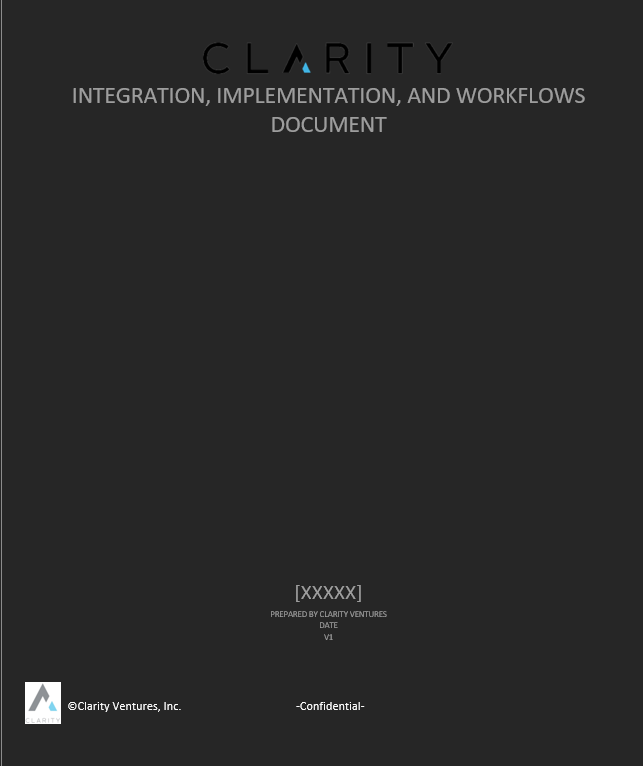
When a new client sales handoff has been provided, the BA will need to start preparing an FSD for the client. FSD templates can be utilized to quickly set up documentation for the Client. Currently (July 2022) there are 3 different project templates.
¶ Process Steps
- Copy the appropriate template to the target Projects File

- Rename the copied FSD template to "Client Name" FSD V1
- Example: Apple Inc would have an FSD name "Apple FSD V1"
¶ Document Format Setup
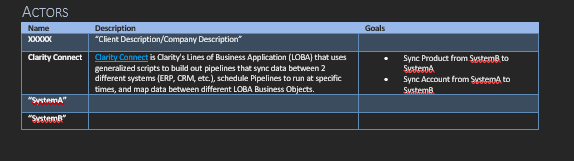
Once created, you will need to update the Template with the Clients's basic information
¶ Cover Page
¶ Header

¶ Actors
¶ User Story Headers

¶ TIP
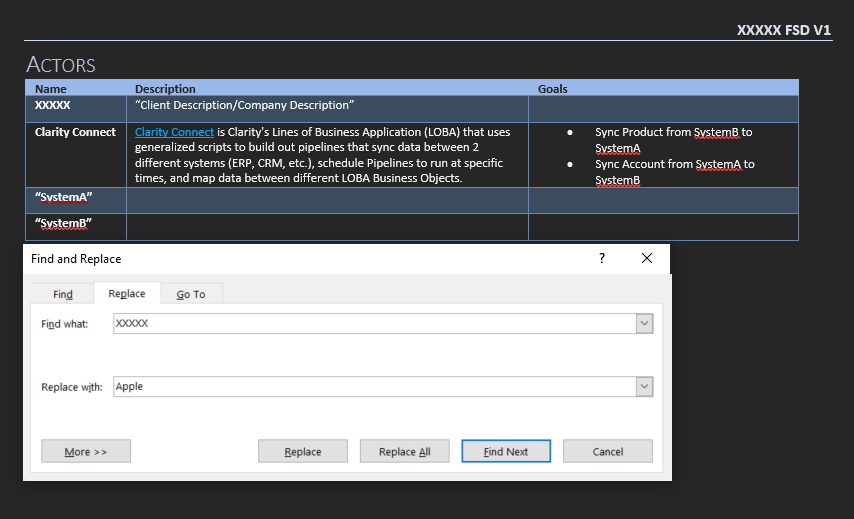
Templates are formatted for Quick setup. Client Name and Systems for example are set up to be filled utilizing Find and Replace (which May differ between templates).
¶ Example:
- Connect Template: "XXXXX" as a placeholder for Client Name
- Connect Template: SystemA/SystemB for Client systems
¶ Client Documentation
Projects FSD will have additional requirements based on the type of project (Additional User Stories, Screenshots, Mappings, etc.) After initial formatting, the document is prepped and ready for discovery. Be sure to fill out the FSD with any relevant information that the client has provided ahead of the initial Discovery meeting.
¶ Pre-Discovery
Request from Client
- Screenshots/Video of Workflows from the client
- Answered Questionnaire
- Mapping Documents
¶ User Story Guideline
A User Story will encompass a single task. For example, a Bi-Directional Sync would be broken up into 2 User Stories (System A → System B) and (System B → System A)
The User Stories description follows the structure of "As an Actor, I want X because Y"
¶ Highlighting in a User Story
- Yellow- Issues (Ex- Plugin will not work with client system)
- Green-Customizations
- (Custom Color)- High level question for client- (High priority discovery talking point, only used in preparation of a discovery meeting, should be removed post discovery meeting)
Comments can be used for Action Items/Questions for both discovery and client review. Comments should be removed as they are answered, with pertinent information moved to the body of the User Story.
¶ User Story Example
¶ [Client Name] Product Sync (Sage 100 to BigCommerce)
+------------------+--------------------------------------------------------------------------------------------------------------------------------+
|Description:|As Clarity Connect, I want to Sync Product Data from Sage 100 to BigCommerce because I want to keep product data up to date|
+------------------+--------------------------------------------------------------------------------------------------------------------------------+
|Priority |
|
+------------------+--------------------------------------------------------------------------------------------------------------------------------+
|Notes |Products Sync Workflow: |
| | |
| |1. Product is created/updated within Sage 100. |
| |2. Clarity Connect starts the Product Sync. |
| |3. Clarity Connect verifies endpoints active for Sage 100 and BigCommerce |
| |4. Clarity Connect Gets All Products based on modified date since Last Runtime from Sage 100 |
| | 1. Sage 100 Returns a list of Products |
| |5. Clarity Connect queries BigCommerce checking product key to see if Record Exists |
| | 1. For each Product from Sage 100, Clarity Connect Maps data to BigCommerce |
| | 1. If Product Records Exists: |
| | 1. Clarity Connect Updates Product Record to BigCommerce |
| | 2. Else: |
| | 1. Clarity Connect Creates a Product Record in BigCommerce |
| |6. Clarity closes connections to BigCommerce and Sage 100 |
| |7. Clarity Updates last runtime |
| |8. Clarity Finishes product Sync |
| | |
| |
|
| | |
| |Notes: |
| | |
| |1. This would contain notes relevant to this User Story |
| | |
| |Materials from Client: |
| | |
| |1. You can post User Story relevant links of client provided materials (Videos, diagrams, etc) for the developers |
+------------------+--------------------------------------------------------------------------------------------------------------------------------+
|Issues |
|
+------------------+--------------------------------------------------------------------------------------------------------------------------------+
|Estimations |Total Hours |
| | |
| |Standard Hours |
| | |
| |- Product Sync: 8 hours |
| | |
| |==Customizations== |
| | |
| |- ==Customizations are highlighted in Green== |
+------------------+--------------------------------------------------------------------------------------------------------------------------------+
¶ Initial Discovery - Phase 1 - Draft
During the initial Discovery, you will be working toward narrowing down the initial scope of the Client's project. Phase 1 will operate as an initial stand-up. Focus will be on the Minimum Viable Product(MVP). The goal of the MVP is to establish a goal post for initial development. Phase 1 should avoid major customizations or additional features. Anything that falls outside the MVP can be considered phase 2. If a client pushes for additions to be included with the MVP, they will most likely need a change request.
Pending-Minor Customizations
CEF- Color/Logo/etc
Connect- Dev determines if Customization is required to meet MVP
¶ Phase 2
Phase 2 contains major customizations and additional features that did not fit within phase 1. Phase 2 will operate the same way as a phase 1 in the sense that the project scope will be determined with set goal posts. Any additions desired outside the defined scope can then be brought to a Phase 3(4/5/etc)
Phase 2 must be discussed with the client after the MVP goes live. Client will need to determine when they want to start Phase 2 as it will need to fit with their needs.
Phase 2 Discovery is conducted during initial discovery phase. This is done so that a full list of items can be identified, prioritized, and broken into phases if needed.
¶ Discovery Requirements from Client
- Client Hosting Requirements
- Payment provider credentials
- Shipping provider credentials
- Access to Client System/Sandbox + Credentials
- Recordings + Screenshots of Workflows: These would be linked into the FSD for DEV review
CEF
-
- Account credentials for all providers integrated with Client project - Shipping, Payment, Tax, SSO
If access has not been set up properly before development, it will affect your timeline.