¶ Setup Teams Tab in Excel
The Teams Tab enables you to create a list of items that is directly linked to Azure DevOps
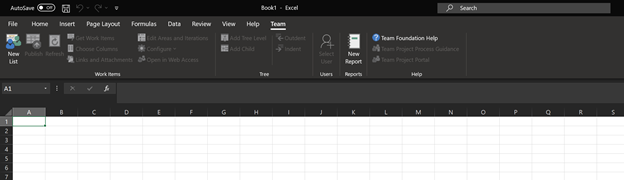
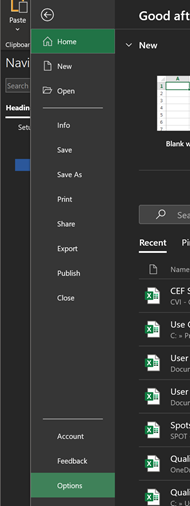
If this tab is not in your Excel Ribbon by default, navigate to the File Tab and click the Options Button in the lower left-hand corner of the screen.
NOTE: You may need to download the Azure DevOps Office® Integration 2019 Exe. File. Download Link:
https://visualstudio.microsoft.com/downloads/#other-family
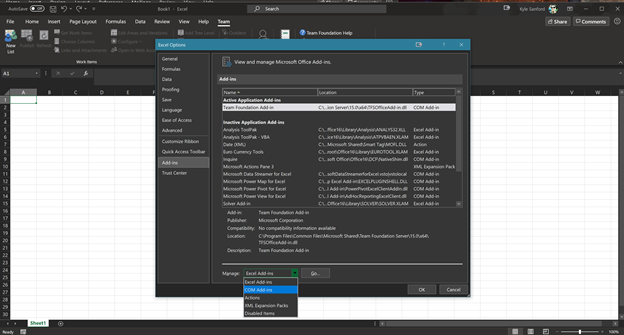
Then navigate to the Add-Ins Tab and utilize the Manage Dropdown to select the COM Add-Ins Option.
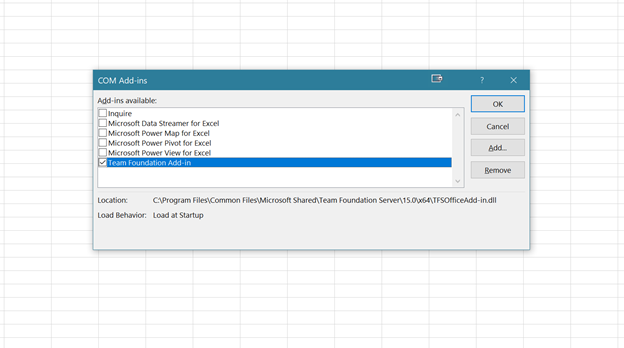
This will show a list of COM Add-Ins. From this list, select the Teams Foundation Add-In.
NOTE: This may be called Azure DevOps Integration Add-In depending on which version you have installed.