EagleOrderImportSpec.pdf
- Authentication with a data base: Client will provide Database details
- One Possible Technical issue: If using MYSQL (Might be old version) Double check versioning as you will need to get appropriate workbench versioning to connect
- You query the database directly
- Epicor Eagle is Inventory and POS management
- You will most likely being pulling data from Epicor Eagle
- The only thing we are sending back is sales orders
- There is no service or integration service layer for Epicor Eagle
- You can do your database calls directly from the Job
var allItemNumbers = await Eagle.Items
  .Where(i => i.UpdatedDate > lastRunDate && (i.Store == "1" || i.Store == "2"))
  .Select(i => i.ItemNumber)
  .ToListAsyncWithRetries();
var items = await Eagle.Items
  .Where(i => itemNumbers.Contains(i.ItemNumber))
  .Select(i => new EagleItem()
  {
    ItemNumber = i.ItemNumber,
    ItemDescription = i.ItemDescription,
    ItemShortDesc = i.ItemShortDesc,
    MfgPartNumber = i.MfgPartNumber,
    Manufacturer = i.Manufacturer,
    CodeTaxStatus = i.CodeTaxStatus,
    Discontinued = i.Discontinued,
    Department = i.Department,
    Fineline = i.Fineline,
    Class = i.Class,
    RetailPrice = i.RetailPrice,
    Price1 = i.Price1,
    Price2 = i.Price2,
    Price3 = i.Price3,
    Price4 = i.Price4,
    Price5 = i.Price5,
    Store = i.Store,
    QuantityOnHand = i.QuantityOnHand,
  })
  .ToListAsyncWithRetries();
- When importing the products, you must assign them a category
- The category names are one of the only things not in the inventory table
- When you’re building the custom key for each category you will have to do the entire tree for each name
- Example
Standard:
Product: Broom
D: 05 Paint/Sundries
C: 500 Brooms/Brushes
F: 005001 Brooms
Non-Standard 1:
Product: Snow Shovel
D: 08 Lawn & Garden
C: 814 Seasonal
F: 005001 Brooms
Non-Standard 2:
Product: Fire Extinguisher
D: 08 Lawn & Garden
C: 210 Personal Safety
F: 008601 Household Safety
Category tables:
DE - Department
CL - Class
FI - Fineline
select distinct
  in_item_number,
  in_item_description,
  fi_fineline_code, fi_fineline_name,
  cl_class, cl_class_name,
  de_department, de_dept_name
from EAGLEDW.IN, FI, CL, DE
where in_fineline = fi_fineline_code
  and in_class = cl_class
  and in_department = de_department
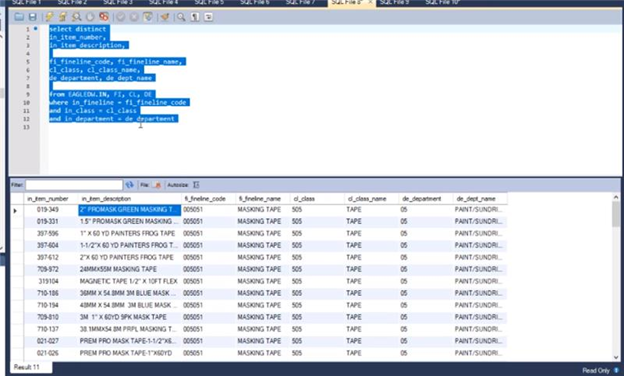
- Occasionally you will have a class that goes in a department you don’t expect
var unwantedDepartments = new string[] { "a1", "OR", "GC", "Q" };

var eagleDepartments = await Eagle.Departments
  .Where(d => !unwantedDepartments.Contains(d.DepartmentNumber))
  .Distinct()
  .ToListAsyncWithRetries();

var eagleClasses = await Eagle.Classes
  .Where(c => c.ClassName != "Z MISCELLLANEOUS - NO SKU")
  .Distinct()
  .ToListAsyncWithRetries();

var eagleFinelines = await Eagle.Finelines
  .Distinct()
  .ToListAsyncWithRetries();
¶ Price Rules and Inventory
- Price 1-5
- These are special prices for different types of customers (price Rules)
- Indicate which user role
select
  in_item_number,
  in_item_description,
  in_retail_price,
  in_price_1,
  in_price_2,
  in_price_3,
  in_price_4,
  in_price_5
from EAGLEDW.IN
select
  in_item_number,
  in_item_description,
  in_store,
  in_quantity_on_hand
from EAGLEDW.IN
order by in_item_number
- Customers may have different accounts at different stores
- They will have different customer numbers for each different store
- Only way to link them is by the sort name
- (If everyone else is using Epicor the same way) Client Specific

- There may be 2 types of Customer accounts
- Customers that are going to be in Epicor database will be professionals they may have several different jobs
- Helps Customers with their internal accounting
- Example: Construction Company has job accounts for each home they are building
| cr_standard_selling_price = price rule |
| 1-5, R, A, C |
| A = Average cost, not used |
| R = in_retail_price |
| C = in_cost_in_price_units |
| cr_standard_selling_price cr_customer, cr_job_number, cr_sort_name_type, cr_sort_name, cr_name, cr_street_1, cr_street_2 cr_city, cr_state, cr_country, cr_contact, cr_area_code, cr_phone, cr_tax_code, cr_store from CR where cr_sort_name_type = 'C' order by cr_sort_name |
- Emails are not in the same table
cx_email_address,
cx_customer,
cr_customer,
cr_sort_name
from CX
left join CR on cr_customer = cx_customer
where
cx_email_address != '' and
cx_job_number = 0
order by
cx_customer
- Querying for all Customers in Connect
var eagleCustomers = (await Eagle.Accounts
  .Where(a => a.LastActivityDate >= lastRunDate)
  .Where(a => EF.Functions.Like(a.SortName, "1%") || EF.Functions.Like(a.SortNameType, "2%"))
  .Where(a => a.SortNameType == "C")
  .Take(100)
  .Select(a => new EagleCustomer()
  {
    CustomerNumber = a.CustomerNumber,
    JobNumber = a.JobNumber,
    Store = a.Store,
    SortName = a.SortName,
    Name = a.Name,
    Street1 = a.Street1,
    Street2 = a.Street2,
    City = a.City,
    State = a.State,
    Phone = a.Phone,
    Zip = a.Zip,
  })
  .ToListAsyncWithRetries())
  .GroupBy(a => a.SortName[1..]);
- Some clients may require you to sync in the tax codes
- You can access them in the tc Table
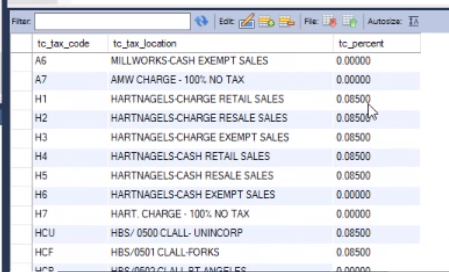
| select tc_tax_code, tc_tax_location, tc_percent from TC |
- No separations between sales order headers and Sales Order lines
- If a customer wants historical order information you would need to import the data from another table
select *
from dw_sls_item_dtl
order by
  dwsi_transaction_date desc,
  dwsi_transaction
- Orders with Items
select
  dwsi_transaction,
  dwsi_reference_no,
  dwsi_customer,
  dwsi_item,
  dwsi_d_p_percent_amt,
  dwsi_qty_selling_units,
  dwsi_qty_pricing_units,
  dwsi_qty_stocking_units,
  dwsi_decimal_placement
from dw_sls_item_dtl
order by
  dwsi_transaction_date desc,
  dwsi_transaction


retail price = in_retail_price * (10 ^ -(in_pricing_dec_place)) * in_price_stk_factor
- In the inventory table, if you see a value for anything pricing in inventory decimal place or price stock factor, make the client do the math
- for prices: if in_pricing_dec_place = 0 and in_price_stk_factor = 1 then the price listed is the actual price per product
- if in_price_stk_factor isn't 1, or price_dec_place isn't 0, math is involved
- refer to the formula or ask the client for help.
- Connect generates the text file for each sales order. It is ftp'd to a location that Epicor Eagle can read. Epicor Eagle reads in the file.
- We don’t send the text file directly into Epicor. Once the sales order is exported into the correct folder, it’s up to the client to import it into Epicor Eagle