¶ Additional Documentation
EDI Integration Documentation.md
- https://www.arcesb.com/resources/edi/x12.rst
- https://www.amazon.com/Demystifying-EDI-Russell-Stultz/dp/1556227086
- https://www.amazon.com/EDI-Its-Role-Commerce/dp/1882419162/ref=sr_1_1?dchild=1&qid=1635785087&qsid=133-3288046-7076055&refinements=p_27%3ANahid+Jilovec&s=books&sr=1-1&sres=1882419162%2C1884322182%2C1583041176%2C1583040668&text=Nahid+Jilovec
- https://www.1edisource.com/resources/edi-transactions-sets/
¶ EDI
- Electronic Data Interchange- Developed in the late 70’s to build an architecture for a standard to interchange data and documents
- EDI has smaller file sizes the xml
- X12 is an alias for EDI (Same standard)
¶ Authentication
- Authentication is restricted to the surrounding technology
- The ability to encrypt or decrypt the actual EDI documents relies on
¶ EDI Groups
- Functional Group
- Transaction Set-
- Beta Elements-
- Transactional Group-
- Segments
- Each Field has a Header
- Each Value is delimited by the delimiter (Usually an asterisk)
- Each Field has a Header
- Segments
¶ EDI 101 Overview
¶ EDI Documents Definition
The Accredited Standards Committee X12 is a standards organization. Chartered by the American National Standards Institute in 1979, it develops and maintains the X12 Electronic data interchange and Context Inspired Component Architecture standards along with XML schemas which drive business processes globally. X12 defines and maintains transaction sets that establish the data content exchanged for specific business purposes. Transaction sets are identified by a numeric identifier and a name. Each transaction set is maintained by a subcommittee operating within X12’s Accredited Standards Committee.
X12 standard is used by hundreds of businesses in supply chain and other industries. Some of the most popular messages are 850, 810, 856, etc.
Earl Owen Co. will not be supporting all supply chain standard EDI documents. Below is a list of EDI documents that are supported by Earl Owen Co. or could be supported in the future.
- · EDI 846 - Inventory Inquiry
- · EDI 850 - Purchase Order
- · EDI 855 - Order Acknowledgement – sent in response to EDI 850 to confirm the receipt of the purchase order from the buyer
- · EDI 856 - Advance Ship Notice is to describe the transfer of shipment and tracking delivery information
- · EDI 810 - Invoice (electronic version of the paper invoice
- · EDI 997 - Functional Acknowledgment
- · EDI 820 - Payment or Order Remittance (requested by Turn5)
- EDI 860 - Order Change Request – used by buyers to request a change to a purchase order submitted previously and is primarily used when a supplier wants to communicate updates to an open order
- EDI 832 - Price/Sales Catalog
- EDI 830 - Planning Schedule with Release Capability
- EDI 870 - Order Status Report
¶ General EDI X12 4010 Standards
¶ X12 Terminology
¶ Interchange
A group of data consisting of three components: an Interchange Control Header, a series of functional groups, and an Interchange Control Trailer. The Interchange Control Header and Interchange Control Trailer encloses the series of functional groups. An interchange can be thought of as a large envelope from your trading partner. Inside that envelope are individual, smaller EDI mail envelopes.
¶ Transaction Set and Message
The terms transaction set and message mean essentially the same thing. The differences are found in the details of their structure. Both transaction sets and messages can be defined as follows: a collection of business-related data called segments that are exchanged between two trading partners. Each segment in a collection is followed by a segment terminator.
¶ Segment
A segment is a logical grouping of data elements or a collection of elements that has a segment identifier, followed by one or more data elements. Between each data element is a data element separator. In X12, the same segment can be used for different purposes. This means that a field’s meaning can change based on the segment.
¶ Segment Identifier (ANSI ASC X12)
A code that uniquely identifies a segment as specified in the appropriate segment directory. For example, the ANSI ASC X12 Invoice Name segment identifier is “N1.”
The data element is the smallest named unit of information in the X12 standard. Data elements can be broken down into types. The distinction between the types is strictly a matter of how they are used. The types are
¶ Element
A unit of information within a segment.
¶ Data Element
The smallest unit of information in a transaction set or message for the X12 Standard. It is like a field in a database. The elements contain the actual data. They consist of qualifiers and values.

¶ Simple Data element
if a data element occurs in a segment outside the defined boundaries of a composite data structure, it is called a simple data element.
¶ Composite Data Element
A collection of two or more data elements. If a data element occurs as an ordinally positioned member of a composite data structure, it is called a composite data element. A telephone number is a simple example of a composite. It has a three-digit area code, which must precede the three-digit central office code, which must precede the final four digits.
Each data element has a unique reference number, and it also has a name, description, data type, and minimum and maximum length.
¶ Element Delimiter
The data element delimiter is a special character that separates the data elements.
In an X12 message, the various delimiters are part of the syntax, dividing up the different elements of a message. The delimiters used in a message are defined in the interchange control header, the outermost layer enveloping the message.
For this reason, there is flexibility in the delimiters that are used. No suggested delimiters are recommended as part of the X12 standards, but the industry-specific implementation guides do have recommended delimiters
¶ Data Element Separator (or EDI delimiters)
A character used to separate elements in a segment.
EDI separators are used to separate the different EDI items from one another. It is imperative that a valid set of delimiters is used, and the various types of delimiters are placed at the correct position within an EDI file.
+---------------------------------------------------------------------------+
|If not otherwise agreed the default separators per standard are defined as:|
+---------------------------------------------------------------------------+
|+--------+---------+-------+----------+-------+-------+ |
||EDI |Component|Data |Repetition|Segment|Sub | |
|| | | | | | | |
||Standard| |Element| | |Element| |
|+--------+---------+-------+----------+-------+-------+ |
||X12 |> |* |^ |~ |: | |
|+--------+---------+-------+----------+-------+-------+ |
+---------------------------------------------------------------------------+
Note: It is important to note that errors could result if the transmitted data includes any of the characters that have been defined as delimiters. Specifically, the existence of asterisks within transmitted application data is a known issue in X12 and can cause problems with translation.
¶ Sub-element Separator
A character used to separate the data elements of an ANSI ASC X12 composite data element. Currently, sub-element separators are reserved for future use.
¶ Segment Terminator
These are the special characters appearing at the end of a segment to indicate the termination of the segment (i.e., ~). Usually not a printable character in ANSI ASC X12. The character can be defined by the customer and can be any character as long as they only appear as the segment terminator to avoid breaking the translation or parsing of the data.
¶ Envelope
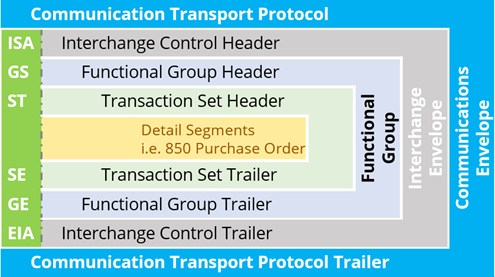
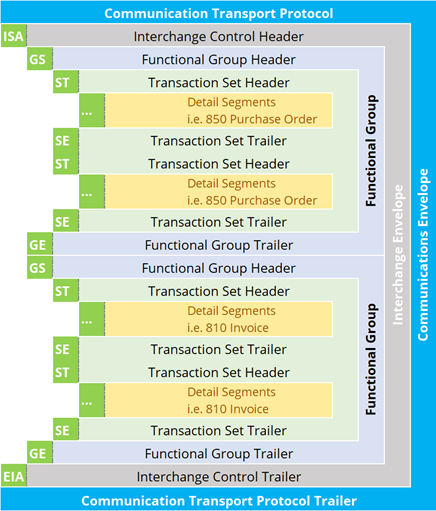
The control information, such as identifiers and addresses, that surrounds data. The data is bound together by header and trailer information. EDI Envelope - EDI files are a combination of transactions (or messages, or business data) wrapped up in functional groups, which are themselves wrapped up in interchange envelopes. Three levels of nesting. See X12 Interchange Control Structure for more details
| EDI Standard | Interchange Header | Group Header | Message Header | Message Trailer | Group Trailer | Interchange Trailer |
|---|---|---|---|---|---|---|
| X12 | ISA | GS | ST | SE | GE | IEA |
¶ Qualifier
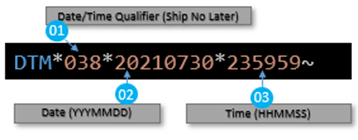
A qualifier is sometimes used to indicate what the values in the data elements are. In the following example DTM01 = 038 which means “Ship No Later”. The shipment would need to be shipped by midnight on 07/30/2021. Autoanything uses code 038.
¶ Loops
Loops are used to combine similar segments together; usually loops contain a parent-child relationship. For example, the N1 segment loops here twice. The first portion contains the Vendor’s address information with child segments of N3 and N4 that contain the vendors address. The second portion contains the Ship To Store address with child segments of N3 and N4 that contain the vendors address. Loops are sets of repeating ordered segments. In X12 you can locate elements by specifying:
- Transaction Set
- Loop, for example “PO loop”
- Occurrence of the loop
- Segment, for example BGN
- Field number, for example 01
- Occurrence of the segment (if it is a repeating segment)
PO1*1*1*EA*282.65**SK*BDRILQ15SCK~
PO1*2*2*EA*54.49**SK*KAN60-1030~
¶ X12 Interchange Control Structure
Trading partners send data in a very specific format called the Interchange Control Structure. There are three basic levels of ASC X12 envelopes:
- The interchange envelope
- The functional group envelope
- The transaction set envelope
The outermost envelope of EDI data is the interchange. An interchange consists of three components:
- ISA Header segment
- A series of functional group
- IEA Trailer segment.
Header and Trailer segments contain sender and receiver addresses. They envelope the series of functional groups.
¶ X12 Envelope Control Number Validation
This is to ensure proper start and end of each envelope is mapped to each individual EDI document.
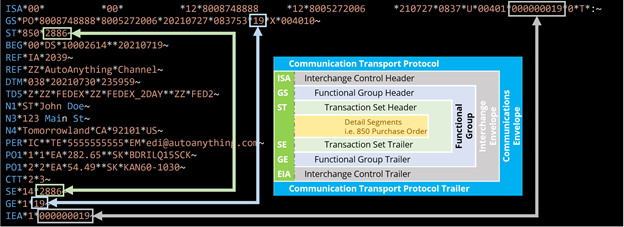
The below elements must match as aligned:
+-------------------------------------------+
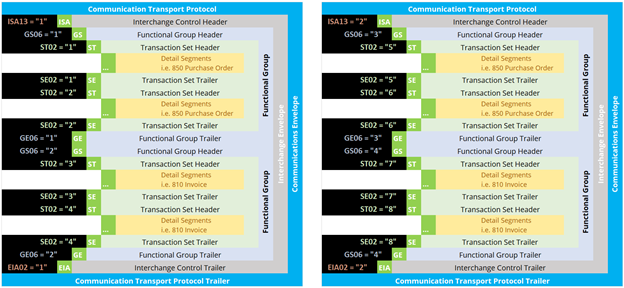
|- ISA13 (Header) must match IEA02 (Trailer)|
|- GS06 (Header) must match GE02 (Trailer) |
|- ST02 (Header) must match SE02 (Trailer) |
+-------------------------------------------+
¶ The control protocol
| when you send interchanges to a trading partner, the interchange envelope has a control number that is used to uniquely identify the interchange. That control number is an integer that typically increments by one each time you send an interchange to that particular partner. |
|---|
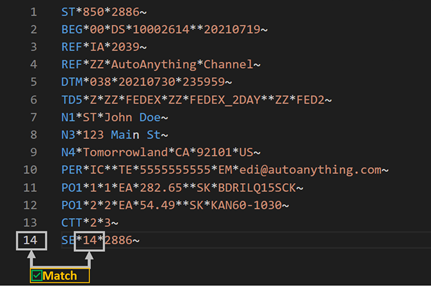
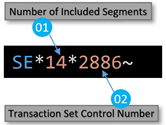
| The SE01 value should be the number of segments from ST to SE inclusive |
To pass proper EDI X12 validation:
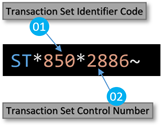
- The ST02 is the transaction Set Control Number and should be matching the SE02 on the SE (Trailer or Closing Envelope).
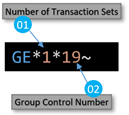
- The GE01 value is the number of transaction sets Included in this Function Group
- i.e. GE01 = 5, if five purchase orders are included on the same envelope
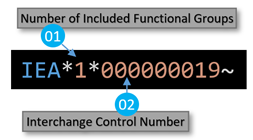
- The IEA01 is the number of functional groups included on the envelope
- i.e. IEA01 = 2, if 850(s) and 810(s) documents are included on the same envelope
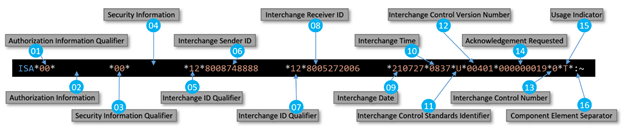
ISA11 Interchange Control Standards Identifier is default to “U” as it means the EDI standard is using U.S. X12 standard
ISA12 Interchange Control Version Number is default to “00401” which is the X12 version, in some cases referred to 4.01 or 4010.
¶ X12 850 Document Breakdown
The EDI 850 document is a Purchase Order document from Autoanything with two Stock Codes
Note: First line (ISA) is wrapped as it is 106 characters and didn’t fit, without making the font smaller
ISA*00*          *00*          *12*8008748888     *12*8005272006     *210727*0837*U*00401*000000019*0*T*:~
GS*PO*8008748888*8005272006*20210727*083753*19*X*004010~
ST*850*2886~
BEG*00*DS*10002614**20210719~
REF*IA*2039~
REF*ZZ*AutoAnything*Channel~
DTM*038*20210730*235959~
TD5*Z*ZZ*FEDEX*ZZ*FEDEX_2DAY**ZZ*FED2~
N1*ST*John Doe~
N3*123 Main St~
N4*Tomorrowland*CA*92101*US~
PER*IC**TE*5555555555*EM*edi@autoanything.com~
PO1*1*1*EA*282.65**SK*BDRILQ15SCK~
PO1*2*2*EA*54.49**SK*KAN60-1030~
CTT*2*3~
SE*14*2886~
GE*1*19~
IEA*1*000000019~
Each segment is conformed with a consistent pattern of elements between the segment name and the segment separator.
All separators are defined in the ISA interchange header. ISA is positional and contains 106 characters. The first 3 are the segment tag 'ISA' and immediately after (4th character) is the data element separator. The last two characters in the ISA are the component data element separator and the segment separator. Sometimes segments can be postfixed and things such as CR\LF can appear at the end of each segment.
At position 106 in the ISA element is always the segment separator (~) in EDI X12 version 4010 (also known as 4.01 or 00401)

¶ ISA and ISA
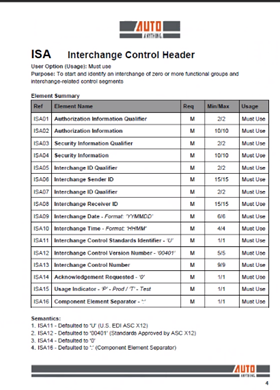
The ISA is the Interchange Control Header
This is the beginning segment of almost all EDI documents. This is the outermost envelope, all of the EDI data is placed within this layer. The purpose of this segment is to identify the sender and receiver, date, time and control number information. This segment must match the IEA trailer segment.
Below is the ISA Segment breakdown into each element from ISA01 to ISA16
IEA is the trailer of the ISA
Note: the ISA14 and the IEA02 must match
¶ GS and GE
GS is the Group Header or Functional Group. Functional groups combine messages of the same type (group of invoices or group of purchase orders but not both) and of the same version. They are logical containers and are mandatory for X12

Functional Group Trailer – Group Control Number GS06 and GE02 should be the same
¶ ST and SE
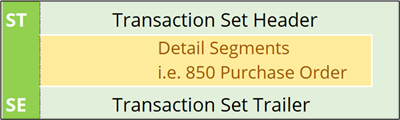
Transaction Set Envelopes (ST/SE)
Each Transaction Set also known as a transaction contains:
- Transaction Set Header (designated ST)
- Transaction Set Trailer (designated SE)
Everything between the ST and SE is the Message or Detail Segment
ST*850*2886~
BEG*00*DS*10002614**20210719~
REF*IA*2039~
REF*ZZ*AutoAnything*Channel~
DTM*038*20210730*235959~
TD5*Z*ZZ*FEDEX*ZZ*FEDEX_2DAY**ZZ*FED2~
N1*ST*John Doe~
N3*123 Main St~
N4*Tomorrowland*CA*92101*US~
PER*IC**TE*5555555555*EM*edi@autoanything.com~
PO1*1*1*EA*282.65**SK*BDRILQ15SCK~
PO1*2*2*EA*54.49**SK*KAN60-1030~
CTT*2*3~
SE*14*2886~
Single message, enveloped within the header and footer
A Transaction Set has a three-digit code, a text title, and a two-letter code, for example, 850, Purchase Order (PO).
The Transaction Set is composed of logically related data grouped into units called segments. For example, one segment used in the Transaction Set might convey the address: city, state, postal code, and other geographical information. A Transaction Set will contain multiple segments. For example, the address segment might be used repeatedly to convey multiple sets of address information.
The X12 standard defines the sequence of segments in the Transaction Set and also the sequence of elements within each segment. The relationship between segments and elements can be compared to the relationship between records and fields in a database environment.
The ST01 shows the document number, 850 (Purchase Order) in this case.
¶ REF
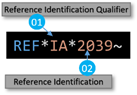
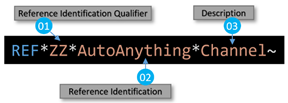
Are composite data elements or set of sub-elements that represent a single named item. Thinking of them as a set of child elements of a regular data element can be helpful. They have a purpose to specify identifying information.
¶ DTM
Segment DTM is Date/Time Reference to specify pertinent dates and times.
Note: Autoanything selected to use code “038” (Ship No Later) for the 850 as shown on the DTM01 below.
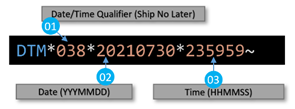
On the DTM Segment, the first date that has one of the listed qualifiers in the DTM01 field is captured as the estimated ship date. The estimated ship date is used to determine if a shipment is going to be late. These are the codes that are used to qualify estimated ship dates:
+----------+-----------------------------------------------+
|Code|Definition |
| | |
|
|
|
+----------+-----------------------------------------------+
|038 |Ship no later than |
| | |
|
|
|
+----------+-----------------------------------------------+
|039 |Ship week of |
| | |
|
|
|
+----------+-----------------------------------------------+
|066 |First scheduled ship |
| | |
|
|
|
+----------+-----------------------------------------------+
|068 |Current scheduled ship |
| | |
|
|
|
+----------+-----------------------------------------------+
|079 |Promised for shipment |
| | |
|
|
|
+----------+-----------------------------------------------+
|083 |Scheduled for shipment (prior to and including)|
| | |
|
|
|
+----------+-----------------------------------------------+
|085 |Promised for shipment (prior to and including) |
| | |
|
|
|
+----------+-----------------------------------------------+
|086 |Scheduled for shipment (week of) |
| | |
|
|
|
+----------+-----------------------------------------------+
|088 |Promised for shipment (week of) |
| | |
|
|
|
+----------+-----------------------------------------------+
|110 |Originally scheduled ship |
| | |
|
|
|
+----------+-----------------------------------------------+
|175 |Cancel if not shipped by |
| | |
|
|
|
+----------+-----------------------------------------------+
The first date that has one of the listed qualifiers in the DTM01 field is captured as the delivery date. The delivery date is used to determine when a shipment missed its delivery window. These are the codes that are used to qualify delivery dates:
+----------+-----------------------------------------------+
|Code|Definition |
| | |
|
|
|
+----------+-----------------------------------------------+
|001 |Cancel after |
| | |
|
|
|
+----------+-----------------------------------------------+
|002 |Delivery requested |
| | |
|
|
|
+----------+-----------------------------------------------+
|061 |Cancel if not delivered by |
| | |
|
|
|
+----------+-----------------------------------------------+
|063 |Do not deliver after |
| | |
|
|
|
+----------+-----------------------------------------------+
|071 |Requested for delivery (after and including) |
| | |
|
|
|
+----------+-----------------------------------------------+
|074 |Requested for delivery (prior to and including)|
| | |
|
|
|
+----------+-----------------------------------------------+
|106 |Required by |
| | |
|
|
|
+----------+-----------------------------------------------+
|996 |Required delivery |
| | |
|
|
|
+----------+-----------------------------------------------+
Example of displaying the code in the DTM segment:
| Code | Definition | Example |
|---|---|---|
| 038 | Ship No Later | DTM*038*20210801 |
| 011 | Date Shipped | DTM*011*20210729 |
| 106 | Required By Date | DTM*106*20210731 |
| ZZZ | Mutually Defined | DTM*ZZZ*20210601 |
¶ X12 4010 Documents Definition
¶ 846 – Inventory Inquiry
The EDI 846 transaction set is an electronic version of a paper Inventory Inquiry/Advice that complies with the ANSI X12 EDI specification. EDI 846 Inventory Inquiry/Advice is used by the supplier to notify a purchaser about stock status and availability. This EDI message is to exchange information about amount of goods currently on hand in various inventory holding locations, such as distribution centers, outlets and warehouses etc. It is used to communicate about inventory between manufactures, suppliers and resellers. EDI 846 is important mainly due to the increase of drop shipping business and e-commerce, which requires up-to-the-minute inventory updates.
EDI 846 Inventory Inquiry/Advice Key Data:
- Identifying number
- Inventory date
- Product item identifiers/services such as UPC/EAN/GTIN needed with their respective quantities
- Out of stock items and restock dates
- Products that have been discontinued
- Discontinued products
- Supplier warehouse locations with on hand amounts by item
- Vendor number
- Additional item identifiers such as buyer item number and vendor part number
- Item description
¶ 850 – Purchase Order
The EDI 850 Purchase Order is an electronic version of a paper purchase order transaction set. The EDI 850 is sometimes also referred to as "PO". It is used by buyers to place an order for goods or services from a supplier. The supplier sends a 997 functional acknowledgment back to the buyer to confirm the receipt of the EDI 850 Purchase Order. Buyers then send an EDI 855 Purchase Order Acknowledgement to the supplier to confirm the requirements in the purchase order.
EDI 850 Purchase Order Key Data:
- Purchase order number & date
- Shipping details & instructions
- Item brand names, SKUs, or model numbers
- Payment terms, such as on delivery or in 30 days
- Carrier details
- Additional data that may be included in the EDI 850
- Item Price and Quantity
- Name & Address of the Buyer
- Name & Address of the Supplier
- Any additional terms for the sale, such as discounts, etc.
- Billing address
- Delivery date
- Price per unit
¶ 855 – Purchase Order Acknowledgement
An EDI 855 Purchase Order is an electronic version of a paper Purchase Order Acknowledgement that complies with the ANSI X12 EDI specifications. It is used by sellers to confirm receipt, reject, or request modification of a purchase order (EDI 850) back to the buyer. The buyer then knows that supplier will be filling the order and shipping the goods by the date as requested.
EDI 855 Purchase Order Key Data:
- Purchase order number & Date
- Shipping & delivery Details & instructions
- Item/Service Identifiers (UPC/EAN/GTIN)
- Order and item status (i.e. accepted, rejected, or backordered)
Additional data that may be included in the EDI 855 pertains to:
- Item Price and Quantity
- Name & Address of the Buyer
- Name & Address of the Supplier
- Any additional terms for the sale, such as discounts, etc.
¶ 856 – Advice Shipping
An EDI 856 transaction is also known as an Advance Shipping Notice or ASN or Manifest. It is used to electronically exchange the contents of a printed packing slip between commercial trading partners. A supplier sends an ASN in advance to inform the trading partner that shipment is on the way so that trading partner can make arrangements to receive the merchandize. Suppliers requiring ASNs may also require GS1-128 barcode labels. The barcode label works in conjunction with EDI 856 and contains the supplier's vendor, carton and ASN number.
EDI 856 Advance Ship Notice Key Data:
- Purchase Order (EDI 850) information
- Shipping Package information such as carton barcodes printed
- Ship notice number
- Pallets Information
- Shipment Moving Information (ship to, ship from)
- Shipment Tracking Information
\
Additional data that may be included in the EDI 856 pertains to:
- Product Description
- Product Quantity Information
- Packaging Types Information
- Ship Delivery Date
- Carrier Reference Information
¶ 810 – Invoice
An EDI 810 document is an electronic version of a paper invoice or bill that complies with the ANSI X12 EDI specification. A supplier will send an EDI 810 invoice to a distributor in response to an EDI 850 (Purchase Order) as a request for payment of goods or services once they are shipped or provided
EDI 810 Invoice Key Data:
Each EDI 810 Invoice document contains segments and data elements. Each segment contains at least one data element. Each data element is a data field. Examples of data elements are:
- Invoice number and date
- Purchase order number
- Payment terms
- Item information, including UPC/EAN/GTIN, as well as their quantities and price
- Shipping details
Additional data that may be included in the invoice pertains to:
-
Carrier and service levels
-
Invoice terms
-
Ship to and remit to locations
-
Vendor number
-
Charges and/or allowances
-
Buyer item number
-
Address information
-
997 – Functional Acknowledgement
An EDI 997 document is an electronic version a paper Functional Acknowledgement that complies with the ANSI X12 EDI specification. The EDI 997 Functional Acknowledgment document is sent as a response to an EDI 850 Purchase Order, EDI 810 Invoice, or any other transaction set received and was processed by the recipient. It does not indicate whether the trading partner accepted the contents of the transaction or the transaction meets business needs. In some instances, EDI 997 may indicate an acceptance or rejection notification. It may be rejected if it contains wrong data, missing required data or violates character length limit.
EDI 997 Functional Acknowledgement Key Data
-
AK1 – Functional Group Response Header (Group Acknowledgment)
-
AK2 – Transaction Set Header (Document Acknowledgment)
-
AK3 – Data Segment Note (Reports errors in specific segments of the document received)
-
AK4 – Data Element Note (Reports errors in specific elements of the document received)
-
AK5 – Transaction Set Response Trailer (Type of Acknowledgement)
-
AK9 – Functional Group Response Trailer (Group Response)
¶ 820 – Payment or Order Remittance
An 820 EDI document is an electronic version of a paper Payment Order/Remittance Advice that complies with the ANSI X12 EDI specification. The 820 EDI document can be used to initiate payments and send remittance information between Trading Partners and Suppliers. 820 Payment Order/Remittance Advice is sent by a buyer to a supplier after an 810 Invoice is received, especially when the mode of payment is Electronic Funds Transfer. By automating the EDI 820 document, businesses can streamline the supply chain, free up resources and reduces human error caused by manually re-key the information.
EDI 820 Order/Remittance Advice Key Data
- Supplier/Buyer identification
- Bank & Account identification
- invoice number & adjustments information
- Billed and Paid Amounts
¶ 832 – Price/Sales Catalog
An EDI 832 document is an electronic version of a paper Price/Sales Catalog that complies with the ANSI X12 EDI specification. The 832 EDI document type is used by suppliers/manufacturers to provide product information and prices in a catalog to retailers, distributors, dealers, trading partners. Instead of a paper catalog which needs to be reprinted for every update, EDI 832 can be updated in real-time and provides accurate catalog information to streamline the trade between buyer and supplier. The 832 document has four major functions: UPC catalog operation, a traditional vendor catalog, item setup and maintenance, and sales price communication. The recipient of an 832 Price/Sales Catalog will send a 997 Functional Acknowledgement in response, indicating that the 832 was successfully received.
\
EDI 832 Price/Sales Catalog Key Data:
Seller contact Details: name, phone number with address
- Terms of sale
- Product pricing information and taxation detail
- Product packaging type details
- Product description details
- Product physical details
- Product identifiers such as UPC/EAN/GTIN
- Product quantity and unit of measure
¶ 830 – Planning Schedule with Release Capability
The EDI 830 transaction set is an electronic version of a paper planning schedule that complies with the ANSI X12 EDI specification primarily in the manufacturing industry. EDI 830 Planning Schedule with Release Capability transaction set is used to provide information regarding a projected schedule for an order and/or the commitment of materials on the part of the supplier. In electronic data interchange, the 830 document is essentially an electronic sales forecast. This document can be used in several different ways: as a simple forecast, as a forecast with the trading partner’s authorization for the seller to commit to future resources like material or labor, or as a forecast that can also be used as a mechanism of order release, containing elements like resource authorizations, specific shipment patterns, and period-to-date quantities which have been cumulated
EDI 830 transaction set can be used in one of three ways:
- A basic forecast
- A forecast with buyer's authorization for the recipient to commit to resources
- Aa forecast that also includes order release mechanism
¶ 860 – Purchase Order Change Request
The EDI 860 transaction set is an electronic version of a paper Purchase Order Change Request that complies with the ANSI X12 EDI specification. The 860 EDI document contains the format and establishes the data contents relating to a purchase order change – Buyer Initiated EDI 860 for use within the context of an EDI environment. It is used by buyers to request purchase order changes (EDI 850) they previously submitted, or by a buyer to confirm acceptance of changes made by the seller to a purchase order, or by mutual agreement of the two parties. The buyer will send the EDI 860 Purchase Order Change Request, and the seller will send back an EDI 865 Purchase Order Acknowledgement with Change in response.
\
Common Requested Changes in an EDI 860:
- Add or change items
- Change items or quantity
- Change dates or Price
- Reschedule dates for items
- EDI 860 Purchase Order Change Request Key Data:
- Purchase order number
- Purchase order date
- Type of order change
- Item/Service Identifiers (UPC/EAN/GTIN)
- Item Price and Quantity
- Item additions and/or deletions
- Any additional terms for the sale, such as discounts, etc.
¶ 870 – Order Status Report
The EDI 870 transaction set is an electronic version of a paper Order Status report that complies with the ANSI X12 EDI specification. It is used by the vendor or supplier as a response to an EDI 869 Order Status Inquiry provided by a trading partner and reports the current status of the 850 Purchase Order in question. The 870 Order Status Report can be used to report on the status about the requirement forecast, entire purchase order, selected items/products/services of a purchase order. This transaction set can be used to update the current status of requisitions or to update the supplier’s scheduled shipment.
EDI 870 Order Status Report Key Data:
- Vendor or supplier information
- Item description (SKU, Quantity, Price etc.)
- Purchase order status report
- Number of the specific purchase order in question
- Additional status details of an order
¶ Connector
¶ Create Document Entities from Document Standards
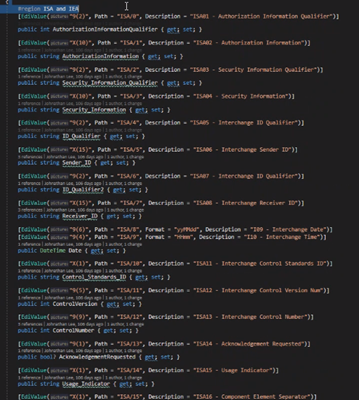
- First map fields from Customer documentation
- You can name properties whatever you want, as long as the Paths match up to the documentation
- Biggest thing that the jobs does is
- Use the EDI service to serialize the entity into the document we created
- Using the mappers to map the data from one entity to another
- Uses Sypro or Epicor to submit that data into the system
- Also the reverse which is the exact opposite
- Only difference is that inside the mapping you are creating an empty EDI value and assigning the values
- Also the reverse which is the exact opposite
- All the job is doing, is using the EDI service to list the documents
- The EDI service has a default method of serializing documents into document classes that we had set up
- Whatever your connecting to, use the translations.
- It will take the items in the document based on entity we set up and will call the mapping methods
¶ ISA/Header
- ISA’s are standardized across documents. Will rarely be customized.
- This is similar to the header/footer envelopes in an XML file.
¶ Body
- The body of the document is highly customized based off of client needs.
- Will need to review their specifications and ensure that the properties all match up exactly.
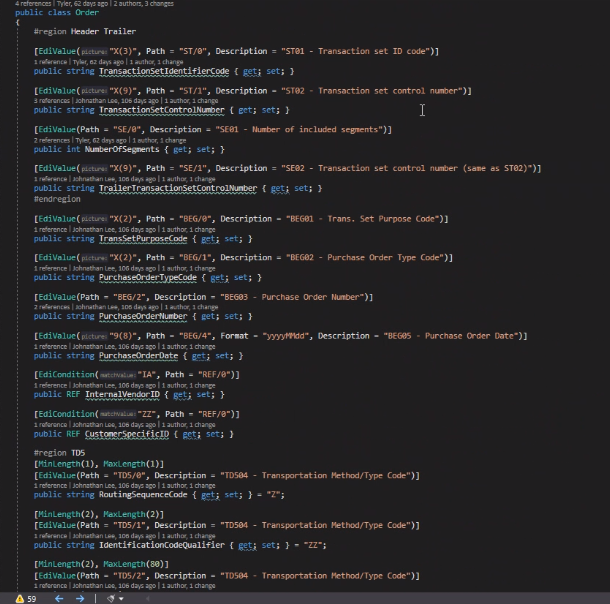
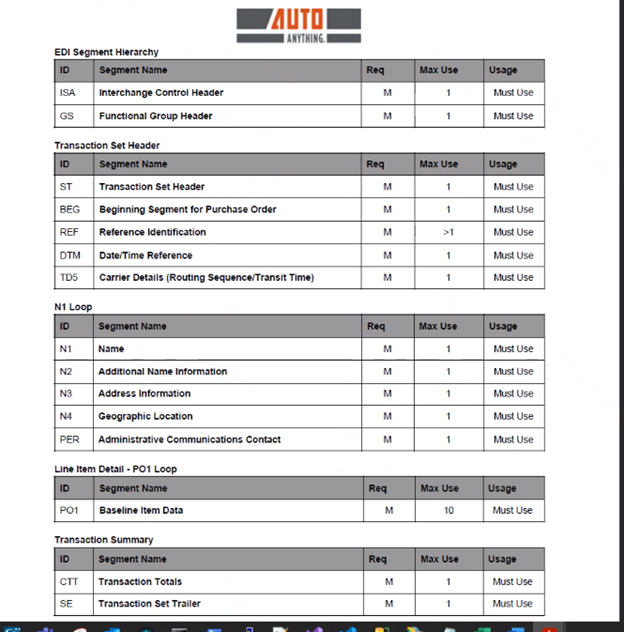
List of all the segments that are going to be involved with the groups
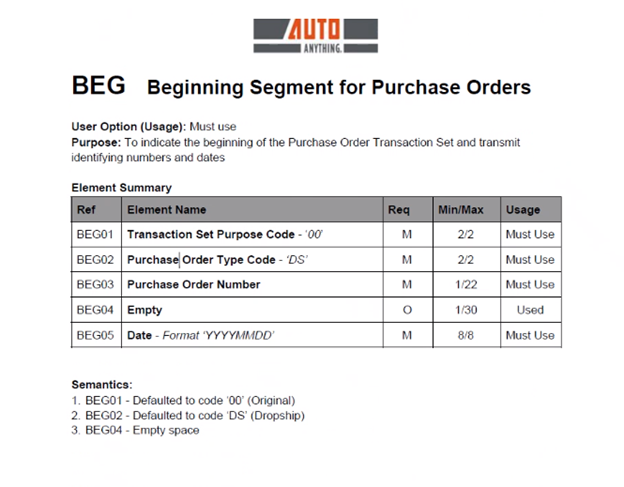
- Details of what goes into each section
- This is what you will see as a reference for the path
- These paths will be the same for each document
¶ Setting Up a Job
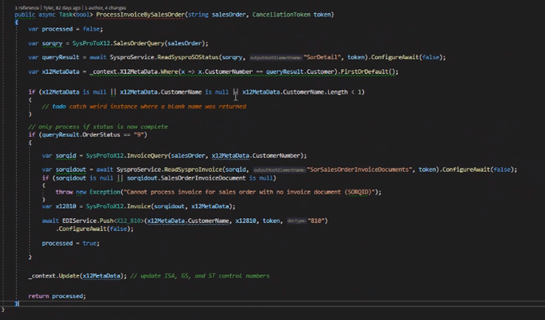
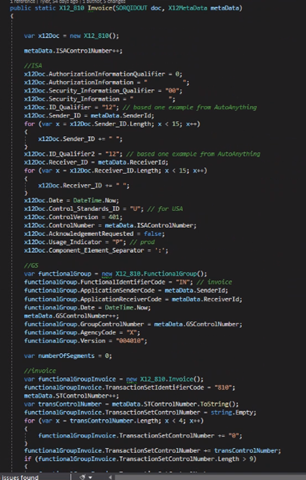
- Write the properties to the document and then use the Push method to send.