- Tools: Azure
- Sphere: Development
- Cadence: Weekly
Ensure that all pertinent information is present on all tasks in the current sprint.
¶ User Story
If a User Story level work item is incomplete, it will be Orange.
Azure Color Key:
- Sage Green – Normal
- Kelly Green – High priority
- Light Blue - Critical
- Neon Blue w/ Red text – Critical and Urgent
- Orange – Something is missing
- Pink – Blocked
- Grey - Closed
¶ State
- New- No work has been started on this User Story
- QA Failed: Work was completed on this user story, but it did not Pass QA.
- In Development: Any work has been started on this User Story.
- Code Complete: The work for this user story has been completed, but it has not been deployed to a testable environment.
- Deployed to QA: the work has been completed for this User Story, and the finished Code has been sent to a QA Environment, the Developer has personally tested it on that environment, and the work is ready for a QA Engineer to test.
- In QA: The QA engineer is actively testing this piece of work.
- Passed QA: The QA engineer has deemed this piece of work to be behaving according to acceptance criteria, and the work item is ready to be deployed to its final environment.
- Deployed to UAT: This item of work has been deployed to UAT and has been tested in this new environment by either the PM, QA Engineer, or Developer to ensure that it is ready for client approval.
- Client Approved: The client has signed off on this piece of work. Rarely will this be done on a User Story level, rather the client will sign off on the entirety of the Feature.
- Deployed to PRD: The piece of work has been deployed to the Production server and is ready to be closed.
- Closed: This piece of work is fully completed.
- Removed: This piece of work is no longer needed.
¶ Additional Data Fields Required to Complete:
Area Path: Ensuring that the Area Path for the User Story is under the correct project.
Tag: Ensure that the Tag is set also - as this provides an additional layer of association.
EP Line Item: Add the EP line item that the developer will be associated with in EP to the ticket to eliminate the need for reallocation
Project Manager: Ensure that the proper Project Manager is associated to the User Story.
Story Points: Ensure that the total Story Points for the user story level work item match the estimate for the whole of the User Story level work item. If a User story level work item does not have any "Story Points" associated with it, you will need to check the total estimate for that User Story and add it to that field.
- If the User Story has associated tasks with it already, enter the user story, and look for "Related Work".
- Open each Task related to that User Story and add the total of the "Original Estimate" on each Task.
- That value will be the number of Story Points for that User Story.
¶ Full Priority:
For any priority over 4-Normal, the Developer should know the timeline expectation for this Priority.
- 1- Critical and Urgent: The Developer must drop EVERYTHING they are doing and complete this work. No meetings, no other distractions. The PM must relay the importance of this Task with the Developer prior to giving it this Priority. No Developer can have more than 1 task of this level of importance.
- This work may need to have a related SLA or other business cleared reasoning for this Priority.
- 2- Critical: If possible, this Task is completed before the end of the day. A developer may not have more than 2 tasks with this Priority.
- 3- High: This work is important for the project to continue, you may be blocking other work, or there may be a project deadline looming. This work is completed prior to all "4-Normal" priority tasks.
- 4- Normal: This is the standard; this is work as it is completed.
- 5- Low: This should not be in the sprint, any work below a "4-Normal" priority will be placed in the backlog.
- 6- Long Term Goal: These are work items that have been de-scoped for the initial project.
- 7- Deferred Bug: This Priority is for noted bugs found by the QA team. These are bugs that we are accepting for the project.
¶ Blocked:
A user story level item with the "Blocked" set to "Yes" can not be worked on.
This may be due to another piece of work that needs to be completed first, a training session requirement, information from the client, network issues, etc.
Any work that can not be worked on immediately, should be blocked.
For a block on a User Story to exist, there must ALSO be an impediment associated to the User Story.
- To create an impediment, click on the green "+" square underneath the Task level associated with the blocked User Story and select "Impediment"
- Naming an impediment: "{Project Acronym} [Issue in under 5 words]"
- Assign the Impediment to the Developer who is impeded.
- Describe the Impediment more thoroughly within the Impediment using the description field.
Iteration Path: This is the active iteration path that the user story is on. If you move a user story to a sprint, you may possibly move ALL associated tasks with it.
CEF Version: This is the version of CEF that the project is working on. If you do not know this, check with your development team.
¶ Task Compliance
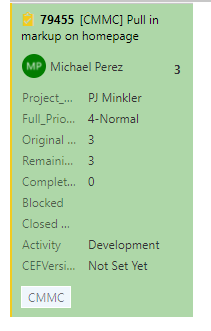
Title: "[Project Acronym] "Description of task in short form""
-
Do not make the title too long, the Developer must have a quick understanding of the general scope of what the Task is for.
-
Project Manager: The related PM to the project.
Priority: Matching the Priority of the User Story
Original Estimate: This is the original estimate for the Task. This number is NEVER changed.
Remaining Work: The real amount of work that is remaining. This number can be higher than the Original Estimate, and can/should be changed by the Developer working on the Task, with approval from the PM.
-
EX: A task is estimated to take 2hrs to complete, but upon initial investigation the Developer finds the Task to be more complex, they can change the Remaining work to the "actual" needed to complete the work. As long as they inform the PM. The PM will make the ultimate decision if the work is to be completed in that timeframe.
Completed Work: This is the amount of time that has been spent on the Task. If more time than the original Remaining work, and/or the original "Original Estimate" has been spent, that Task has Exceeded Estimations. We would rather this number be the actual time, so that we can determine what a developer is spending time on.
Blocked: A task that is blocked must have an impediment.
Closed Date: Is toggled when the Task is closed.
Activity: Most often will be Development, may be others.
CEFVersion: If it is a CEF project, it will match the CEF version in the User Story. If it is not a CEF project, it should be set to "Not Version Specific" ASK CAROLINE
MONITOR AZURE AND EMAIL FOR CORRESPONDENCE
- Developers and QA will comment on tasks and user stories for information needed when blocking tickets or even to ask for clarification. PMs must respond to these communications as soon as possible by monitoring Azure emails as well as checking tickets for communications.