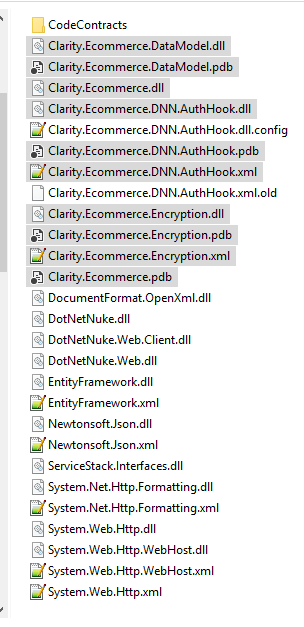
- Check for the latest AuthHook dll's (Compile from Visual Studio)
- Compile the solution
- Open the AuthHook folder and go to bin/debug
- Use V8 for DNN8, the other for DNN 7
- Copy the Clarity.Ecommerce.* files
- Don't copy .config
- Don't copy .xml.old
1
- Paste the files in the DNN Website Bin
- Ensure no Proxy in Service web.config
- Edit the web config, look for proxy and make sure it's either not
there or commented out
- DNN web.config -> Newtonsoft multi-binding
- For DNN 7 sites
- Add the bin2 folder with the NewstonSoft.Json.dll and .xml
from the AuthHook bin/debug directory (NewtonSoft v6)
<dependentAssembly>
<assemblyIdentity name="Newtonsoft.Json" publicKeyToken="30ad4fe6b2a6aeed" />
<codeBase version="4.5.0.0" href="bin\Newtonsoft.Json.dll" />
<codeBase version="6.0.0.0" href="bin2\Newtonsoft.Json.dll" />
</dependentAssembly>
<dependentAssembly>
<assemblyIdentity name="Newtonsoft.Json" publicKeyToken="30ad4fe6b2a6aeed" />
<bindingRedirect oldVersion="0.0.0.0-7.0.0.0" newVersion="7.0.0.0" />
</dependentAssembly>
- Test the /DesktopModules/ClarityEcommerceDNN/API/Token/Get URL
- Run debugger w/all exceptions on (attach to the w3wp.exe process for
the site)
- Pull Latest from source control
- Get Help