¶ Key Terminology
¶ Price Rule vs Price Point
The Price Rule, is a simple table that states the names of the different tiers. It
does not contain any actual price or cost modification rules and serves
as a relationship point.
¶ The Account Price Point
Accounts are assigned a specific price tier which they have access to,
so there would be an Account Price Point record that contains both the
Price Tier's identifier and the Account's identifier.
Note: In a future version, Account Price Point will also include a
global % off value to used in all price calculations for the account.
¶ Product Price Point
The meat of the Tiered Method is handled in the Product Price Points
table. Each Product will be assigned one or more Price Tiers with the
following information:
- The Product Identifier
- The Price Tier Identifier
- The % Markup from the Price Base (from the Simple Method)
- The specific $ amount increased or decreased (can use negative
numbers) against the Price base - A flag determining if the change is % or $ based
- 2 Quantity values, a minimum and a maximum, to specify that this
price point is for a specific volume of units (default 1-2147483647)
¶ Accounts vs Users
Accounts are the overarching element that is associated to one or more users. An Account can have a 1 to 1 or 1 to many relationship with a user, but a user can only have a 1 to 1 association with an account. Users are often also referred to as contacts or account contacts.
¶ Known Integrations
¶ GEM (Connect v?)
- Developers: Greg Deane
- Integrations: Accounts (To), Contacts (To/From), Sales Orders (To/From).
- Current Branches:
?
¶ GRASS (Connect v?)
- Developers: Anonymous User
- Integrations: Accounts (To/From), Addresses (To/From), Products (To), Inventory (To), Pricing (To), Sales Orders (To), Invoices (From).
- Current Branches:
?
¶ CHEM (Connect v3)
- Developers: Austin Gregg, Greg Deane
- Integrations: Accounts (To), Users (To), Products (To), Pricing (To), Inventory (To), Sales Orders (To/From), Invoices (To).
- Current Branches:
?

¶ Authentication
"CefOptions": {
    // Should be the API pool (may need to be created manually)
    "BaseAddress": "https://max-qa.clarityclient.com/DesktopModules/ClarityEcommerce/API/",
    //"BaseAddress": "http://max-local.clarityclient.com/DesktopModules/ClarityEcommerce/API",
    "Username": "ClarityConnect",
    "Password": "adADADASdASdASd",
    "UseSalesOrderPageSize": true,
    "SalesOrderSearchBackDays": 180,
    "SalesOrderPageSize": 500,
    "UseProductPageSize": true,
    "ProductPageSize": 500,
    "ProductSearchBackDays": 180,
    // Added by JFL in MAX
    "CountryCodeRewrites": {
        "UNITED STATES": "USA"
    }
}
¶ Request URI Formation
public async Task<TModel> Create<TModel, TRequest>(TRequest request, CancellationToken token)
            where TModel : class
        {
            if (!(request is CreateRequest<TModel> createRequest)) throw new ArgumentException("Invalid request");
            var requestUri = $"{_httpClient.BaseAddress}/{createRequest.Schema}/{createRequest.Table}/Upsert";
...
if (readRequest.CustomKey != null) { requestUri = $"{_httpClient.BaseAddress}/{readRequest.Schema}/{readRequest.Table}/Key/{HttpUtility.UrlEncode(readRequest.CustomKey)}"; }
            else { requestUri = $"{_httpClient.BaseAddress}/{readRequest.Schema}/{readRequest.Table}/Id/{readRequest.Id}"; }
¶ Logs Page
- Admin:
/Admin/Clarity-Ecommerce-Admin/System/Logs/List - SQL:
System.SystemLog
¶ CRUD Operations
CRUD Nodes
using System.Threading.Tasks;
using C4.Graph;
using C4.Utils;
using Clarity.Ecommerce.Models;

namespace C4.Modules.ESM.CEF20214;

public class Pick<T> : CEFSyncer, IIterNode<Pick<T>.Ins, Pick<T>.Outs, Pick<T>.Flows>
    where T : BaseModel
{
    public record struct Ins(BaseSearchModel? SearchModel);
    public record struct Outs(ulong Index, ulong Count, T? Next) : ITellProgress;
    public record struct Flows(Flow Pre, Flow Loop);

    public bool FullMapping { get; set; }

    public IAsyncEnumerable<(Outs Outs, Flows Flows)> Pump(Ins inputs, NodeContext context)
    {
        // TODO@JL: May need to rework this if count is 0 when flowing from Pre.
        var count = 0ul;
        return List<T>(inputs.SearchModel, new() { FullMapping = FullMapping, CountAvailable = newCount => count = newCount, }, context.Token)
            .Select((res, index) => (
                new Outs((ulong)index, count, res),
                new Flows(Flow.Halt, Flow.Continue)
            ))
            .Prepend((
                new(0, count, null),
                new Flows(Flow.Continue, Flow.Halt)
            ));
    }
}

public class Read<T> : CEFSyncer, IStmtNode<Read<T>.Ins, Read<T>.Outs, Read<T>.Flows>
    where T : BaseModel
{
    public record struct Ins(int? ID, string? Key);
    public record struct Outs(T? Ent);
    public record struct Flows(bool WasFound)
    {
        public Flow Found => WasFound ? Flow.Continue : Flow.Halt;
        public Flow NotFound => !WasFound ? Flow.Continue : Flow.Halt;
    }

    public async Task<(Outs Outs, Flows Flows)> Pump(Ins inputs, NodeContext context)
    {
        var res = await Read<T>((object?)inputs.ID ?? inputs.Key, context.Token);
        return (
            new(res),
            new(res is not null)
        );
    }
}

public class Push<T> : CEFSyncer, IStmtNode<Push<T>.Ins, Push<T>.Outs, Push<T>.Flows>
    where T : BaseModel
{
    public record struct Ins(T Ent);
    public record struct Outs(T UpdatedEnt);
    public record struct Flows(bool WasCreate)
    {
        /// <summary>
        /// Flows only if the entity did not already exist in CEF
        /// </summary>
        public Flow Created => WasCreate ? Flow.Continue : Flow.Halt;
        public Flow Updated => !WasCreate ? Flow.Continue : Flow.Halt;
    }

    public async Task<(Outs Outs, Flows Flows)> Pump(Ins inputs, NodeContext context)
    {
        var wasNew = inputs.Ent.ID is 0 && inputs.Ent.CustomKey?.NullIfWs() is string key && await IDByKey<T>(key, context.Token) is null;

        var res = await Upsert(inputs.Ent, context.Token);
        return (new(res), new(wasNew));
    }
}
¶ Connect Specifics
- By convention, we use the ClarityConnect user
- All entities have:
- ID
- CustomKey
- Active?
- JsonAttributes
- Created/UpdatedDate
- ID
- Most entities need the following to be created:
- Type
- Status
- State (sometimes)
- Type
- There are tables that store all countries and regions. Countries/regions on sales orders must be in those tables
- Products:
- SEOUrl is unique
- Resolve by name by default:
Clarity.Importing.ProductCategories.AllowResolveByName - Appsettings
```sh cd CEF\00.Core\00.Clarity.Ecommerce.RegistryLoader rg <phrase related to what you want>```
¶ Syncing Products Into CEF
The first step would be to retrieve the last time the integration was run from Hangfire using the "GetCompareDate" method from the HangfireJobService class. Then use that date to retrieve remote system records that have been modified since then.
Common pitfalls here are the remote system records not having a last modified field, or the remote system not returning records that are no longer active instead of having an Active flag. In either case you will want to retrieve all records from the remote system to sync into CEF. For inactive products no longer being returned, you can compare the remote system's key fields with the CustomKey in CEF to determine if those products should be set inactive in CEF.
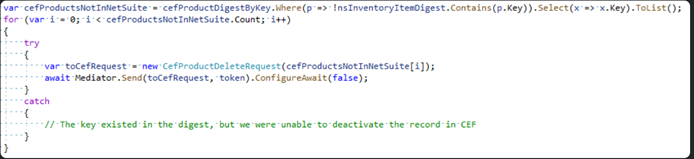
A good way to save time is to break out of the integration method early if there are no modified records found. Do this before spending additional time retrieving digests.
At this point you will want to retrieve ProductDigest from CEF. Performing look-ups against the digest can be improved by placing them into a dictionary indexed by the Product CustomKey. This can result in an exception if there are duplicate keys, but I consider that a feature since we do not want to allow duplicate CustomKeys and that will alert us to the issue.
One reason this can occur is if the key field occurred in the list of records from the remote system multiple times. In this case you will want to make the CustomKey more specific, or work with the client to remove duplicates.
We will also want to retrieve any other digests from CEF that would be applicable to the integration. In this documentation, we are looking at InventoryLocation record so we would also want to retrieve the digest models for that. At this point we will want to ensure that an InventoryLocation record applicable to our Product has been created in CEF. If not, we will then have to create that record in CEF, or throw an error.

Now we're ready to actually start processing records from the remote system. Loop through the product records from the remote system, and retrieve the full product record if only the product key was retrieved earlier. At this point we will want to check if there are any reasons the product shouldn't be synced so we can skip any further processing (For instance if the current record doesn't have a value to map to the Product Name). Additionally it can help to never have to sync non-active records in the remote system into CEF in the first place to save that processing time.

Now that we have the record, we map the remote system product's properties to the CEF ProductModel. This is commonly accomplished by creating an AutoMapper profile to map the remote system record's fields to the CEF Product fields. We will need to ensure at least all required ProductModel fields have been set - This would include Name, CustomKey, SeoUrl, TypeKey, StatusKey, and PackageID. The product's category is not required to be synced, but will need to be set before the product can be viewed in the store catalog.
We will want to ensure that all client specific product records exist in CEF. This would include statuses and/or types exist in CEF, and we will need to create them if not. Since we are syncing in the InventoryLocation, a great example of this would be the related contact address. If you are trying to sync a country or region that does not exist that will cause an error. I have created a StackOverflow post that should how those missing records can be created: https://stackoverflow.com/c/clarityteam/questions/332
Before we send our Product to CEF, we'll create a Hash to compare with what is already in CEF for this model. I usually place my method to hash the model in the same file as my AutoMapper profile. This is an excellent article creating a hash from a CEF model: Digest Models and Hashing
If our new Product's CustomKey does not exist in the ProductDigest, or the Product's Hash does not match the Hash in the ProductDigest, then you know you need to send the Product to CEF. If the Product's CustomKey exists in the digest but the Product's Hash does not match the digest, you can then set the Product's ID so CEF doesn't need to look up the product by its CustomKey. If the Hash values match exactly, you can save some time and not send the Product to CEF, since you can assume the values mapped to the Product are already present in CEF.
¶ PILS (Product Inventory Locations)
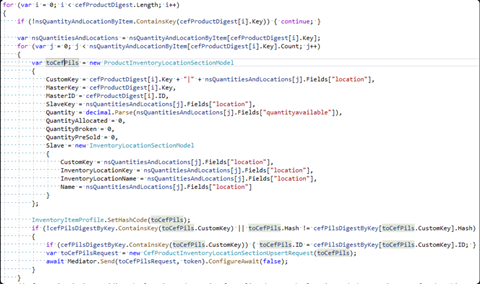
- For creating the InventoryLocation in CEF, we will want to have created the CEF Product first and then upsert the InventoryLocation record afterward. At least in some versions of CEF the product upsert doesn't support creating attached ProductInventoryLocationSection records. Another reason we'll want to do this anyway is inventory location records in a remote system will usually be separate from the product record itself so this can be its own sync. I will usually loop through the ProductDigest records while syncing InventoryLocations so that we only create those records where the Product in CEF exists.
¶ Pricing
Cannot be set through a product upsert:
if (catalogPrices.TryGetValue(prod.PartNum, out var plp))
{
    // Set the price to 0 for all, then we use non-zero adjustments in price rules to fake a base price.
    var price = new RawProductPricesModel
    { ID = cefProd.ID, PriceBase = plp.BasePrice, PriceSale = null, };
    var result = await client.SendCustomAsync("PATCH", client.BaseAddress + "/Pricing/Prices/RawForProduct/Update", JsonSerializer.Serialize(price), null, token);
    var respStr = await result.Content.ReadAsStringAsync();
    result.EnsureSuccessStatusCode();
    jobLog.LogInfo($"\tUpdated price in CEF to PriceBase={price.PriceBase} PriceSale={price.PriceSale}");
}

if (prod.PartWhses.Count > 0)
{
    var inv = prod
        .PartWhses
        .Sum(pw => pw.OnHandQty - pw.DemandQty);

    var inventory = new { ID = cefProd.ID, Quantity = inv, };

    var result = await client.SendCustomAsync("PATCH", client.BaseAddress + "/Providers/Inventory/UpdateInventoryForProduct", JsonSerializer.Serialize(inventory), null, token);
    var respStr = await result.Content.ReadAsStringAsync();
    result.EnsureSuccessStatusCode();
    jobLog.LogInfo($"\tUpdated inventory for product #{inventory.ID} to {inventory.Quantity}")
¶ Price Rules
- Not the same as Price Points
- Not the same as setting a product's price
PriceRuleModel mapRule(DiscBase disc, string? prod, string? prodCode, string? cust, string? custGroup) => new()
{
    Priority = 1,
    IsPercentage = true,
    IsExclusive = true,
    PriceAdjustment = -disc.DiscountPercent,
    CustomKey = disc.CustomKey,

    Products = prod is not null ? new() { new() { SlaveKey = prod, }, } : null,
    PriceRuleCategories = prodCode is not null ? new() { new() { SlaveKey = prodCode, }, } : null,

    Accounts = cust is not null ? new() { new() { SlaveKey = cust, }, } : null,
};
¶ Image Uploading
Any image a browser can display
if (img is not null && cefProd.Images.FirstOrDefault(i => i.OriginalFileName == img.ImageFileName) is not ProductImageModel cefImg)
{
    // Upload image to folder
    var response = await client.PostAsync(client.BaseAddress.ToString().TrimEnd('/') + "/Media/StoredFiles/Upload", new MultipartFormDataContent
                                          {
                                              {new StringContent("ImageProduct", System.Text.Encoding.UTF8, "application/json"), "EntityFileType"},
                                              {new ByteArrayContent(img.ImageContent.ArrayFromBase64()), "Images", img.ImageFileName + img.FileType},
                                          });
    response.EnsureSuccessStatusCode();
    var resp = await response.Content.ReadFromJsonAsync<UploadStoredFileResponse>();
    var name = Path.GetFileName(resp.UploadFiles.Single().FileName); // Note: FileName comes back as a Windows path (blech)
    // Associate image to product
    cefImg = new()
    {
        CustomKey = img.ImageID,
        OriginalFileName = name,
        Name = img.ImageFileName,
        OriginalFileFormat = img.FileType.TrimStart('.'),
        DisplayName = img.ImageFileName,
        TypeKey = CEFOpts.ProductImageTypeKey,
    };
    cefProd.Images.Add(cefImg);
}
else
    cefImg = null!;
¶ Associations
// Cannot send them in at the same time as the product/etc because we don't know if the related products are there yet.
if (cefProd.ProductAssociations?.Any() == true)
{
    foreach (var assoc in cefProd.ProductAssociations)
        bomBag.Add((cefProd.CustomKey, assoc));

    cefProd.ProductAssociations = null;
}
...
var assocs = bomBag.Where(x => curProds.Contains(x.assoc.SlaveKey)).ToLookup(x => x.prodKey, x => x.assoc);

foreach (var group in assocs)
{
    await CefService.UpsertProduct(new()
                                   {
                                       CustomKey = group.Key,
                                       ProductAssociations = group.ToList(),
                                   }, token);
}
¶ General Attributes
- Active
Helper code for setting attributes based off another type's properties:
public static void SetSerializableAttributesFrom(this BaseModel self, object? other, Func<PropertyInfo, bool>? filter, Func<PropertyInfo, object, string>? superSerial = null)
        {
            if (other is null) return;

            filter ??= _ => true;
            superSerial ??= (_, val) => val?.ToString() ?? "";
            self.SerializableAttributes ??= new();

            foreach (var prop in other.GetType().GetProperties())
            {
                if (!filter(prop) || prop.GetCustomAttribute<JsonExtensionDataAttribute>() is not null) continue;

                var val = new SerializableAttributeObject
                {
                    Key = prop.Name,
                    Value = superSerial(prop, prop.GetValue(other)),
                };
                self.SerializableAttributes.AddOrUpdate(prop.Name, val, (_, _) => val);
            }
        }

        public static void SetSerializableAttributesFrom(this BaseModel self, object other, Dictionary<string, Dictionary<string, HashSet<string>>> filters, Func<PropertyInfo, object, string>? superSerial = null)
            // Note that we trim Model off the CEF type's name first
            => self.SetSerializableAttributesFrom(other, prop => filters.GetValueOrDefault(self.GetType().Name[0..self.GetType().Name.LastIndexOf("Model")])?.GetValueOrDefault(other.GetType().Name)?.Contains(prop.Name) == true, superSerial);
In appsettings:
"SerializableAttributeFilters": {
            "Product": { // CEF type
                "Part": [ // External type
                    "SearchWord", // Property to include as an attribute
¶ Account Sync
- All Account names need to be distinct
- Sometimes Contacts can cause a request to be too large and cause issues. If Contacts begin to number in the hundreds then it is beneficial to create a separate sync for Contacts.
- GFS is a good example of this.
- If dealing with International customers or regions that immediately recognized, we need to verify if that region exists and then create a new country and region.
¶ Contacts
- Contacts have a 1:1 with addresses
- Every individual address maps over as a contact
¶ Users
- Some Clients may require you to create Users in addition to an Account but this is very uncommon. All Users do require an Account to already be created and then assigned to the User.
- Users have their own Contacts separate from Account Contacts
¶ Sales Orders
- Requesting a List of Sales Orders will only retrieve the Header with no Associated Objects.
- Will need to iterate through these and do a Read request for that Sales Order. This will populate the Sales Order Lines.
- Will need to do a Read for both the Billing and Shipping Contacts using the Billing Contact ID and Shipping Contact ID from the Sales Order Record.
- All Sales Orders need to be associated with an Account. If no Account exists matching that customer, then an Account needs to be created.
¶ Known Customizations
- Contacts
- Remove Text Modifier from Email
- Sales Orders
- Requisition Form PDFs
- Custom
- eSample Results Report PDFs from Google Drive
- Accounts
- Differentiate B2B v B2C
- Addresses
- Business User Flag
- Products
- Variants and Kits
- Pricing
- 2 Syncs
- Base pricing
- Customer Specific Pricing
- 2 Syncs
- Sales Orders
- Shipping Customizations
- Invoices
- Payment Method Restrictions
- Invoice Creation after Shipment
- Partial Shipments create Separate Invoices tied to Original Order
- Accounts
- Completely New Workflow
- VOC/HazMat Customers
- Users
- Completely New Workflow
- Products
- VOC/HazMat Custom Logic
- Sales Orders
- Order Update Sync
¶ Outlying Issues
- Must use the API app pool in order to have all endpoints available
- No easy way to check for newly created/updated ents – You will need to manually check the table
- There is no easy way to find which schema/table beyond guessing
- Worst case scenario: Attach to CEF (link to these docs)
- When in doubt – Try clearing the caches. (All of them)
- CEF debugging process:
- If it's not a browser cache, it's a redis cache
- If it's not the redis cache, it's elastic
- If it's not elastic, most likely there is another issue
¶ Common Model Mappings
¶ Common Model Workflows
Phase 2