A Requirement refers to a condition or capability that is needed by a user to solve a problem or achieve an objective. Clarity will be using Requirements to document all data that will be required to develop a feature, as well as to define the Requirements for each workflow mockup (screenshot).
+---------------+-----------------+--------------------------------------------------------------------------------------------------------------------------------------------------------------------------------------------------------------------------------------------------------------------------------------------------------------------------------------------------------------------------------------------------------------------------+
|Item Name |Item Field |Definition |
+---------------+-----------------+--------------------------------------------------------------------------------------------------------------------------------------------------------------------------------------------------------------------------------------------------------------------------------------------------------------------------------------------------------------------------------------------------------------------------+
|Requirement|Name |A short name that can stand on its own as an explanation of the Requirement. |
| | | |
| | |Examples: |
| | | |
| | |- Web page must be printable |
| | |- Must be able to customize the number of entries displayed on one page |
+---------------+-----------------+--------------------------------------------------------------------------------------------------------------------------------------------------------------------------------------------------------------------------------------------------------------------------------------------------------------------------------------------------------------------------------------------------------------------------+
|Requirement|Description |An elaboration of the Requirement’s details as necessary, especially if the Requirement uses a brief name. |
| | | |
| | |Example:\ |
| | |Requirement: Printing |
| | | |
| | |Description: The web page must provide a means to display the page in a printer-friendly format. |
+---------------+-----------------+--------------------------------------------------------------------------------------------------------------------------------------------------------------------------------------------------------------------------------------------------------------------------------------------------------------------------------------------------------------------------------------------------------------------------+
|Requirement|Priority |The priority indicates the relative importance of the Requirement. Lower numbers mean higher priority. Characteristics of high priority items include: |
| | | |
| | |- Needed in early iterations |
| | |- High risk |
| | |- Architecturally significant |
| | |- Important to customer |
| | |- Important to business |
+---------------+-----------------+--------------------------------------------------------------------------------------------------------------------------------------------------------------------------------------------------------------------------------------------------------------------------------------------------------------------------------------------------------------------------------------------------------------------------+
|Requirement|Type |Indicates the Requirement type. Useful if there is a large number of Requirements and that need to be sorted by Requirement type. |
| | | |
| | |You may type in your own value in addition to using the predefined choices. The choice-list can also be modified via the Tools/Predefined Fields menu item. |
+---------------+-----------------+--------------------------------------------------------------------------------------------------------------------------------------------------------------------------------------------------------------------------------------------------------------------------------------------------------------------------------------------------------------------------------------------------------------------------+
|Requirement|Release |Indicates which release the Requirement is applicable to. You can use any text that suits your organization, for example, a date or a release codename. |
| | | |
| | |By default, there are no choices defined, however, you may specify your own choice-list by customizing predefined fields via the Tools menu. |
+---------------+-----------------+--------------------------------------------------------------------------------------------------------------------------------------------------------------------------------------------------------------------------------------------------------------------------------------------------------------------------------------------------------------------------------------------------------------------------+
|Requirement|Source |Use the source field to keep track of where the Requirement originated. This could be a person, a customer, a document or a cross-reference number. |
| | | |
| | |By default, there are no choices defined, however, you may specify your own choice-list by customizing predefined fields via the Tools menu. |
+---------------+-----------------+--------------------------------------------------------------------------------------------------------------------------------------------------------------------------------------------------------------------------------------------------------------------------------------------------------------------------------------------------------------------------------------------------------------------------+
|Requirement|Status |The Requirement status field is updated when decisions are made during the project lifecycle. |
| | | |
| | |You may type in your own status in addition to using the predefined choices. The choice-list can also be modified via the Tools/Predefined Fields menu item. |
+---------------+-----------------+--------------------------------------------------------------------------------------------------------------------------------------------------------------------------------------------------------------------------------------------------------------------------------------------------------------------------------------------------------------------------------------------------------------------------+
|Requirement|Assigned To |Identifies which particular person or group is responsible for the Requirement. |
| | | |
| | |By default, there are no choices defined, however, you may specify your own choice-list by customizing predefined fields via the Tools menu. |
+---------------+-----------------+--------------------------------------------------------------------------------------------------------------------------------------------------------------------------------------------------------------------------------------------------------------------------------------------------------------------------------------------------------------------------------------------------------------------------+
|Requirement|Related Documents|All Requirements can reference related documents or URL's. Use drag/drop from the Windows Explorer or right-click to manually add a document. Note that the document is only referenced here - it is not stored in the Use Case model. If other people need to access the document, make sure it is on a shared server or specify a relative path and put it in a version control system along with your Use Case files.|
| | | |
| | |Examples: |
| | | |
| | |- UI specifications |
| | |- Software interface specifications |
| | | |
| | |Screen mockups - note that standard image files can automatically get inserted as pictures into Word reports. |
+---------------+-----------------+--------------------------------------------------------------------------------------------------------------------------------------------------------------------------------------------------------------------------------------------------------------------------------------------------------------------------------------------------------------------------------------------------------------------------+
|Requirement|Issue Description|A description of Requirement issues. |
+---------------+-----------------+--------------------------------------------------------------------------------------------------------------------------------------------------------------------------------------------------------------------------------------------------------------------------------------------------------------------------------------------------------------------------------------------------------------------------+
|Requirement|Issue Assigned To|Indicates who the Requirement issue is assigned to. |
+---------------+-----------------+--------------------------------------------------------------------------------------------------------------------------------------------------------------------------------------------------------------------------------------------------------------------------------------------------------------------------------------------------------------------------------------------------------------------------+
|Requirement|Issue Resolved By|Indicates who the Requirement issue was resolved by. |
+---------------+-----------------+--------------------------------------------------------------------------------------------------------------------------------------------------------------------------------------------------------------------------------------------------------------------------------------------------------------------------------------------------------------------------------------------------------------------------+
|Requirement|Issue Status |Indicates the status of the Requirement issue. |
+---------------+-----------------+--------------------------------------------------------------------------------------------------------------------------------------------------------------------------------------------------------------------------------------------------------------------------------------------------------------------------------------------------------------------------------------------------------------------------+
|Requirement|Notes |All Requirements can have notes attached to them. The date of the note is automatically filled in with the date the note was added. |
| | | |
| | |Examples: |
| | | |
| | |- Reader comments |
| | |- Questions |
| | |- History of changes |
| | |- Decisions made and why they were made |
| | |- Action items from meetings |
| | |- Reminders |
| | |- Tasks |
+---------------+-----------------+--------------------------------------------------------------------------------------------------------------------------------------------------------------------------------------------------------------------------------------------------------------------------------------------------------------------------------------------------------------------------------------------------------------------------+
|Requirement|Has reference to |This list shows the items that the current item references. References are automatically created when you add ID links to an item's description or other fields such as goals, steps, and custom fields. To create an ID link, type the ID, or use the right-mouse menu. An automatic reference is also created when you type in the name of an Actor or definition. |
+---------------+-----------------+--------------------------------------------------------------------------------------------------------------------------------------------------------------------------------------------------------------------------------------------------------------------------------------------------------------------------------------------------------------------------------------------------------------------------+
|Requirement|Is referenced by |This list shows the items that reference this one. See the help for references to for information on how references are created. |
| | | |
| | |This list helps you understand which items may be affected if you make modifications to the current item. For example, if you add a field to a definition, you can see which Use Cases may need modification in order to take the new field into account. |
| | | |
| | |Explicit references can be removed at any time by right-clicking on them on this list. |
+---------------+-----------------+--------------------------------------------------------------------------------------------------------------------------------------------------------------------------------------------------------------------------------------------------------------------------------------------------------------------------------------------------------------------------------------------------------------------------+
|Requirement|Testing Procedure|Used to define any number of test scenarios for the primary path, alternate paths, bounds testing, etc. |
| | | |
| | |Enter the procedure that a tester should use to verify that this requirement is met. This information is shown on the "Test Cases" Word report for each Use Case that this Requirement applies to. |
+---------------+-----------------+--------------------------------------------------------------------------------------------------------------------------------------------------------------------------------------------------------------------------------------------------------------------------------------------------------------------------------------------------------------------------------------------------------------------------+
|Requirement|Expected Results |Describe the results that the tester should observe to confirm that the test procedure completed as expected. |
+---------------+-----------------+--------------------------------------------------------------------------------------------------------------------------------------------------------------------------------------------------------------------------------------------------------------------------------------------------------------------------------------------------------------------------------------------------------------------------+
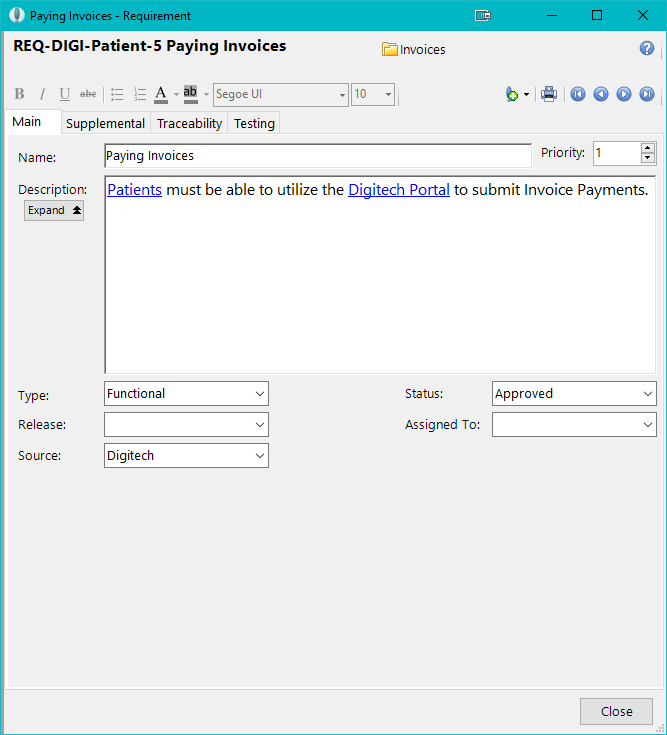
Requirement: Main Tab
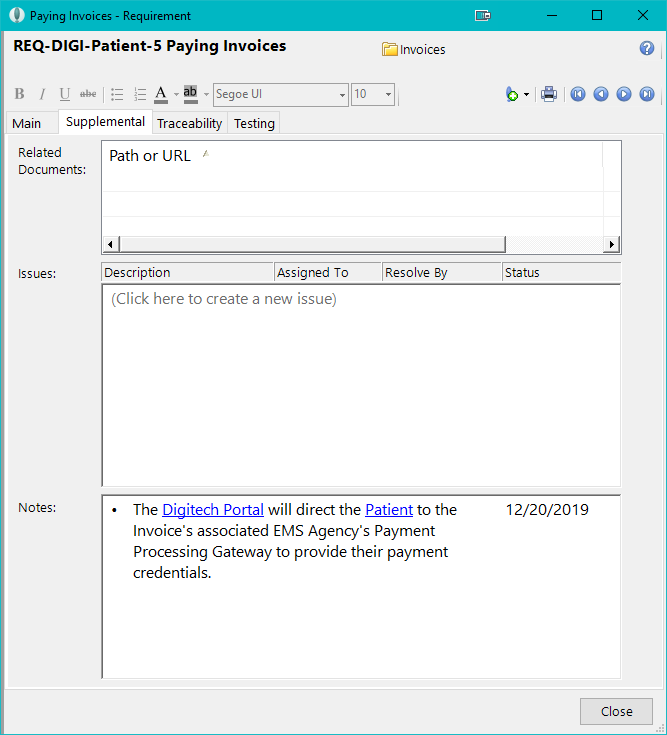
Requirement: Supplemental Tab
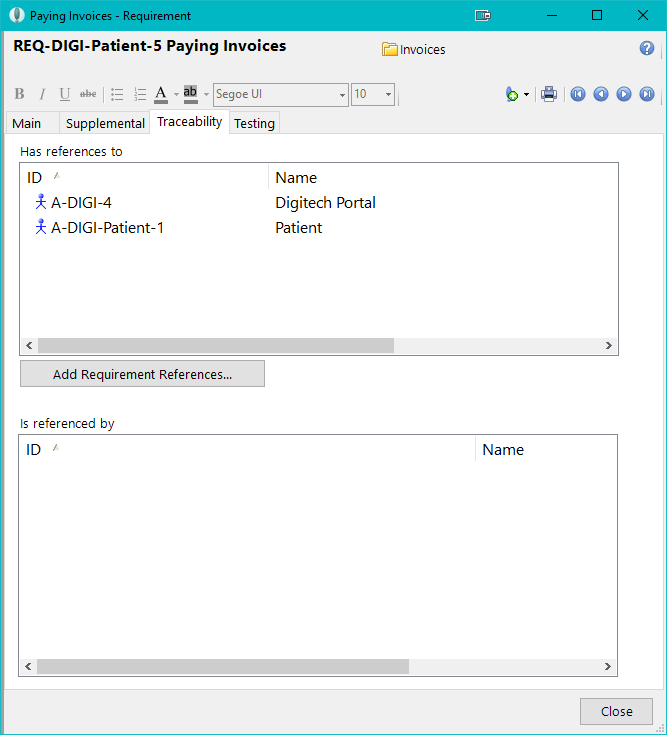
Requirement: Traceability Tab
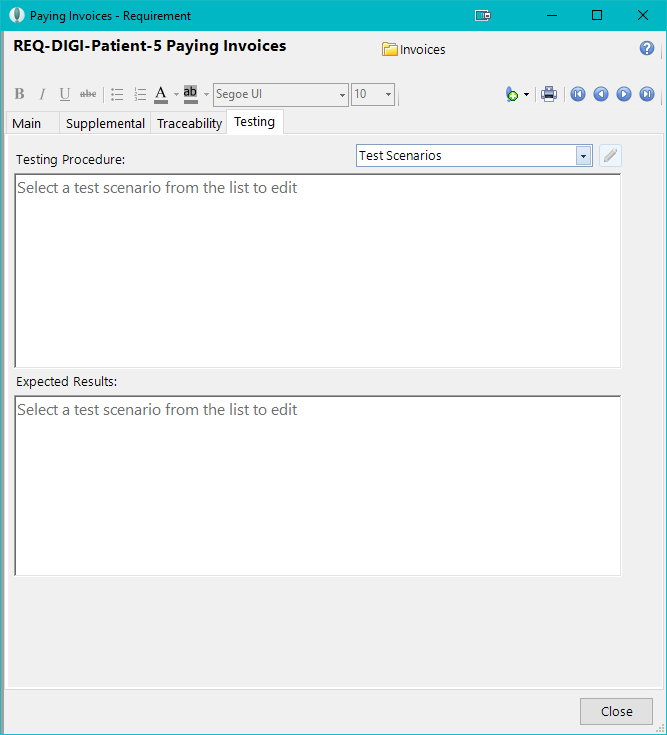
Requirement: Testing Tab