¶ Key Terminology
- BigCommerce APIs reference the following terms:
- Catalog, Customers, Orders, Order Refunds, Price Lists, Pricing Order, Shipping, Tax.
- BigCommerce references the following utilities:
- Email Templates, Payment processing, Scripts, Settings, Store Logs, Widgets, Webhooks.
- BigCommerce utilizes the following types of APIs:
- Storefront APIs, Management APIs, Provider APIs, Multi-Storefront API, Rest APIs, Promotions API (BETA), Customer Segmentation API (BETA).
¶ Known Integrations
¶ IDS (Connect v4.7)
- Developers: (P) Jim Lynch
- Integrations: Accounts (To/From), Items (To), Sales Orders (To/From),
- Current Branches:
4.7/develop
¶ TEC (Connect v3)
- Developers: Anonymous User
- Integrations: Accounts (To), Products (To), Inventory (To), Sales Orders (To/From),
- Current Branches:
support/clients/tec/*
¶ DOWN (Connect v4.7)
- Developers: Anonymous User, Anonymous User
- Integrations: Contacts (From), Inventory (To), Sales Orders (From),
- Current Branches:
4.7/develop
¶ Authentication
Authentication | BigCommerce Dev Center
BigCommerce has five different APIs that let you manage store data, log in customers, make client-side queries for product information, and more. Each requires a different authentication method.
Both the V2 and V3 APIs use the same authentication method – a random value, generated via the admin panel, sent in the X-Auth-Token HTTP header.
- The Base Api will look something like this:
¶ The following steps outline how to generate store API Credentials.
- Navigate to Advanced Settings > API Accounts > Create API Account.
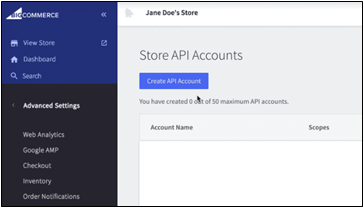
Give the account a name (it will only be visible to store users).
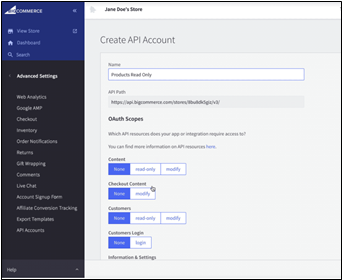
- In the OAuth Scopes section, select the minimum scopes the app will require.
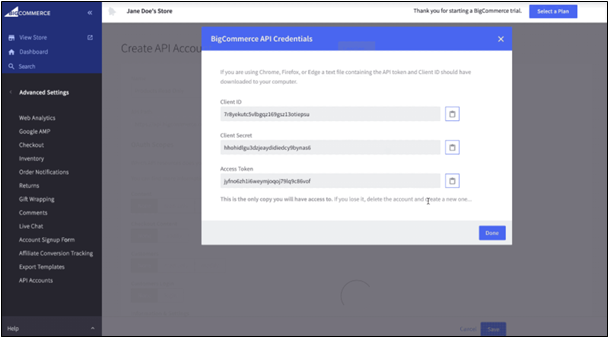
- Select Save.
Successfully saving will display a pop-up containing an Access Token. Your app will need this credential to run authenticated requests. A .txt file containing the same credentials will (on most browsers) automatically download to your computer. This file also contains the base API Path for your store, preconfigured for the V3 API.
The base API path will look something like this:
https://api.bigcommerce.com/stores/123456/
In the base path, the store hash is the 123456. You will use this to make API requests.
To get started making requests, see API Requests.
¶ API Best Practices
Ensure your integration is up-to-date (Devs)
BigCommerce frequently enhances its core product and is actively developing v3 API endpoints. Ensure that your app has access to the latest resources by using the newest API version. Using the newest API Version also provides a user experience consistent with what merchants will see in their BigCommerce store’s control panel. To stay up to date, bookmark the BigCommerce changelog.
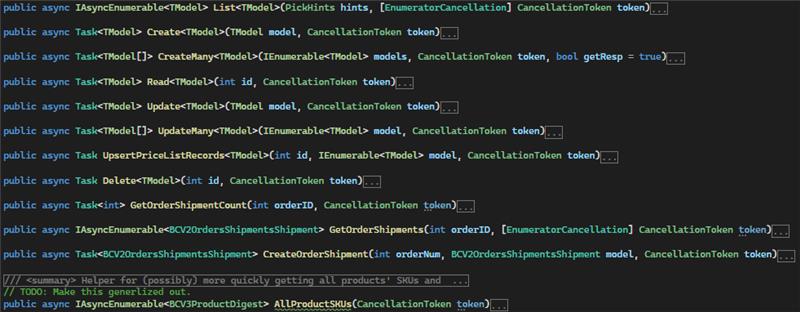
Clarity has built out tools for generating models for both the V2 and V3 REST APIs. A recent version should be available alongside stock Clarity Connect Versions 3.1 and up but for more information, check with a more senior developer.
¶ API Rate Limits
Apps that authenticate with OAuth are rate-limited based on a quota that is refreshed every few seconds. The maximum quota for a store will vary depending on the store’s plan.
| Plans & sandboxes | Maximum quota |
|---|---|
| Enterprise plans and Enterprise sandboxes (Enterprise-Test) | Unlimited (7mil / 30sec) |
| Pro plans | 60k per hour (450 / 30sec) |
| All other sandboxes (Dev/Partner/Employee) | 20k per hour (150 / 30sec) |
| Plus & Standard plans | 20k per hour (150 / 30sec) |
Each request to the API consumes one available request from the quota. When an app is at it's quota limit, the system will reject subsequent requests until you fresh the quota limit.
The system distributes a store's overall quota across all apps that can access the store at a time. Distributing overall store quotas across all apps provides fairness when multiple apps access the API simultaneously, preventing a single app from consuming the store's entire quota by itself. The quota might adjust as additional clients connect or disconnect while you're running requests.
¶ Links and Documents
- API Docs: https://developer.bigcommerce.com/api-docs
- Has a more general overview of the API
- API Reference: https://developer.bigcommerce.com/api-reference
- Has more in depth examples and schemas for different endpoints
- Cited from https://developer.bigcommerce.com/api-docs/
¶ API Base URLs
| API | Base URL |
|---|---|
| Server-to-Server | https://api.bigcommerce.com/stores//v3/ |
| V2 | https://api.bigcommerce.com/stores//v2/ |
| Storefront API | https://your-store.mybigcommerce.com/api/ |
| GraphQL | https://www.{bigcommerce_storefront_domain}.com/graphql |
| Customer Login | https://www.{bigcommerce_storefront_domain}.com/login/token/ |
| Current Customer | /customer/current.jwt?app_client_id= |
¶ CRUD Operations
¶ Create
Example: Create Customer
var client = new HttpClient();
var request = new HttpRequestMessage
{
    Method = HttpMethod.Post,
    RequestUri = new Uri("https://api.bigcommerce.com/stores/store_hash/v3/customers"),
    Headers =
    {
        { "X-Auth-Token", "" },
    },
    Content = new StringContent("[\n  {\n    \"email\": \"string@example.com\",\n    \"first_name\": \"string\",\n    \"last_name\": \"string\",\n    \"company\": \"string\",\n    \"phone\": \"string\",\n    \"notes\": \"string\",\n    \"tax_exempt_category\": \"string\",\n    \"customer_group_id\": 0,\n    \"addresses\": [\n      {\n        \"address1\": \"Addr 1\",\n        \"address2\": \"\",\n        \"address_type\": \"residential\",\n        \"city\": \"San Francisco\",\n        \"company\": \"History\",\n        \"country_code\": \"US\",\n        \"first_name\": \"Ronald\",\n        \"last_name\": \"Swimmer\",\n        \"phone\": \"707070707\",\n        \"postal_code\": \"33333\",\n        \"state_or_province\": \"California\",\n        \"form_fields\": [\n          {\n            \"name\": \"test\",\n            \"value\": \"test\"\n          }\n        ]\n      }\n    ],\n    \"authentication\": {\n      \"force_password_reset\": true,\n      \"new_password\": \"string123\"\n    },\n    \"accepts_product_review_abandoned_cart_emails\": true,\n    \"store_credit_amounts\": [\n      {\n        \"amount\": 43.15\n      }\n    ],\n    \"origin_channel_id\": 1,\n    \"channel_ids\": [\n      1\n    ],\n    \"form_fields\": [\n      {\n        \"name\": \"test\",\n        \"value\": \"test\"\n      }\n    ]\n  }\n]")
    {
        Headers =
        {
            ContentType = new MediaTypeHeaderValue("application/json")
        }
    }
};
using (var response = await client.SendAsync(request))
{
    response.EnsureSuccessStatusCode();
    var body = await response.Content.ReadAsStringAsync();
    Console.WriteLine(body);
}
¶ Read
Example: Get all Customers
https://api.bigcommerce.com/stores/{store_hash}/v3/customers
var client = new HttpClient();
var request = new HttpRequestMessage
{
    Method = HttpMethod.Get,
    RequestUri = new Uri("https://api.bigcommerce.com/stores/store_hash/v3/customers?sort=date_created%3Adesc"),
    Headers =
    {
        { "X-Auth-Token", "" },
    },
};
using (var response = await client.SendAsync(request))
{
    response.EnsureSuccessStatusCode();
    var body = await response.Content.ReadAsStringAsync();
    Console.WriteLine(body);
}
¶ Update
Example: Update Customer
var client = new HttpClient();
var request = new HttpRequestMessage
{
    Method = HttpMethod.Put,
    RequestUri = new Uri("https://api.bigcommerce.com/stores/store_hash/v3/customers"),
    Headers =
    {
        { "X-Auth-Token", "" },
    },
    Content = new StringContent("[\n  {\n    \"email\": \"string\",\n    \"first_name\": \"string\",\n    \"last_name\": \"string\",\n    \"company\": \"string\",\n    \"phone\": \"string\",\n    \"notes\": \"string\",\n    \"tax_exempt_category\": \"string\",\n    \"customer_group_id\": 0,\n    \"id\": 1,\n    \"addresses\": [\n      {\n        \"address1\": \"string\",\n        \"address2\": \"string\",\n        \"address_type\": \"string\",\n        \"city\": \"string\",\n        \"company\": \"string\",\n        \"country_code\": \"string\",\n        \"first_name\": \"string\",\n        \"last_name\": \"string\",\n        \"phone\": \"string\",\n        \"postal_code\": \"string\",\n        \"state_or_province\": \"string\"\n      }\n    ],\n    \"authentication\": {\n      \"force_password_reset\": true,\n      \"new_password\": \"string123\"\n    },\n    \"accepts_product_review_abandoned_cart_emails\": true,\n    \"store_credit_amounts\": [\n      {\n        \"amount\": 43.15\n      }\n    ],\n    \"origin_channel_id\": 1,\n    \"channel_ids\": [\n      1\n    ],\n    \"form_fields\": [\n      {\n        \"name\": \"test\",\n        \"value\": \"test\"\n      }\n    ]\n  }\n]")
    {
        Headers =
        {
            ContentType = new MediaTypeHeaderValue("application/json")
        }
    }
};
using (var response = await client.SendAsync(request))
{
    response.EnsureSuccessStatusCode();
    var body = await response.Content.ReadAsStringAsync();
    Console.WriteLine(body);
}
¶ Delete
Example: Delete Customer
var client = new HttpClient();
var request = new HttpRequestMessage
{
    Method = HttpMethod.Delete,
    RequestUri = new Uri("https://api.bigcommerce.com/stores/store_hash/v3/customers"),
    Headers =
    {
        { "X-Auth-Token", "" },
    },
};
using (var response = await client.SendAsync(request))
{
    response.EnsureSuccessStatusCode();
    var body = await response.Content.ReadAsStringAsync();
    Console.WriteLine(body);
}
¶ Connect Specifics
¶ Pick Hints
  public struct PickHints
    {
        public DateTime? CreatedSince { get; set; } = null;

        /// <summary>
        /// Includes those items CreatedSince this time.
        /// </summary>
        public DateTime? UpdatedSince { get; set; } = null;

        /// <summary>
        /// A list of conditions to filter by, in field-value format. Assume these to be ANDed together.
        /// </summary>
        public ImmutableDictionary<string, FilterTo> Filters { get; set; }

        public ImmutableHashSet<string> Expands { get; set; }
...
¶ Product Sync Snippet
 foreach (var prod in externalProds):
                    var bcProdsBySKU = await BCService
                        .List<BCV3Product>(PickHints.Where("sku", FilterOp.Eq, part.PartNum), token)
                        .ToListAsync();
                    var existing = bcProdsBySKU.SingleOrDefault();
                    var prod = MapExternalToBC(part, existing);

                    if (existing is not null)
                        await BCService.Update(prod, token);
                    else
                        await BCService.Create(prod, token);
¶ Order Sync Snippet
// BigCommerce to External System
var orders = await BCService.List<BCV2OrdersOrder>(new PickHints()
    .AndWhere("date_created", FilterOp.GtEq, cmpDate)
    .AndWhere("status_id", FilterOp.Eq, (int)OrderStatus.AwaitingFulfillment), token)
    .ToListAsync();

var bcCustAttribs = await BCService.List<BCV3CustomerAttributeValue>(new(), token).ToLookupAsync(a => a.CustomerId);
var bcAttribs = await BCService.List<BCV3CustomerAttribute>(PickHints.Blank, token).ToDictionaryAsync(a => a.Name, a => a.Id);
foreach (var order in orders.Where(o => o.StatusId != (int)BC.OrderStatus.Completed && o.StatusId != (int)BC.OrderStatus.ManualVerificationRequired)):
    // Push to external system
    ...
     await BCService.Update(new BCV2OrdersOrder { Id = order.Id, StatusId = (int)OrderStatus.ManualVerificationRequired, }, token);
¶ Integration Service Methods Available
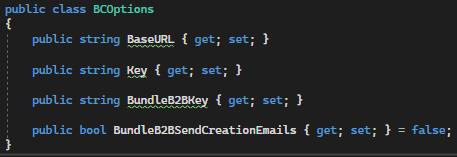

¶ Known Customizations
- Products (To)
- Flagging
- Diff Key Caching
- Sales Orders (From)
- Orders API V3 Meta Fields
- Sales Orders (To)
- Changed Sales Orders
- Contacts (From)
- Custom Database Tables
- Sales Orders (To/From)
- Multi-Database/Table
- Products (To)
- Product Visibility Restrictions
- Inventory (To)
- Separate US/CA Inventories
¶ Outlying Issues
BigCommerce is generally not well equipped to (out of the box) deal with B2B scenarios. Potential issues and solutions:
- No multi-location inventory (yet – see GraphQL section below)
- No Account vs Customer distinction for grouping customers
- There are customer groups, but they’re mainly used for price list management
- There is an external plugin called BundleB2B which Clarity has used on previous projects to provide such functionality, but it should be noted that its API is separate from BigCommerce’s API and as such is custom functionality. See here for API information.
- The API is inconsistent about spaces in SKUs. The price list endpoints will consider
FOOandFOO(note the space at the end) to be different, but the product create endpoint will not allow creatingFOO(no space) whenFOO(space) already exists.
¶ GraphQL (Devs, IT, Sales)
Although the official BigCommerce GraphQL explorer has a schema for multiple-inventory-location setups, there does not presently appear to be an API for updating such fields, only pulling them down. BigCommerce has previously noted that multi-location inventory is a TODO, and currently has no concrete timeline on when this will be done and available for usage by developers. Presently, the workaround is twofold:
- Sync each location’s value into a separate custom field on the product
- Modify the storefront’s theme to pull down and display the custom fields in place of the standard inventory count.
¶ Common Model Mappings
¶ Common Model Workflows
Phase 2