In this page we'll go through common ways to set up your environment so you can get your very own LLM working locally.
- Setup your Python environment
- Why set up an environment at all!?
- Two words "dependency conflicts. The last thing you want to do is start up a new project, install a new library to do that cool new thing, then go to another project and try to run it, just to find out its now broken. Often when new libraries are installed, the installation process replaces old versions of a dependency with newer ones. A new environment isolates those dependencies within it.
- PRO TIP: ALWAYS, and I mean ALWAYS, create a new environment for new projects
- Why set up an environment at all!?
- How to set it up
- Conda
- Conda Navigator is a tool in windows that allows a user to simply create, manage and view python libraries through an easy-to-use UI.
- You can click the create new environment button, choose the Python version and you are set
- Conda Terminal
- From your location
- conda create --name myenv python=3.10
- conda activate myenv
- From your location
- Conda Navigator is a tool in windows that allows a user to simply create, manage and view python libraries through an easy-to-use UI.
- Python
- Python terminal
- From your location
- python -m venv
- Windows name\Scripts\activate
- linux source venv/bin/activate
- From your location
- Python terminal
- Conda
- Add whatever library you need
-
pip install
-
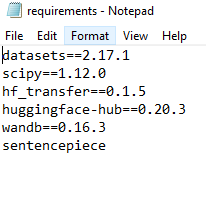
You can make the process easier by creating a requirements.txt file which has all your libraries listed and then run pip install -r requirements.txt
-
And there you have it. You are ready to explore your python scripts without fear of ruining other projects.
-