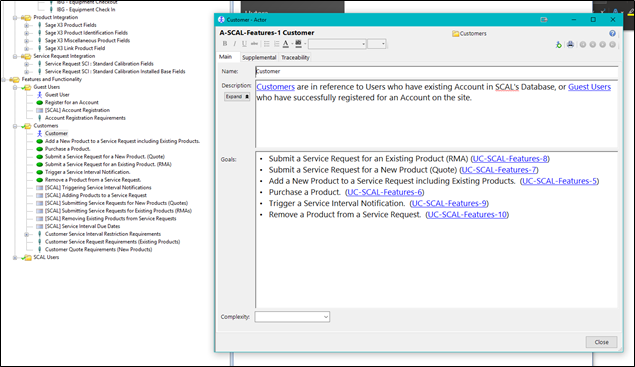
An Actor is an external person or thing which interacts with the system and attempts to achieve some goal. An Actor is a role, not a specific person or thing.
Examples:
- Loan Officer
- Customer
- Cash Dispenser
- Merchant Gateway
+-------------+-----------------+--------------------------------------------------------------------------------------------------------------------------------------------------------------------------------------------------------------------------------------------------------------------------------------------------------------------------------------------------------------------------------------------------------------------------------------------------------------------------------------------------------------------------------------------------------------------------------------------------------+
|Item Name|Item Field |Field Definition |
+-------------+-----------------+--------------------------------------------------------------------------------------------------------------------------------------------------------------------------------------------------------------------------------------------------------------------------------------------------------------------------------------------------------------------------------------------------------------------------------------------------------------------------------------------------------------------------------------------------------------------------------------------------------+
|Actor |Name |Indicates the name of the external person or thing that will be interacting with the system |
+-------------+-----------------+--------------------------------------------------------------------------------------------------------------------------------------------------------------------------------------------------------------------------------------------------------------------------------------------------------------------------------------------------------------------------------------------------------------------------------------------------------------------------------------------------------------------------------------------------------------------------------------------------------+
|Actor |Description |Include a short summary of the Actor's role here including a description of the business function that the Actor performs. |
| | | |
| | |It is also useful to include the background and skills of the Actor so that developers keep in mind the skills of the end-user during development. |
| | | |
| | |Example:\ |
| | |Actor: Bank Customer |
| | | |
| | |A Bank Customer is an individual or business that currently has a relationship with the bank. For the purposes of this system, a customer is someone who holds an active account or has been extended credit. Skills: assume that a bank customer is not a sophisticated user but is familiar with touchscreen displays. |
+-------------+-----------------+--------------------------------------------------------------------------------------------------------------------------------------------------------------------------------------------------------------------------------------------------------------------------------------------------------------------------------------------------------------------------------------------------------------------------------------------------------------------------------------------------------------------------------------------------------------------------------------------------------+
|Actor |Goals |The Actor's goals define how the system will be used. To help find goals, ask the following questions for each Actor: |
| | | |
| | |- What measurable value is needed by the Actor? |
| | |- What business event might the Actor initiate? |
| | |- What service does the Actor need from the system? |
| | |- Does the Actor need to receive information from the system? |
| | | |
| | |Once the Actor’s goals have been identified, CaseComplete can create a Use Case for each goal and create a link between the Actor and each new Use Case. |
+-------------+-----------------+--------------------------------------------------------------------------------------------------------------------------------------------------------------------------------------------------------------------------------------------------------------------------------------------------------------------------------------------------------------------------------------------------------------------------------------------------------------------------------------------------------------------------------------------------------------------------------------------------------+
|Actor |Complexity |Actor complexity is primarily determined by the nature of the Actor's interaction with the system under design. Consider the degrees of freedom in the interactions. For example, an external system that interacts with the system through web services is generally low in complexity because the nature of the interaction is bounded by a defined programming interface. A human Actor interacting with the system through a kiosk-style limited interface is generally of medium complexity, while a human Actor interacting with the system through a graphical user interface is a complex Actor.|
| | | |
| | |Actor complexity is used by the CaseComplete Estimator report. If you want this Actor to be factored into the estimation of the time to complete this project, you must choose a value. |
| | | |
| | |You may type in your own complexity descriptions in addition to using the predefined choices. You may also customize the choice-list via the Tools/Predefined Fields menu item. However, if you choose a complexity other than a predefined choice, this Actor will not be counted in the CaseComplete Estimator report, unless you first customize the report. |
+-------------+-----------------+--------------------------------------------------------------------------------------------------------------------------------------------------------------------------------------------------------------------------------------------------------------------------------------------------------------------------------------------------------------------------------------------------------------------------------------------------------------------------------------------------------------------------------------------------------------------------------------------------------+
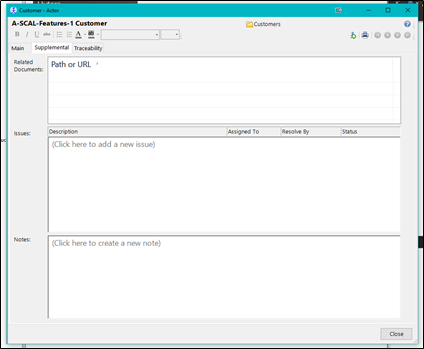
|Actor |Related Documents|All Actors can reference related documents or URL's. Use drag/drop from the Windows Explorer or right-click to manually add a document. Note that the document is only referenced here - it is not stored in the Use Case model. If other people need to access the document, make sure it is on a shared server or specify a relative path and put it in a version control system along with your Use Case files. |
| | | |
| | |Examples: |
| | | |
| | |- UI specifications |
| | |- Software interface specifications |
| | | |
| | |Screen mockups - note that standard image files can automatically get inserted as pictures into Word reports. |
+-------------+-----------------+--------------------------------------------------------------------------------------------------------------------------------------------------------------------------------------------------------------------------------------------------------------------------------------------------------------------------------------------------------------------------------------------------------------------------------------------------------------------------------------------------------------------------------------------------------------------------------------------------------+
|Actor |Issue Description|List of all End User Issues that need to be addressed including who the issue is assigned to, who it was been resolved by (if resolved), and the status of the issue. |
+-------------+-----------------+--------------------------------------------------------------------------------------------------------------------------------------------------------------------------------------------------------------------------------------------------------------------------------------------------------------------------------------------------------------------------------------------------------------------------------------------------------------------------------------------------------------------------------------------------------------------------------------------------------+
|Actor |Issue Assigned To|Indicates who the Actor issue is assigned to. |
+-------------+-----------------+--------------------------------------------------------------------------------------------------------------------------------------------------------------------------------------------------------------------------------------------------------------------------------------------------------------------------------------------------------------------------------------------------------------------------------------------------------------------------------------------------------------------------------------------------------------------------------------------------------+
|Actor |Issue Resolved By|Indicates who the Actor issue what resolved by. |
+-------------+-----------------+--------------------------------------------------------------------------------------------------------------------------------------------------------------------------------------------------------------------------------------------------------------------------------------------------------------------------------------------------------------------------------------------------------------------------------------------------------------------------------------------------------------------------------------------------------------------------------------------------------+
|Actor |Issue Status |Indicates the status of the Actor’s issue. |
+-------------+-----------------+--------------------------------------------------------------------------------------------------------------------------------------------------------------------------------------------------------------------------------------------------------------------------------------------------------------------------------------------------------------------------------------------------------------------------------------------------------------------------------------------------------------------------------------------------------------------------------------------------------+
|Actor |Notes |All Actors can have notes attached to them. The date of the note is automatically filled in with the date the note what added. |
| | | |
| | |Examples: |
| | | |
| | |- Reader comments |
| | |- Questions |
| | |- History of changes |
| | |- Decisions made and why they were made |
| | |- Action items from meetings |
| | |- Reminders |
| | |- Tasks |
+-------------+-----------------+--------------------------------------------------------------------------------------------------------------------------------------------------------------------------------------------------------------------------------------------------------------------------------------------------------------------------------------------------------------------------------------------------------------------------------------------------------------------------------------------------------------------------------------------------------------------------------------------------------+
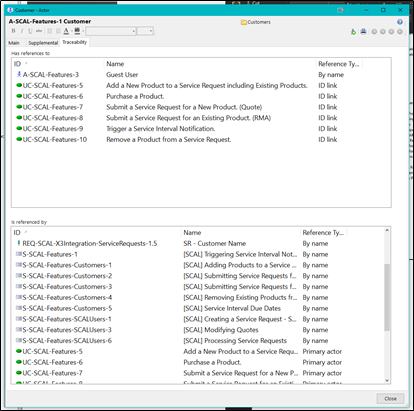
|Actor |Has references to|This list shows the items that the current item references. References are automatically created when you add ID links to an item's description or other fields such as goals, steps, and custom fields. To create an ID link, type the ID, or use the right-mouse menu. An automatic reference is also created when you type in the name of an Actor or definition. |
+-------------+-----------------+--------------------------------------------------------------------------------------------------------------------------------------------------------------------------------------------------------------------------------------------------------------------------------------------------------------------------------------------------------------------------------------------------------------------------------------------------------------------------------------------------------------------------------------------------------------------------------------------------------+