¶ Amazon Seller Documentation
¶ Additional Documentation
- https://developer-docs.amazon.com/sp-api/docs
- https://aws-quickstart.github.io/quickstart-amazon-selling-partner-api/
¶ Amazon API setup
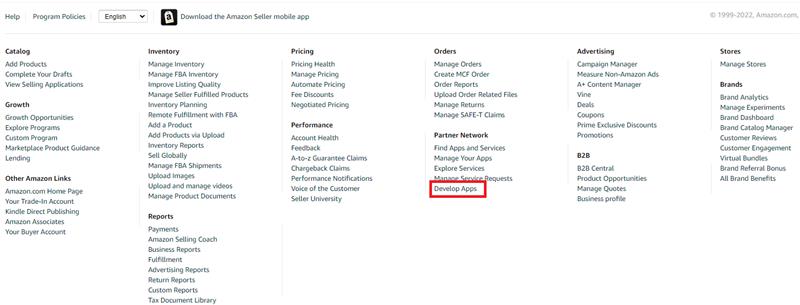
¶ Accessing the Develop APPs Partner Network
In the Amazon Selling Partner Network you will find the Develop APPs link
¶ Accessing the API
These are all the fields required to access the Amazon API
AmazonConnection = new AmazonConnection(new AmazonCredential()
{
AccessKey = {accessKey},
SecretKey = {secretKey},
RoleArn = {roleArn },
ClientId = {clientID},
ClientSecret = {clientSecret},
RefreshToken = {refreshToken},
MarketPlace = MarketPlace.US,
//Environment = Environments.Sandbox
});
¶ Access Key & Secret KEY
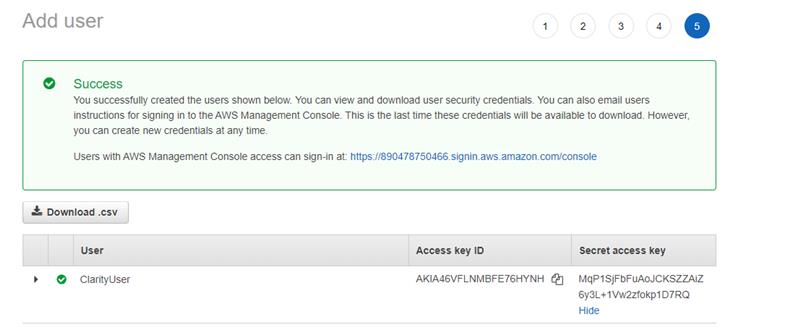
Access key and secret key will be created for the user during initial setup on AWS
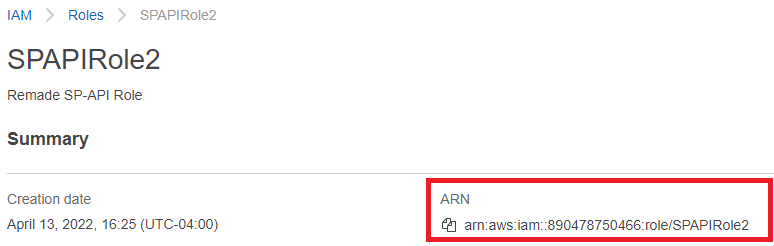
¶ Role ARN
The role you will be using to configure the connector will be the one you created during initial setup
¶ Client ID & Client Secret
To Client ID/Client Secret select the view link to view all LWA credentials
This will be found in the same place you registered the developer application in ASC/AVC

¶ Refresh Token
This will be found by selecting the drop-down and selecting authorize

You can select authorize app and a refresh token will be generated
